

Your Browsing History


Brian L.
Joined on 01/19/14
0
0
product reviews
- 11
Blazingly fast!
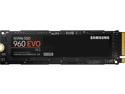
SAMSUNG 960 EVO M.2 500GB NVMe PCI-Express 3.0 x4 Internal Solid State Drive (SSD) MZ-V6E500BW
Pros: - Fastest drive I ever owned - Affordable - About the size of a stick of chewing gum
Cons: - Used this in my GIGABYTE AORUS GA-Z270X-Gaming K7 motherboard. After booting, found that some of my SATA ports didn't seem to work. Checked the product manual and found that I needed to move the drive to a different M.2 port, which resolved the problem. It' not an issue with the drive itself, but with the motherboard. Thought I would share this in case someone else has the same issue.
7/16/2017See more detail
Impressive power for an attractive price
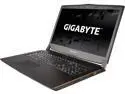
GIGABYTE P57Xv7-KL3K3 Gaming Laptop Intel Core i7 7th Gen 7700HQ (2.80 GHz) NVIDIA GeForce GTX 1070 1 TB HDD 256 GB M.2 SSD 16 GB Memory 17.3" QHD 2560 x 1440 120 Hz DVD Windows 10 Home 64-Bit
Pros: - Very fast CPU and GPU - Running Diablo 3 and StarCraft 2 at max settings on internal display produces no lag. Silky smooth. - Appreciate the removable optical drive comes with a dummy insert for expanding storage. If I do not need to use CDs or DVDs, can simply swap it out and make it a bit lighter. - Barely can hear the fans when system is being burdened. When not gaming, I cannot hear the fans at all. I have not modified the fan settings yet either. - Does not get hot - Can upgrade to 32 GB of memory - The 256 GB SSD boot drive is really fast - Very thin and lightweight compared to my older 17" Sony Vaio laptop - Case is plastic, but does not feel cheap. It feels very rugged and presents a striking appearance. Opening and closing the display lid has the perfect amount of resistance, stays in place, no wobbly play when adjusting. - Back lit keyboard (simply press Fn - space bar to enable/disable) - Internal speakers are a bit tinny (no subwoofer), but they are very crisp and clear with a real "stereo" feel - Free backback is great. The laptop fits snugly inside and feels comfortable when worn with one or two arms. - The rubber-ish feet on the bottom and above the screen are great. Laptop does not just slide around. It stays where you put it. The strips at each side of the top of the screen are perfectly located and provide a nice cushion when closing that does not damage where they meet just below the keyboard. - Product box is quite attractive and very sturdy. Arrived with no dents. Was very easy to unpack. - $100 rebate!
Cons: - Keyboard has a good feel to it, but I am not particularly fond of the physical layout of keys. It has a 10 key number pad, but it is I simply used an external USB keyboard to finish setup. To fix the problem, I went into Device Manager, removed the internal keyboard device, rebooted (it installed the driver automatically), and then it has worked perfectly since. - I like the placement of where the power cord connects, but wish it was on the left side instead of the right and also wish it was an L-shaped adapter to steer cabling away from me. Between the reinforced shielding around the connector and the thick magnet filter, It does not leave me with much room to use the mouse. I guess it was designed with left-handed people in mind.- - I wish the back lit keyboard had the ability to adjust the brightness. It currently has low, high, and off. I wear glasses and I need something in-between. I hope Gigabyte can address this with a software fix. I wish there was other color options for the keyboard backlighting and the power button, such as red. - Location of removable optical drive/expansion bay is a bit inconvenient, but only when needing it to read discs. My tummy often ejects the media tray. An easy fix was to swap the optical drive with the expansion bay. - The system LED's (power/battery/wifi/etc) present two issues. At first, it is kinda cool that they look like pinpoints of bright light. However, they are bright - very bright. I wear glasses and get a pretty bad glare, especially at night. I wish there was an option to dim them or turn them off entirely, or maybe even change the color to something in the red spectrum. The other concern was the placement of them. While using the internal keyboard they will be covered up by your forearm. If they would have been located near the main power button, that would have been better. The only workaround I had was to get a small piece of black vinyl tape to cover them. - The Nvidia GeForce GTX label (bottom right side from the keyboard) was installed crooked, not aligned with the Intel decal. - Warranty registration did not not recognize my serial number, but Gigabyte support resolved the issue very quickly. - The labels on the bottom of the laptop indicate WS/N (warranty serial number), but not SN. The SN was not actually labeled at all, but it was labeled on the product box. - The $100 rebate took more effort than I had expected. Gigabyte uses a third party vendor to process the rebates. Their system would not recognize my laptop's serial number either. Gigabyte support pointed me to the vendor Afligo, but the vendor did not reply for over a week. I found a toll-free number for the vendor on the BBB web site and it got me to a person right away. They were able to do something in their system that allowed me to proceed. They said they will get with their technical specialists to find out why it did not work. I mailed out the warranty today and will wait for it to arrive in the mail.
Overall Review: Friends and family have seen my new laptop. They ask about it because they have never heard about Gigabyte (non-gamers). When comparing specs and price of my laptop to others locally or online, they are impressed that a good blend of performance and features can be purchased at the perfect price point. I recently purchased a Gigabyte motherboard (https://www.newegg.com/Product/Product.aspx?Item=N82E16813128964) and really liked it. I can already tell I will like this new laptop.
11/13/2017See more detail
This is a pretty decent backpack
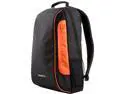
Gigabyte GBP57S Gaming Backpack for 15" and 17" Laptops
Pros: - Came free when I purchased my laptop - 17" Gigabyte P57 laptop fits perfectly - Comfortable when worn (one or two-arming it) - I like the colors: black with orange highlight, and the Gigabyte logo is cool - Has a small hole for headphones, very convenient - Came in a box, but the backpack itself was shrink wrapped. After cutting through the plastic, no strange odor, and found it to be nice and clean.
Cons: - Not a lot of smaller pockets and compartments, but not a big deal. This fact alone is probably a good thing or I would end up overloading it.
Overall Review: - Too bad you cannot just buy this outright. I would not mind having a second one. They are currently available with the purchase of a Gigabyte laptop.
11/1/2017See more detail
Blue LED on power button
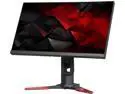
Acer Predator XB1 XB271HK bmiprz 27" 4K UHD IPS NVIDIA G-Sync Black/Red Gaming Monitor, 3840 x 2160 (4K), 100% sRGB Color Accuracy, Tilt / Swivel / Pivot / Height Adjustable, Build in Speakers
Pros: - At first, I thought the blue LED on the power button was going to be a problem. If you go through the on screen display, there is an option to dim or delay turning it off. I chose the delay option and found that after a few moments, it turns the LED off automatically! Great feature!
Cons: None
7/16/2017See more detail
Amazing and feature-filled Mobo!
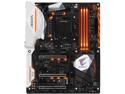
GIGABYTE AORUS GA-Z270X-Gaming K7 (rev. 1.0) LGA 1151 Intel Z270 HDMI USB 3.1 ATX Motherboards - Intel
Pros: - Tons of features! - LED lighting is really cool. I didn't buy the mobo for lighting though because my case sits in a location where they cannot really be seen. - Can retask the audio ports (see 'cons' section for more info) - I'm not going to repeat all the cool features that can be found on the product page
Cons: - Didn't realize that where I inserted my M.2 NVMe drive mattered. If plugged into the port near the CPU, some of the SATA ports cannot be used, so I had to move it to the other port because I have a lot of other SATA devices. - Didn't realize DDR4 and DDR3 RAM are not interchangeable. The memory slots are keyed so that only DDR4 RAM can be used. Not really a big deal, but the DDR4 RAM is really, really fast. I was hoping to use my DDR3 RAM, but have to buy DDR4 RAM instead. - Had a lot of problems getting the audio ports to work. Install the Realtek driver first and then Creative X-Fi MB5 software/driver second. I had problems getting it to recognize my rear speakers. I also had problems getting the audio I/O jacks on the front of my case to work. Had to enable them to work simultaneously with the rear speakers. On every other computer I owned, if you connected headphones to the front then the rest of the speakers were disabled. With this workaround, I have to actually turn off the other speakers.
Overall Review: - Flash the BIOS before doing anything. This will correct some issues, such as the CPU voltage.
7/16/2017See more detail
Great PSU!
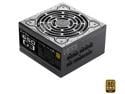
EVGA SuperNOVA 650 G3, 220-G3-0650-Y1, 80+ GOLD, 650W Fully Modular, EVGA ECO Mode with New HDB Fan, Includes FREE Power On Self Tester, Compact 150mm Size, Power Supply
Pros: - Quiet and powerful - Modular cabling makes routing cables very simple. I'll never buy a non-modular PSU again! - Cabling is labeled on both ends
Cons: None
7/16/2017See more detail