
Your Browsing History


Charles H.
Joined on 03/03/11
0
0
product reviews
- 54
Windows 7 Issues
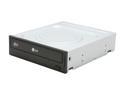
LG CD/DVD Burner 22X DVD+R 8X DVD+RW 8X DVD+R DL 22X DVD-R 6X DVD-RW 16X DVD-ROM 48X CD-R 32X CD-RW 48X CD-ROM Black SATA Model GH22NS70 OEM
Pros: Cheap, works, and uses SATA! Windows 7 SP1 supports this drive fully with Intel H67 chipset. Make sure you leave a disk in the drive until you have downloaded and installed Windows 7 Service Pack 1.
Cons: There may be an issue with Windows 7 built in drivers not working correctly with Intel H67 chipset controllers. If you are having problems with booting when this drive is connected make sure you update to Service Pack 1 before trashing it. Little to nothing on line about this issue.
Overall Review: When installed - running Windows 7 make sure you leave a optical disk in the drive until you update to Service Pack 1. If you try booting and it hangs during the drive check of the BIOS - simply power cycle and put any DVD you have in the tray. It will find the drive and then hand off to the OS.
5/28/2011See more detail
Update
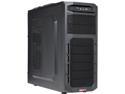
LOGISYS Computer CS369BK ATX Mid Tower Computer Case with 480W Power Pupply
Pros: None
Cons: Had to purchase second power supply from local store to make system operate. Power supply was tested with Digital VOM, and top shelf power supply tester. 12v rail was producing 2.3v at 500ma. 3v rail was non operational as was the 5v output. When connecting to tester, nothing would power up at all.
Overall Review: The combo was listed as perfect entry level gaming computer,. Was at a decent price until expense of second power supply was added into the cost. Avoid purchasing this case unless you plan on swapping out the included power supply.
7/11/2014See more detail
Arrived quickly, no coasters, reads well in all devices.

Verbatim DVD-R 4.7GB 16X DataLifePlus Shiny Silver Silk Screen Printable - 50pk SP
Pros: Burns well, no coasters in first 10 attempts, expect that all will work the same. Quality is top notch, no visible imperfections or signs of bad workmanship.
Cons: None. Most of the errors obtained while working with this media were from Operating System (Windows 10) issues. Once that was discovered, the process completed successfully. If you are trying to copy large files within Windows 10, if the file size is over 2mb it will stall out and cause the DVD buffer to have under-run issues. Make sure to use DVD software that has buffer control / under run / over flow options and enable them if needed. Using Fedora 24, Brasero there were no issues with any of the large files (HD photos) at all.
Overall Review: This is a "silk screen" printable set, not for use in a standard inkjet printer. If you are using a permanent marker do not just get any old "sharpie" or you may risk damage to the surface of the DVD. Do your self a favor and get the ones meant to use on DVD / Blue Ray /CD media. Also - the speed at which the data will be written to the DVD will vary depending on several factors. The most common issues with low speeds relate to file types being written to the DVD media, not the burner doing the writing. I ran tests with common files (document, photos, music and video) and the speeds never dipped below 8x on a Windows 10 based platform, and similar results were obtained from a Linux (Fedora) platform. If you want to use Linux (Fedora, Mint, Ubuntu or SuSE) I would recommend using the "Brasero" application as it is much more stable than K3B at this point. With Windows - I use ImgBurn with good success - it will handle most anything you need to do with an easy to understand layout. Good luck.
7/1/2018See more detail
Great print speed, comes out face down in top tray like laser, WiFi hotspot, NFC printing.
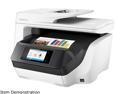
HP OfficeJet Pro 8720 All-in-One Wireless Printer with Mobile Printing, Instant Ink ready (M9L75A)
Pros: Networking options are great - have quite a few ways to print from network connected devices, mobile phones, and tablets. Has a built in "access point" so you can print directly to it without being on a network, also has NFC printing for "tap and print" options. Ink tanks are larger than I would have expected, but load easily. HP Instant Ink is a good deal, check it out.
Cons: Setup is not as intuitive as it should be... Options on screen do not follow included printed guide, will not warn you about necessary steps needed for initial setup.
Overall Review: I would recommend this printer for any small business or home office over a casual printer needed for occasional use.
8/1/2017See more detail
The perfect "green" gigabit switch for a medium network...
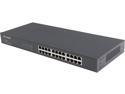
TP-Link 24 Port Gigabit Ethernet Switch | Plug and Play | Sturdy Metal w/Shielded Ports | Rackmount | Fanless | Limited Lifetime Protection | Unmanaged (TL-SG1024)
Pros: Small footprint (7" deep) and comes with rack mounting "ears" to use with 19" rack. Uses a standard power plug, like the one for a desktop computer (supplied in the box) and works quite well. Does not power unused ports even if a cable is attached.
Cons: This did not fit into a normal 6" deep rack (punch down rack) so I had to wall mount it. Does not affect air flow, just looks a bit different. Looking at a 12" deep 6u rack to update my network area.
Overall Review: Great switch, replaced my 16port TP-Link switch, was plug and play. Is 1.5" deeper than the 10/100 it replaced but still runs quietly, cool and without a fan. I also like that it does not use a "brick" type power adapter. Simplifies the wiring closet and makes use of a standard PC power cord, I used a 90 degree to adapt it to my wiring layout, but a straight plug works as well. Just know that it is 7.1" deep without power cord, so make sure to add that into your rack mount equations.
8/1/2017See more detail
Best router for wall mount application!
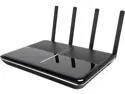
TP-Link Archer C3150 V2 AC3150 Wireless MU-MIMO Router - Comprehensive Antivirus and Security, Works with Alexa and IFTTT
Pros: Looks classy, subdued LED lights (do not blink with activity) and classy black silver exterior are well suited for wall mounting. This replaced a "new" router provided by FiOS ISP and far exceeded our expectations. This TP-Link router is mounted in the center of our home on the second floor and I have full coverage WiFi thru the entire 3000' home. This was purchased so we could eliminate the dead spots and weak WiFi signals we were getting from the FiOS supplied routers. Also - we moved from "cable" TV to our own local HD over the air content, and streaming on HULU and Netflix. This is saving us a TON of cash, especially since we were not watching 90% of the cable channels they were trying to "push" to us. If you are thinking about "unplugging" your cable TV, this is the router to get, and will pay for itself in a few months of dumping all those useless channels.
Cons: None - so using for "features" review: Gigabit ports for WAN and LAN work with our new TP-Link 24port switch and also the FiOS ONT on the side of our house. Thru put speed is impressive! MU-MIMO that works! Concurrent streaming to several WiFi connected devices without buffering issues. Smart WiFi - TP-Link has the bugs worked out - their "smart WiFi" works better than any other I have tried so far.Wireless signal strength improved markedly - AC range is about 35 to 40 feet, N ranges is well over 150 feet. GUI / Web is intuitive, simple to understand and there are good "help" files online. Smartphone APP is as good as it gets, both for Apple and Android devices, it really makes it nice to be able to turn on / off the guest network remotely.
Overall Review: To dump cable / FiOS TV and those annoying set top box issues with provider supplied hardware: 1. Make sure you have an ethernet port and CAT5e running from the ONT (the proider box) to your router location. This will remove the need for a MoCA "bridge" device that will translate MOCA or other RG cable connection to your router. 2. Purchase a good router (like this one), connect the CAT5 cable from the ONT to the WAN port on the router, reboot the router and then set your WiFi Passwords (don't leave them defaulted) and enjoy. 3. Sign up for HULU, use Roku or similar streaming device, and Netflix to watch your favorite shows, both past and present and pay a significantly reduced bill to your internet provider. I highly recommend this WiFi router to anyone that is needing a good improvement over their provider's supplied junk... It ROCKS! Parts used: Wiegand HD patch panel antenna (from HomeDepot). TP-Link 24port unmanaged switch TP-Link Archer AC-3150 Router (this one). Savings - over $150 per month. Expect to have this equipment pay for itself in less than 2 months of use. Feel free to contact me for additional information.
8/1/2017See more detail