

Your Browsing History


Michael B.
Joined on 07/21/04
0
0
product reviews
- 16
Awesome HTPC
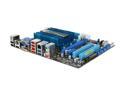
ASUS E35M1-M PRO Fusion AMD E-350 APU (1.6GHz, Dual-Core) AMD Hudson M1 Micro ATX Motherboard/CPU Combo
Pros: Great value considering the features and capabilities. All the latest interfaces!!! 6 SATA III connectors, 2 - USB 3.0, 12 USB 2.0 Gigabit Ethernet, DVI/HDMI/RGB video connection options, 1 PCI, 1 PCIe X1, 1 PCIe x4 (physically a x16 connector). The APU incorporates a decent graphics engine that will play the most demanding 1080p video flawlessly (provided you enable GPU acceleration). Windows supports GPU acceleration easier than on most Linux distributions. Comes with 5 nice quality SATA cables with locking ends!! I am using an Intel PCI Gigabit card along with the on board Realtek Ethernet port and both works flawlessly (even the PXE boot rom shows up at powerup).
Cons: Minor, but the built in heatsink has a logo plate on top, which blocks airflow. A fan is included as "optional", and it installs OVER the logo plate... not very smart. It is just glued and removes easily. Lowered the idle temp to 37C. It is a small fan, maybe 2" across and rather quiet. You could run this without a fan in a well ventilated case but expect higher idle temps. Not crazy about 4 of the 5 internal SATA connectors that protrude sideways on the edge of the board. This might make for cramped access in a very tight case, so keep that in mind. Mine is in a standard size ATX case and was not a problem at all.
Overall Review: This is not a powerhouse processor, and is not advertised as one. It is applicable as a HTPC or an office / email / browser PC. It will play some older games at decent settings, but dont buy this expecting to play newer highly demanding games. Adding a separate graphics card doesnt do much either as the x16 PCIe connector only supports x4 data transfer.
9/14/2011See more detail
Bad drivers for Win7 64bit
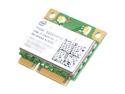
Intel 622AN.HMWWB Wireless Adapter 6200 Centrino Advanced-N Mini PCI Express Up to 300Mbps Wireless Data Rates
Pros: Works flawlessly in Ubuntu 11.04 out of the box
Cons: None of the drivers I tried from the Intel web site would work on my Acer Aspire 722. Running Windows 7 sp1 64bit. I tried 13.5 down to 13.0.0.107. Some would install, but upon reboot, machine would freeze. Others would lock the machine during driver install. Windows update installs a driver, but it is "unsigned" and would not run after being installed. Used a utility to sign the driver files as "test drivers", then set windows to "test mode" to allow unsigned drivers, this somewhat worked but was unstable and BSOD a few times. Finally gave up and removed. Will be returning.
Overall Review: Not sure if this issue is specific to my laptop model (using AMD Fusion processor). Saw another user post that also has a Fusion netbook with a very similar issue to mine. Probably is NOT a HW issue with the card, but a Windows driver issue, maybe related to the new AMD processor??? Who knows, but it doesnt work with my Windows configuration.
8/22/2011See more detail
Disappointed
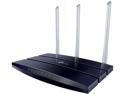
TP-Link TL-WR1043N 450 Mbps Wireless N Gigabit Router
Pros: Great hardware capabilities, especially for the price. SAMBA, FTP, and Print services using USB 2.0 port
Cons: WiFi shuts off every 2-3 days. Router continues to work just fine. Must reboot to bring WiFi back up. Sometimes just accessing the web configuration page and changing a wireless setting and clicking APPLY will also turn the WiFi back on... but not always. Using most current stock firmware, setup as a basic router, WPA2, BGN-mixed, 20Mhz channel, fixed on channel 6. Tried even turning off all USB services. Does not make a difference. WiFi light stays on and is rapidly flashing, but does not broadcast SSID. SAMBA shares do not work with NTFS formatted drives, only FAT32. Firmware does not even recognize EXT2,3 or 4 (Linux) formatted drives. FTP server DOES work, speeds are fairly good (10MB/s)
Overall Review: This router has outstanding HW capabilities, but something just isn't working right. Tried reflashing the stock firmware and factory default 30/30/30. WiFi still shuts off every 2-3 days. I own a TP-Link WR841N and it works FLAWLESSLY, which is what prompted me to buy this model. Unfortunately I threw away the box, otherwise it would be going back. RMA is my next step I think.
7/3/2012See more detail
Impressive for the price
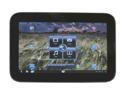
lenovo IdeaPad K1 (130422U) Tablet - Black NVIDIA Tegra 2 1.00GHz 10.1" 1GB LPDDR2 Memory LPDDR2 600MHz 32GB Flash NVIDIA ULP GeForce
Pros: Tegra2 1.0, GHz 32GB, microSD, front/back camera w/flash, GPS, Bluetooth, physical Home button, optical scroll sensor on Home button, 10 hour battery life. Support DRM playback so it officially supports NetFlix!! Using Vellamo benchmark, it OUTSCORES the Samsung Galaxy and Asus Transformer tablets by 5%.
Cons: Proprietary 30 pin connector for Charging and USB. Separate cables for USB and charger. You CANNOT CHARGE this using the USB data cable. It will only charge using the wall charger with its proprietary plug. You CANNOT use the USB Data cable AND charger at the same time. NO micro or mini USB plug! Come pre-loaded with a fair amount of bloatware, BUT you can UNINSTALL all of it except Zinio. BEWARE, every time you do an OTA update, the bloatware is REINSTALLED as part of the OS update.
Overall Review: At $299 you can't beat the specs of this device. You need to UPDATE it immediately out of the box via Lenovo over the air service. Mine came with Honeycomb 3.1 and I went through THREE update / reboots to eventually end up at 3.2.1. There are known performance, GPS and screen issues if you do not update. These seem to be fixed with the latest 3.2.1 release.
12/10/2011See more detail
Wirless shuts down regularly
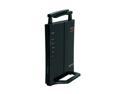
BUFFALO AirStation HighPower N300 Wireless Router - WHR-HP-G300N
Pros: Runs DD-WRT (sort of) WAN-LAN hardwire features work great
Cons: Wireless continuosly shuts down. Have tried the factory DD-WRT Pro version and regular DD-WRT... it doesn't matter. In order to restore wireless, i have to go into the web gui and just change any wireless setting and "save"... magically the wireless comes back up... but only for a few hours... then it disappears. Hardwire features always stay online and work, just wireless is flakey. Doesnt matter mode B G N, channel, encryption.. tried all different combinations. Something is wrong with DD-WRT on this device.
Overall Review: On paper, it seems like a good device, but I have had nothing but issues with the wireless. Am currently using my old Buffalo G router for wireless. Waste of money.
8/10/2011See more detail
Ruined TWO motherboards
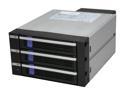
ICY DOCK MB453SPF-B 3 in 2 SATA I, II & III Hot-Swap Internal Backplane Raid Cage Module
Pros: Absolutely None. If I could give it a ZERO, I would. From what I read and saw about the product, I thought it was a good deal. ICY-DOCK has a good reputation, and we use them at work.
Cons: Installed into Asus P5Q Pro system. Hooked up power to both molex connectors, attached the new SATA cables I purchased at the same time I ordered ICY-DOCK. Inserted 3 WD 1GB drives. Turned on power. Lights up, fans come on, but no POST or beeps. Turn off power, pull everything out, re-power motherboard. No Post or Beep. Start troubleshooting. Pull off components down to bare board and video. Still no post. Check CPU and video in other computer, both good. Check new SATA cables using USB -SATA adapter and verify cables and drives are good. Thinking ICY-DOCK fried my motherboard. Try connecting ICY-DOCK no another computer (which was dispensable). Hook up, power on. SAME THING. Not post or beep. Another fried computer. Both computers had high quality Seasonic power supplies. A 700 and 500 watt. Both power supplies still measure +12 and +5 so they are still good. Checked back side of ICY-DOCK and discovered two small SMD transistors Q6 and Q7 FRIED above SATA1 connector.
Overall Review: The brand new ICY DOCK just ruined a $125 motherboard. I call ICY DOCK. Very friendly and helpful guy, but about all they will do is let me RMA it. They will not cover incidental damage caused by a defective product. They offer to send me a replacement. Like I am going to take a chance on sticking ANOTHER one of these in my NEW motherboard that I am now going to have to order to fix my machine. They did want the S/N (1068269) off it so they could check it out when it gets sent back to them from NewEgg. My first and last ICY-DOCK purchase, both personally and at work. NOT HAPPY AT ALL.
9/2/2010See more detail