
Your Browsing History


Paul S.
Joined on 08/05/04
0
0
product reviews
- 5
Works well for tennis elbow too
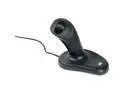
3M EM500GPL 3 Buttons USB Optical Ergonomic Mouse
Pros: Very comfortable hand/wrist position, thumb button takes very little effort to use, finger button is in just the right place for my hand. I have a problem with tennis elbow (caused by holding the mouse with a death grip while scrolling to read stuff). I tried a trackball, which helped but then made my thumb hurt from rolling that ball so much and wrist hurt from holding it stiff. Added a “Launch Pad” ($80 wrist rest) which helped the wrist issue but then the trackball kept slipping out of position and the ball of my hand hurt from putting my arm’s weight on it. This device has solved all of that for me. To move the mouse, you use your shoulder muscles, which aren't very precise but can be trained. Fine control can be done with the wrist if needed, but if you have wrist issues it is not necessary to move the wrist. It’s a great device. I look forward to the next version, maybe with a rubber textured grip or something.
Cons: No function for scroll wheel. The finger button acts like when you hold down the wheel on an MS mouse, and you can then scroll by moving the mouse - but you can't do the 3-line scroll that the wheel does. Also, on Google Maps, you have to use their zoom buttons, can't zoom by rolling the (nonexistent) wheel.
Overall Review: Took a few days to get used to, accidentally dragged some folders to subfolders of other folders when reaching for and grasping the mouse. You need to have a light touch when you grab it (part of my issue).
6/23/2008See more detail
Looking for a bargain? Keep looking.
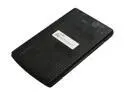
EAGLE EB-240-00065 2.5" USB2.0 to IDE mesh External Enclosure
Pros: Newegg did a stellar shipping job as usual. The black mesh casing promises to keep the drives cool, looks good. The included cable is very nice, has integrated dual USB for extra power, and thick housing. The drive has a power jack for yet more additional power, no cable for it though. The enclosure is just big enough for the drive, with no wasted space. The screws and the holes they go into are solid.
Cons: I bought two units, and they had the same exact problems: Power on/off switch is extremely touchy, will power off your drive when you don't want it to, just for an instant. Compatibility issues: Both worked OK with two different brand 60GB disks, neither worked with my 30GB disk (same brand as one of the 60s). That 30GB disk worked fine in another IDE-USB enclosure.
Overall Review: I removed the circuit board and re-soldered all six legs of the on/off switch - problem still happened. It's not a bad solder job, it's a cheap microswitch. I held the switch carefully so that the solder would not be stressed at all, and lightly pushed on the switch sideways to its normal motion, and the power went out. Let go, power cames back. A light touch is all it takes, which might happen when you move the disk during a copy operation. I can't have that happen while copying a 50GB VHD file, or worse, while running a VM from an external disk. I removed the black plastic cap from the microswitch, so now the actual switch is exposed and recessed into the casing, and that will work for me. I'll never use the switch. If you are looking for a reasonably good IDE to USB enclosure at a bargain price, keep looking. Spend a little more for a better one and save yourself the trouble. I'm only keeping these because the money is not worth the time/effort/shipping to do the RMA
2/9/2009See more detail
Good PSU in general, but got a bad one
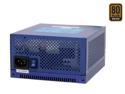
FSP Group ZEN 400 400W Fanless ATX 2.2V SLI Certified CrossFire Ready 80 PLUS BRONZE Certified Active PFC Power Supply
Pros: No noise, lots of connectors, long cords, cords wrapped in mesh to keep them from tangling, lighted switch, looks nice.
Cons: Heavy - to be expected with no fan though.
Overall Review: I have purchased two of these. The second one failed after 13 months of service. Has 3 year warranty so I am doing the RMA process. 4-6 weeks turnaround is what their website says. For this price, seems they could afford to do an advance RMA.
8/10/2009See more detail
Setting the record straight
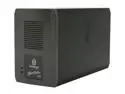
Iomega StorCenter ix2 Network Storage Server 1TB
Pros: I am not an Iomega employee. I want to correct some things that previous reviewers have said. 1. The ix2 DOES have HTTP access. I tested it and it works. 2. FTP users are able to see the existence of other users' folder, but cannot view the contents. 3. If you install the SSL certificate, you don't have to look at the warnings anymore. Durr. 4. It is not FTP only. I've used HTTPS, NFS, and SMB (\\storcenter\folder) as well as FTP. Very versatile. 5. E-mail notification works fine. Perhaps the reviewer's ISP blocks port 25? 6. The disks ARE user-replaceable, it's just not easy. See "Other Thoughts". 7. The Seagate drives are 7200 RPM SATA 3.0. I guess that's "lower end" when compared to 15K SAS disks, but then the price would have to go up with faster disks. The bottleneck is the networking, not the hard disks.
Cons: It is not EASY to replace the hard disks, but it can be done, if you took a disk image of a healthy one before the failure, or if you have one good disk left in it. The small fan in the back is noisy, but easy to replace.
Overall Review: Here is the procedure to replace the hard disks: 1. Have a disk image of a good disk from the StorCenter handy. I used Acronis True Image Home version 11 to back up and restore the disk image. 2. Remove the existing disks from the unit. That means removing a lot of screws and connectors, and loosening the mainboard to squeeze the disks out. If you're not good with hardware, stop. 3. Use disk imaging software to put the images on both disks. You might only need one but I didn't bother figuring out which. 4. Use a partition editing software (Windows disk manager?) to remove the large partition from each disk, leaving the small one. 5. Reassemble the StorCenter, boot it, and authorize it to rebuild the mirror set.
3/5/2009See more detail
Nothing but good
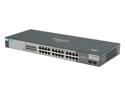
HP J9028B Managed ProCurve 1800-24G Switch
Pros: Very good switch for the price, have not found any compatibility issues with 10bt, 100bt, and 1000bt devices on the same switch like you will find with the cheaper products. Worth every penny if you want a reliable no-fuss switch.
Cons: No PoE, no fast uplink for stacking - but hey, what do you want for this great price?
9/9/2008See more detail