
Your Browsing History


Jeffrey D.
Joined on 07/01/07
0
0
product reviews
- 5
Quiet, Sturdy and Attractive
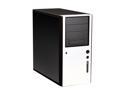
Antec Solo Black/Silver Steel ATX Mid Tower Computer Case
Pros: Excellent Contruction, Intuitive Design and QUIET!!! Did I say Quiet? I was nearly desperate for a quiet pc solution, having grown tired of the constant drone of fan noise coming both from my case fans and my outdated 4850 video card (I have since ordered, but not yet received/installed a replacement 'fanless' 5870). This review is intended to compare with past experience using the same components. I have tried numerous different cases, each of which seemed promising at first, only to grow louder as the fan speed needed to increase to cool the internal components. Even with the lack of a front case fan, the Antec Solo case seems to keep components as cool as when I would remove the side off of other cases. Upon taking it out of the box, you can tell by its weight that it is a made from a heavier duty steel than most. It just 'feels' nice. Also, I like the very clean integration of the USB ports on the front of the case, which are both stylish and easily accessible.
Cons: The case fan that ships with it is a little loud, though there is a fan controller included. I needed to set it to low before I considered the sound acceptable. I was concerned that my case temps would increase because of this, but so far this hasn't happened. I recently ordered a 120mm Nexus Real Silent replacement case fan, which I think may be even quieter. At first, I though the lack of a front intake fan was going to be bad for cooling, but again, not a problem so far. Though I don't really think I'll need it, I have also ordered a 92mm Nexus Fan for the front as well. If it doesn't add much noise, I'll keep it in there. The PSU was a little difficult to install, and if it ever needs to be replaced, it will surely require removing the cpu heatsink. It's a fairly large PSU (Zalman 850), and it really seems like it needs more support towards the front, because it's mildly distorting the metal where it mounts at the rear. Not Antec's fault I guess, but thought I'd mention it.
Overall Review: All in all, I REALLY like this case! I really don't understand the negative reviews I've read here. I suspect many of those may not be familiar with all of the features that have been intelligently designed into this case. For example, some people have mentioned that it is difficult to work behind the front door... but it removes really easily. Once you open the door, just lift up on it and it pulls right off the hinges. It is plastic, so you need to be careful, but it's not flimsy. Same goes for the inside steel door hinged in the opposing direction, which serves as a fan mount, and covers the hard drives. Again, it is designed to pull right off the hinges if you open it and lift up. Finally, yeah it's a little tight in there, but if you build it right, you shouldn't need to service it very often. Besides, if you need more space than this, then c'mon, it's YOU that has obviously chosen the wrong case.
1/5/2011See more detail
Doesn't work
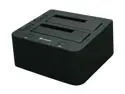
Sharkoon SATA QuickPort Duo USB3.0 2.5" & 3.5" Black SATA 2 x USB 3.0 Hard Drive Docking
Pros: Looks Nice, Seems simple enough to use. Separate power button for each drive.
Cons: Doesn't work as advertised!
Overall Review: Very Frustrating! When I first got this, and plugged it in to a USB 3.0 port, I was extremely curious to see how long it would take to transfer large amounts of data. It started off really nice, but then just randomly disconnects! I cannot transfer data for more than 20 seconds without this thing disconnecting and reconnecting! USB 2.0 seems to work fine, but that is NOT why I bought this. Very disappointed in this flawed product!!
4/27/2011See more detail
8MB Cache / NOT 64 as advertised.
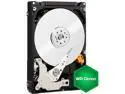
Western Digital Green WD15NPVT 1.5TB IntelliPower 8MB Cache SATA 3.0Gb/s 2.5" Internal Hard Drive Bare Drive
Pros: No review, just confirming previous owners comments that this drive is rated by WD as having an 8MB cache. www.wdc.com/wdproducts/library/SpecSheet/ENG/2879-771439.pdf
Cons: No review, just confirming previous owners comments that this drive is rated by WD as having an 8MB cache. www.wdc.com/wdproducts/library/SpecSheet/ENG/2879-771439.pdf
Overall Review: No review, just confirming previous owners comments that this drive is rated by WD as having an 8MB cache. www.wdc.com/wdproducts/library/SpecSheet/ENG/2879-771439.pdf
3/6/2013See more detail
Waste of Time!
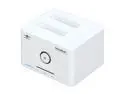
Vantec NexStar SuperSpeed Dual Bay 2.5"/3.5" SATA to USB 3.0 Hard Drive Dock - Model NST-D400S3
Pros: For my application - NONE!! Wish it worked. I like the color, the size, and the button on the front is stylish (Blue LED) and simple to use.
Cons: Does not support 3.0 speeds for use with Asus motherboard. Yes, I updated the firmware.
Overall Review: Vantec's website offers very poor guidance in even the simplest tasks such as updating firmware. First, its a challenge to even determine which unit you are wanting to update. The model number isn't listed ANYWHERE on the drive dock. Every other piece of information does though; Serial number, material specification, power supply requirements (both voltage an amps), dimensions, etc. You know, all the pertinent info you need EXCEPT for the actual model you have in your hand. I actually had to find the box to be verify my model! Second, the directions are not clear on the website for updating firmware. Granted, I know I need to turn it on to update the firmware, but they should mention that you need a drive installed to update the firmware for the dock itself. Finally, I am just very disappointed in the amount of time required to troubleshoot this. I couldn't figure out where the problem was until I read other NewEgg reviews showing incompatibility with Asus mobos. Thanks guys!
1/15/2011See more detail
Fast, Cool, and Quiet!!
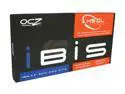
OCZ IBIS OCZ3HSD1IBS1-240G 3.5" 240GB HSDL (High Speed Data Link) MLC Enterprise Solid State Disk
Pros: Fair Price, Nice Packaging, Simple Hook Up, and Incredible Speed!! ~ This thing is definately FAST! I am running Win7 (64) with this as the primary drive, and 2 additional SATA drives for storage (that need to be loaded during POST). From the same screen that I am typing this review, I can reboot in about 45 seconds to an actual usable computer and get back on the net in about another 5 seconds (literally!). Puts a smile on my face every time. I think it drives my wife nuts when I call her into the room just to say "Hey, check this out" and when I reboot, she just kinda gives me this blank stare when it comes back up and she says "Sooooo.... What am I looking at?" Also, I suspect it may have more potential, as I don't think I have the proper settings for this thing yet - I still son't have the BIOS set up in AHCI yet. I heard that it may be a little tricky to reboot once I change that over. I will follow up.
Cons: Frustrating to initially set up!! Frustrating to initially set up!! Frustrating to initially set up!! There is no documentation whatsoever that comes with this drive! Just the Drive, the PCIe Card, and the Cable. That's it. Not even a driver CD. What's up with that? For 700 bucks, I'd like to think that could be included!!! I would have gladly paid the additional 30 cents the cd would have cost to include with this drive.
Overall Review: As a follow up to the notes about the difficulty setting up this drive, I would like to point out that I absolutely positively could not get the IBIS drivers to load during initial installation of Win7, and I pulled the drivers directly from OCZ's own website! My BIOS could recognize the drives, but during WIN7 setup, there were no drives detected. When I attempted to load the drivers, I kept getting an error that there were no digitally signed drivers. I even tried booting into F8 and disabling digital drive signature enforcement, and still nothing! VERY FRUSTRATING! Finally, I stumbled across a thread which suggested using the REVO drivers, and THAT finally did the trick. How was I supposed to know that? C'mon OCZ, you really need to include a driver disk with documentation with these drives! That is the ONLY complaint I have. For others experiencing the same difficulty, I downloaded the drivers from here: http://www.ocztechnology.com/drivers/RevoDrive_and_RevoDrive_X2/
1/2/2011See more detail