
Your Browsing History


Richard M.
Joined on 11/21/07
0
0
product reviews
- 2
Good concept, shaky execution. Mine may mostly be QC issues?
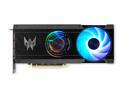
Acer Predator BiFrost Arc A770 Video Card Predator BiFrost Intel Arc A770 OC DP.BKCWW.P02
Pros: The a770 Bifrost is nice, when it is working without issues. It isn't double stick taped together like it's counterpart, and has better cooling and performance. On Win 11, It easily manages 60FPS+ at 4k, and rockets Firestrike upwards of 200FPS with a score of 26000+, and if your game won't run on it, odds are simply adding the correct DXVK Vulkan driver in the game folder will have it playing smoothly without issues. But for some HELLISH reason, it functions better in my Ryzen rig, gaining over 3K total score on Firestrike, as well better perf in others as well.
Cons: But that being said, it has many software compatibility hangups that make it not quite worth full price, IMO. My friends who also have them are not having as many issues as me, so take this with a grain of salt. My first card was unstable and had coil whine so bad it could be mistaken for a tiny tesla coil or taser. So it got, RMA'd. With the replacement it still has issues. But at least it doesn't sound like it's singeing its PCB black somewhere... Issues include random restarts of display adapter, signified by suddenly black screens and a beep. Decode issues making local video playback technicolor kaleidoscopes, until you reload file or toggle between Hardware and software decode or fullscreen/windowed. Hooking issues for streamshare in discord where every program and monitor preview is black screen [ sometimes ctrl+shift+win+B to force display adapter restart fixes this and other small hangups, for a bit..] but really, tip of the iceberg with it's list of issues with discord, my streams constantly end themselves too etc.. etc... But discord has been getting more and more inconsistent as the years go on.. Since Win 11 re calibrates your monitor layout every time it thinks you unplug, it , you turn off a monitor this causes the card to reassign the designation from "Device" to "Device (2)/(3)/(4)" which causes Win11 to switch to the "New" device and wrecks voicemeeters input/output settings. That means Voicemeeter has audio device selection issues and loses/ changes the enumeration of the devices when they are powercycled. so you have to re select it every time you turn off a monitor. It causes program crashes on load and acts like its out of memory when it is not. Usually games, but not always. Certain programs like photoshop etc do not like the card and complain that it does not support directx or does not have enough memory when it does.... And it may/ may not function despite the errors. I suspect I may have received another lemon to return at this point as the black screens and display resets are becoming more frequent as I multitask and play games like Elden Ring....
Overall Review: The list of issues goes on, but it works, and is slowly improving with updates- so If you can get it on sale and don't mind troubleshooting through the software growing pains, go for it. Otherwise, find an acceptably stable alternative for your needs...
1/10/2023See more detail
Revised post, please approve this legitimate review. I wanted to like
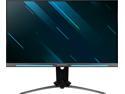
Acer Predator XB273U GSbmiiprzx 27" WQHD (2560 x 1440) IPS Monitor with NVIDIA G-SYNC Compatible, VESA Certified DisplayHDR400, Up to 0.5ms (G to G), 165Hz, (1 x Display Port & 2 x HDMI Ports)
Pros: The Good: Good resolution and sharpness Nice stable framerate and response time Good color balance and brightness -If only it was a non damaged and uniform panel I might have been able to tolerate it's other numerous shortcomings....
Cons: The Bad: Just plain hurts my eyes Bad gradients that cause banding Unintuitive OSD menu controls and layout Horrible light uniformity and viewing angles Color/Contrast/Gain/Bias all at 0 and still illuminates my whole room with solid "black" Speakers are a joke, I've had dollar store headphones that were louder Can't turn off frequency overlay in sports mode- it just overwrites the custom user profile Either horribly dark and no black details on HDR with pixelation, or just plain faked and not even real HDR High contrast/ dark mode with white text burns text lines into my eyes after a while and I don't want it damaging my vision
Overall Review: The Ugly Truth: I wanted to like it, but I lost the panel lottery again and I'm not willing to gamble any more... In my review pictures/video, I used the defective pixel test on all monitors to more clearly showcase the poor black levels and uniformity- With eizo monitor test. A lesser known and very useful site to keep in your toolkit along with the better known UFO test for ghosting. Even in the picture with my desktop and some windows open it is horrible, and I had turned everything in the OSD to 0 to give it a best/worse case scenario test... It never had a chance... This is probably my last online monitor purchase, as this is the second Acer in 2023, and fifth total of poorly QCed panels from misc manufacturers [Acer, Dell, HP, and LG].. I will only buy in person and ask to open and test them in store before taking home from now on. My standards aren't all that ridiculous, but I am thorough with my testing and picky about accepting subpar goods when I've spent respectable amounts in exchange for good working products. I've tried all kinds, and had to RMA/refund them all over the last five years respectively, and that is not counting in my in-store purchases which takes that number up to nearly a dozen.. I've wasted my time and money enough. It is bad quality panels across the board, regardless of price point these days, at least in my VERY unfortunate personal experiences. The only panels I have had any luck with uniformity on and accepted enough to keep, have been Samsung QHD TVs. But even so, they have chronic software functionality and update issues, and inappropriate uncontrollable inline ads that disable all the Tizen apps if blocked on my router, and I simply tolerate it while seething at my inability to do anything about it as they do not offer anything other than "Smart TVs" anymore.. That all aside.. This Acer Predator XB273U has put the last nail in the coffin. It is very bad with blacks, has lightbleed/ poor viewing angles even in an adequately lit room when square in front of it, and it's getting sent back for it. I had hoped to like it, and to have a predator monitor that matched my Intel a770 Bifrost, but I feel jilted with the poor quality of what I received and will be returning this for a full refund. I can't tolerate it for my multitasking and 3d rendering/ photo editing, and I haven't even felt like gaming on it when it is that washed out on the lefthand side at all times no matter what angles I set it up at. It's not viable. At least not with my multi-monitor use case in a regularly low light environment. I wanted to like this monitor as it has crisp resolution, good refresh rate, and a nice flat panel which is becoming more scarce these days, but I bought it expecting some glow, but wanted at least some semblance of backlight uniformity as it was not a curved panel, and as it is lacking in that regard as well as the others I mentioned in bullet-points I cannot bring myself to want to keep it, even at this reasonable price point. I wish things had worked out better. But they did not.
2/9/2024See more detail