
Your Browsing History


Michael B.
Joined on 08/09/04
0
0
product reviews
- 5
decibels schmecibels
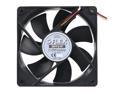
Scythe S-FLEX SFF21F 120mm Case Fan
Pros: It's just a fan, so why get excited about it, right? Wrong! I had an old, cheap no-name case fan that put out impressive airflow, but was so loud that it made the cicadas outside seem silent. I built a new system and decided to "splurge" on nice fans, and Wholly cow! I can actually hear other sounds again! <Newegg didn't think the proper spelling was appropriate???> Seriously these are super quiet, and they out-perform my house fans (ounce for ounce, that is). They're black--very classy in an all-black case, and they feel very solid.
Cons: Wish it came with sleeved cables, but that's nothing. Hey Scythe, could you make one of these in a 50mm size? yeah, it's not common, but the ASUS Sabretooth P67 has a hole in its armor with your name on it.
Overall Review: I have 2 of these on my Corsair H70 cooler, and I can't even hear them. I decided to get 2 more to replace the stock intake and exhaust fans on my case. Do it right and buy as many as you need all at once, since Newegg is currently offering a discount for purchasing multiples. The moral of the story: don't sweat the cost of your fans. They're not even 20 bucks so go crazy!
3/18/2011See more detail
I was happy until...
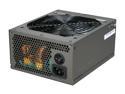
Thermaltake Black Widow W0319RU 850 W ATX 12V v2.3, EPS 12V v2.91 CrossFire Certified 80 PLUS BRONZE Certified Modular Active PFC Power Supply
Pros: Beautiful, lots of cables of more than adequate length, even for a full tower. More than enough power for a gaming rig running one graphics card. The cables are sleeved in a nylon mesh that is really easy on the eyes.
Cons: Unfortunately the rocker switch is of ridiculously poor design. a little metal clip that's not much bigger that a standard sized staple is the only thing keeping the power on. Like most people, I never touch it. I turn my system power on and off at the front of the case, so the psu's switch stays in the on position at all times. Well, it figures the ONE time I flipped that switch in the 3 months I've owned this psu, and it breaks, rendering the psu 100% useless.
Overall Review: Happily Thermaltake's warranty is good for 5 years.
4/22/2010See more detail
If I had a billion dollars...
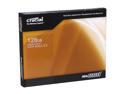
Crucial RealSSD C300 2.5" 128GB SATA III MLC Internal Solid State Drive (SSD) CTFDDAC128MAG-1G1
Pros: What an impressive upgrade this was! I wish I had four of these. More importantly, I wish I hadn't waited so long to take the plunge. I had a 4 year old HDD prior to this, and I knew this drive would be fast, but I didn't expect it to be FAST! Most upgrades are pretty marginal--sometimes it's hard to even tell a difference, but not this time. When you go from HDD to SSD, you'll never go back. The speed boost is ridiculous.
Cons: It's getting a lot better, but SSD prices are still high, and capacities are too low. That's just the way it goes though. Give it time, and it will balance out.
Overall Review: If you're going to splurge on one upgrade for your rig, this is the one. Yeah, you can pick up a 1 Tb hard drive for $75, and it will serve you well for years to come. But you should never be afraid to buy the best--you'll always enjoy it. If you make sacrifices to save money, you'll regret it by the next payday.
4/1/2011See more detail
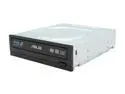
ASUS Black 12X BD-R 2X BD-RE 16X DVD+R 12X DVD-RAM 8X BD-ROM 8MB Cache SATA Blu-ray Burner BW-12B1LT LightScribe Support
Pros: It just doesn't get any better than this (yet). This drive can burn just about anything, and the speed is top notch. Lightscribe is awesome because Sharpie's have a bad habit of walking away from my desk.
Cons: Sorry everyone--it looks like I bought the last one.
Overall Review: There seem to be two different faceplate designs floating around, but the model numbers are the same. Mine came with a perfectly flat black matte finish, with Asus, Bluray and DVD logos on the front of the tray (matches Newegg's pics). It looks and fits like absolutely every other drive on the market. If you Google image search this drive, you'll see one with no logos, it's shiny,and it looks like it isn't perfectly flat--there's a diagonal facet to it. Very stylish, but I can see where it may not line up properly if your case has a custom faceplate that sits in front of the drive.
4/1/2011See more detail
Absolutely Flawless
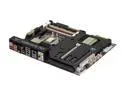
ASUS SABERTOOTH P67 (REV 3.0) LGA 1155 Intel P67 USB 3.0 ATX Intel Motherboard
Pros: I'll start right off with the most unique feature of this board: the "Thermal Armor." Some may love it, others may hate it. Personally I love it, although I couldn't care less about its thermal properties. I just think circuit boards are ugly. The armor covers all the ugliness with a nice black matte finish. I installed this in a Corsair 600T which is by far the most well thought-out case I've ever had the pleasure to use. It's all black inside, and mine has a window, so I wanted my build to have a clean look. I love Asus because they are like me--early adopters. if there's some new tech on the horizon, Asus probably already makes a board that can handle it. This is no exception. They bounced back from Intel's Sandy Bridge fiasco with amazing speed.
Cons: I really don't have much to say here. I've built a great many PC's over the years, and Asus never disappoints. This is a trivial gripe, but if you happen to water cool with this board, you will want to get a 50mm case fan. There's a well designed spot for it on the board (a 3-pin fan header is inside, out of the way), and it makes sure you have airflow underneath the armor. 50mm is a fairly unusual size, so you don't have a lot of fans to choose from. I wish they had gone 40 or 60mm, or just included a nice one.
Overall Review: This doesn't have all the crazy overclocking capabilities of the Maximus IV, but I'll be painfully honest: You won't miss them. You can overclock with this just fine. Maybe not as high as the Maximus IV can go, but you'd be crazy to go higher. Invest in an unlocked ("K") cpu, and you can take this to 4.0Ghz easy.
3/30/2011See more detail