
Your Browsing History


Virgil G.
Joined on 05/05/20
0
0
product reviews
- 13
Not Game compatible
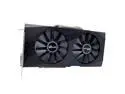
ENVINDA AMD RX 580 8GB Video Cards Hashrate 28-30mh/S 256bit 2048Sp For GDDR5 GPU Performance RX580 Graphics Cards
Pros: Cheaper than normal 8GB videoc cards
Cons: Can't use it as a gamers card. Most TV's and monitors can't handle it when Game mode is initiated for the TV when connecting by HDMI.
Overall Review: I bought this to use as a normal everyday video card to connect to my 70". I am not a gamer but just a heavy computer user that is on it around twenty hours a day. When I first started up the computer with this new card, I had a green screen and no video from the operating system. I quickly learned that my LG TV would set the HDMI 3 port to Gaming mode which caused it to go green. I had to go into All Settings, then to PIcture, Additional Settings and choose HDMI enabled for certain ports. My computer enabled game mode on HDMI3 and it did not like that. When I disabled the HDMI port 3 so I can get to a screen video of my Windows 11. But I am not able to get a good working screen resolution.
8/5/2023See more detail
Worse board ever
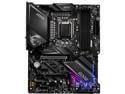
MSI MPG Z490 GAMING EDGE WIFI LGA 1200 Intel Z490 ATX Intel Motherboard
Pros: NONE
Cons: EVERYTHING THAT IS SUPPOSED TO MAKE A MOTHERBOARD OPERATIONAL.
Overall Review: I can only give this motherboard a one egg due to the fact that it will only accept certain brands of memory from a company that has paid the rights to MSI to use their memory. If you attempt to use any other brand that is not on their compatibility list then it will automatically shut down the memory banks if it is not on the list. i had purchased Mushkin Enhanced RGB Redline 32GB (2 x 16GB) DDR4 3600 (PC4 28800) Desktop Memory Model MLA4C360JNNM16GX2 memory for this board but it will not boot, the DRAM light comes on showing a memory fault. Even though this is basically the same as the other memories on the list, since Mushkin never paid MSI the rights to work on their board it does not read the memory. This was the first MSI board I had purchased in over twenty-five years and I will never ever again purchase another one. Also another problem with this board is the placement of the USB 3.0 header, instead of normal boards with the header oriented upward, it is on the side which cuts down on the types of cases you can use this in. You will need to get an adapter to use the header. Do not purchase this board, run away and don't purchase any MSI motherboards or video cards, they are all junk.
2/14/2023See more detail
Good Memory for MSI motherboard
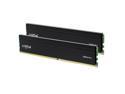
Crucial Pro 32GB (2 x 16GB) 288-Pin PC RAM DDR4 3200 (PC4 25600) Desktop Memory Model CP2K16G4DFRA32A
Pros: Works for MSI motherboards. MSI motherboards will only accept certain makes of memory and these will work with no problems.
Overall Review: I had been having a problem finding a memory that would work in my MSI MPG Z490 GAMING EDGE WIFI motherboard due to MSI's policy of memory makers paying a fee to operate on their motherboards. These memory chips are not on the compatibility list but they were on the Crucial compatibility list to work on the motherboard so I purchased them here on Newegg.
6/19/2023See more detail
Just a Toy
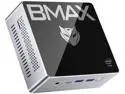
BMAX B2plus Desktop Mini PC with Intel Gemini Lake N4120 Intel 9th Gen UHD Graphics 600 Dual-HDMI Interface 8GB LPDDR4 + 128GB SSD Windows 11
Pros: None
Cons: Very underpowered Not able to upgrade memory or anything else No product support from the company
Overall Review: Just a toy and nothing else. Too weak for most computer usage.
12/27/2022See more detail
Slow memory
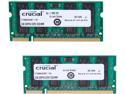
Crucial 4GB (2 x 2GB) 200-Pin DDR2 SO-DIMM DDR2 667 (PC2 5300) Laptop Memory Model CT2KIT25664AC667
Pros: Nothing.
Cons: The laptop reads it as four gigs of memory, but they run extremely slow, the laptop ran faster on just two gigs of memory.
Overall Review: I cannot in good faith recommend these memory chips since they evidently are damaged in some way.
7/6/2022See more detail
Great blank DVD's
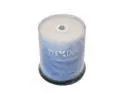
PlexDisc 16X DVD-R 4.7GB Logo Top Blank Media Recordable Disc 632-815-BX, 100 Discs
Pros: low price, no failures
Overall Review: After several years of experience burning DVDs and then attempting to read them a year or two later and find them unreadable despite how much I had paid for them due to the main fact that I had burned them at the listed highest speed. I quickly learned that the best format to get is the DVD-R and to burn them at the slowest possible speed. I know some fellows want to go as fast as possible but that only causes bad burns in the long run. I burn these at the slowest acceptable speed my LG BLU RAY burner will go at 8X speed. I also had to search through numerous other sellers for these blanks. Some sellers will sell the same item at over twice the price of other sellers. I found this brand at the lowest price on Newegg. These can be written on, but I use a DYMO label maker to put the name of the DVD on it as it prints much better than I can by hand. Although you can use a magic marker to write on them. I also like having the lines on the blank to make it easier to line up the labels when I put them on.
6/17/2022See more detail
seller reviews
- 7
DOA. Don't buy from this seller.
By the time my home health aide had returned from vacation, the first chance I had to connect this mac mini, it would come up but no video. Cheated again by another seller on Newegg.
On-time
Delivery
Product
Accuracy
Customer Service
Satisfactory
12/22/2025See more detail
Typical seller of Newegg.
Wait tills he can get the item to send.
On-time
Delivery
Product
Accuracy
Customer Service
Satisfactory
12/5/2025See more detail
Great little external case.
I was skeptical at first as so many of these only work with certain M2 drives. I have the normal 1 and 2 TB drives and this worked well. You do need to be careful when unpacking so as not to lose the mounting hardware to secure the drive inside of the case. My drives have a single notch and not two.
On-time
Delivery
Product
Accuracy
Customer Service
Satisfactory
7/3/2023See more detail