
Your Browsing History


Brian J.
Joined on 01/15/05
0
0
product reviews
- 1
Near Perfect Keyboard!
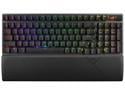
ASUS ROG Strix Scope II 96 Wireless Gaming Keyboard, Tri-Mode Connection, Dampening Foam & Switch-Dampening Pads, Hot-Swappable Pre-lubed ROG NX Snow Switches, PBT Keycaps, RGB-Black
Pros: * Small Footprint * Switches/Overall sound due to foam inside * PBT Keycaps * Wireless Functionality * Good Stabilizers * Included Magnetic Wrist Wrest
Cons: * Dim RGB Lighting * No Per Key Lighting option in Armoury Crate
Overall Review: Asus pretty much nailed it with this thing, the size is great and the switches are fantastic which make it a great typing and gaming experience. With a few tweaks this thing could be the perfect keyboard in my opinion. First off the size, it's great having a keyboard around the same size of a TKL while still having all the functionality of a full size keyboard. I use this keyboard for work and play so i need a numpad which this provides. The switches are some of the best I've used, they are well lubed so they are smooth and I haven't noticed any pinging. Another plus is that the keyboard is hot swappable so that you can change out the switches if one goes bad or if you prefer to get a different kind, but most of you will love them! The PBT keycaps seem to be of good quality so no complaints there, but they could use some tweaks. First off, I think they should be dual toned like they are in the Azoth instead of only black, with the "F" keys bunched up it would be a nice quality of life feature. Another thing would be to add the dual back lit legends for the number keys for both the number and symbols, useful for us people who like to work in the dark. If Asus would make a aftermarket set for these with the above feature also containing the sub-legends for the functions I would buy them! The stabilizers for this thing are the best I've used for a mass produced keyboard. The ones I have are mostly great but there are a few keys that have a little rattle, but not on the annoying side. I'll have to see if I can tweak them later to get them to my liking. The wireless feature is also a plus as it lets me hook it up to my PC, laptop, and tablet without having to manually plug it in. It has a 2.4 Ghz wireless dongle that can be magnetically stored in the back of the keyboard, it is their new Omni receiver which technically can connect both a mouse and keyboard at the same time, but as of now the choices are slim. It also has Bluetooth connectivity where you can have up to 3 Bluetooth devices hooked up to it and switch between them using hotkeys. The other plus to this being wireless is that it can be physically connected to a USB C cable, it's nice not having a thick cable permanently attached. Due to it being a standard USB C cable it easily be replaced if there is an issue without having to whip out the soldering kit. I do love me some RGB, but the LEDs used in this keyboard are a bit dim in my opinion, think they can stand to be 50% brighter. I've had Logitech and Corsair keyboards with brighter LEDs, even tried to move over my keycaps from the Corsair and didn't notice much of a difference. If Asus is worried about battery life they could limit the brightness in battery mode and make it brighter when plugged in. The main lighting feature I'm missing is "Per Key Lighting". I understand you can do this in Aura Creator, but when you do you loose the ability to control the brightness on the keyboard. Also, if you use an Asus motherboard it forces you to connect it with the keyboard, so you can't just control the keyboard without having to pretty much change everything. Another down side is if you connect between multiple devices the keyboard will "unsync" with your setup, so you have to go in and manually add it again. Due to this they really need to just add the option within Armoury Crate to simplify this. The keyboard also includes a magnetic wrist rest which is very convenient. It has a leatherette top cover with a thin layer of foam. The foam is the only thing I would change on it, it is thin to the point where you feel the plastic underneath it so I hope future wrist rests have a thicker or denser foam to remedy this. For those of you who need a full size keyboard but are still worried about space this may be the perfect keyboard for you. Due to the 96% layout its a bit of a learning curve but worth it as this is much more compact than a full size without loosing any functionality. Overall Im very happy with my purchase and I hope Asus reads this so that they can make improvements in the future!
9/13/2023See more detail