
Your Browsing History


Chow C.
Joined on 10/09/05
0
0


product reviews
- 7
Built a server with amazing performance/price ratio with this
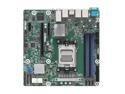
ASRock Rack B650D4U-2L2T/BCM Micro-ATX Server Motherboard Single Socket AMD EPYC™ 4005/4004 and AMD Ryzen™ 9000/8000/7000 Series Processors (LGA 1718) B650E PCIe 5.0 Dual 10G Lan
Pros: The only server motherboard that allows you to use a consumer grade Zen 4 CPU. For workload that is not memory bound, a 16-core Ryzen 7950X will outrun any 16-core EPYC, at half the price or less.
Cons: - Expensive: this board is an overkill if you do not need the server features such as BMC or official ECC support. - Boot is slow: all server motherboards boot slow due to the extra features they have. Again, this board only make sense if you need the server features.
Overall Review: I cannot emphasize enough---only get this board if you need server features! Without using those features, you would be buying an overpriced and very slow-booting B650 motherboard.
7/4/2023See more detail
Pins weren't soldered...
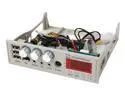
Multifunction Hi-Speed USB 2.0 Front Panel
Pros: Very good design and functionality, would have given this product at least a 4 if not for...
Cons: Astonishingly poor quality control. None of the USB ports works in my case. Instead of paying shipping for return I decided to dissemble the panel and see if I fix myself; to my surprise I found that *none* of the USB pins were soldered. I proceed to solder them myself and everything works fine now.
9/28/2007See more detail
Excellent value but poor touchpad quality control
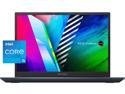
ASUS VivoBook Pro 14 OLED Ultra Slim Laptop, 14" WQXGA+ 16:10 OLED Display, Intel Core i5-11300H CPU, Iris Xe Graphics, 8GB RAM, 256GB SSD, Windows 11 Home, Quiet Blue, K3400PA-WH55
Pros: For USD $500 you get: - A gorgeous 2.8K OLED screen - 11th gen Intel H-series CPU - USB-C port with video out and power delivery - A keyboard with ample travel
Cons: - The touchpad is noticeably smaller than the cutout on the chassis, resulting in a visible gap (1st photo). - Worse, out of the five units I purchased, two have touchpads with a noticable amount of flex. To be clear, the touchpad is fully functional---no ghost clicks, etc.---but the quality control is truely terrible. - The network card driver on ASUS's website does not work. These units have a MediaTek MT7921 WiFi card instead of a Realtek card.
Overall Review: Despite issues with the touchpad, the laptop remains an excellent value---there is simply nothing comparable at USD $500. Not even close. My theory is, these units came from a large custom order being returned due to the poor touchpad quality control. If you are willing to open up the laptop, you can easily fix the touchpad's flex by pasting a small strip of foam underneath it (2nd photo). If you plan to replace the SSD, note that you will need to: - Download the Intel Rapid Storage Technology driver to the Windows installer USB drive and load it during installation, otherwise the installer will not see any disk. - Download MediaTek MT7921 driver. This is necessary to get WiFi working. Once you have that, everything else will download automatically.
9/6/2022See more detail
Full NVMe 1U server for less than $2000
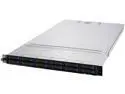
ASUS RS500A-E11-WOCPU006Z 1U Rackmount Server Barebone Socket SP3 DDR4 3200 RDIMM / LRDIMM / LRDIMM 3DS
Pros: - Fits 12 U.2/SATA HDD in the front. Most 1U servers only have 10. - Three available PCIe slots plus one OCP 3.0 slot. Many other 1U NVMe servers require the use of some PCIe slots to serve the backplate, leaving you with only one or even no available PCIe slot.
Cons: The chassis is quite long. If you mount it on a standard 1M server rack, it will extend beyond where many cable management arms sit.
Overall Review: Overall excellent value. With this barebone, fill this up with fast NVMEs and 200Gbps network cards and you can build yourself a top-of-the-line 1U distributed storage unit.
8/31/2022See more detail
Excellent spec, bad touchpad
ASUS VivoBook Pro 14 OLED Ultra Slim Laptop, 14" WQXGA+ 16:10 OLED Display, Intel Core i5-11300H CPU, Iris Xe Graphics, 8GB RAM, 256GB SSD, Windows 11 Home, Quiet Blue, K3400PA-WH55
Pros: 4-core H-series CPU, 8GB RAM and 256GB SSD would have easily cost over $1000 a few years ago. Add in the gorgeous high resolution OLED screen and the thing looks really high end.
Cons: Touchpad has serious quality control issue. First, the pad is smaller than the cutout on the chassis, leaving a visible gap in between (see attached photo). Second, the bottom half of the pad is loose and will vibrate as you scroll. To be clear, the pad is usable---no false click, etc.---just bad QC.
Overall Review: I bought four of these for an NGO and I am reasonable sure that the touchpad's QC issue is the reason why these are so cheap. The bad touchpad notwithstanding, it is still excellent value for what you pay---no other $500 laptop will match its specs. Just grab a wireless mouse and you are good to go.
8/31/2022See more detail
Works out-of-the-box in 2009 MBP
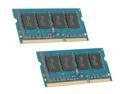
Mushkin Enhanced Essentials 8GB (2 x 4GB) 204-Pin DDR3 SO-DIMM DDR3 1066 (PC3 8500) Dual Channel Kit Laptop Memory Model 996644
Pros: Works out-of-the-box with my mid-2009 13" MacBook Pro.
Cons: None so far.
12/4/2010See more detail