
Your Browsing History


Edward B.
Joined on 06/09/05
0
0
product reviews
- 28
no case fan? yes it has it!
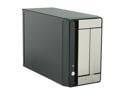
APEX MI-100 Black / Mirror finish Steel Mini-ITX Tower Computer Case 250W Power Supply
Pros: A lot of people are writting about this case not having a case fan. Well, it does. It is in the power supply. It sucks fresh air from the case cover side vent and expells it out the back of the power supply. The fan speed is fixed, it's very quite, but fairly efficient unless you have a board generating a lot of heat which is unusual on a mini-ITX. On my Intel DG45FC it works fine. And this is the only ITX case I know of that comes with a 250 watt power supply, good for the few ITX boards shipping already with socket 775. The power connector is a 24 pin. Your ITX board may not have that and you may need a 24 to 20 pin converter cable. The boards I know with socket 775 all have 24 pin plus the 4 pin processor power connector, so this case is perfect for that.
Cons: Front panels with mirror finish gets messy, and cleanning it all the time will scratch them. I would rather see the front panel "plastic" mirrors replaced by plain black plastic, and not shinny like the cover paint, so no finger prints to clean all the time.
Overall Review: I am running an E8400 with stock HS. I used the original Intel HS on it but not with the push pin clips which bends the board baddly. I removed the push pins and use nylon screws with a coil spring (half inch long) taken from another HS and put a 5mm thick nylon washer in between the board and the HS on each of the attachement legs making an ideal heigh set for some pressure on the processor but not enough to bend the board. The nylon screws come from below the board, pass through the board, through the washer, enter the HS leg which has a coil spring inside and a nylon nut at the top. Don't you think you need a lot of pressure between heatsink and processor for it to have good heat tranfer. Non sense. Pressure helps nothing but damage your board. What you need is a good and flat HS, good thermal paste, and just make sure the HS is absolutelly touching its whole surface with the processor's surface and all of it covered with thermal paste. Word from an engineer. Trust if you will.
8/30/2008See more detail
So So...
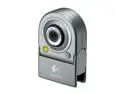
Logitech QuickCam for Notebooks Deluxe 0.35MP Effective Pixels USB 2.0 WebCam
Pros: Looks good. Fit well on Toshiba screen. Excellent microphone. Two feet long cable. Good for online videochat only.
Cons: Software does not allow install just drivers and you have to install the application, but it does not need to be running for you to use it on Skype or MSN Messenger. 0.35 megapixel should be better, I have a Creative Live Ultra with 0.30 megapixel and the image is way much superior. The software does not have room monitor feature with movement or sound detection. Software offers picture snap and movie but the image quality is awfull, no mater if you select any of the three available resolutions up to 1280x960 which is fake. Cable comes right up from behind so it does not make it flat and we need to be careful when carrying it in the laptop carrying case, not to bump on it or the cable may become loose or broken. If you care about image quality on picture and movie out of a webcam, get a real 1.3 megapixel, not this.
Overall Review: Overall, it's pratical and good for MSN Messenger, Skype and similar use where you only need a small image screen. Comes with a little pouch for protection when inside your laptop carrying case.
4/3/2007See more detail
Still think it's the best, but...
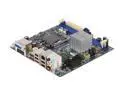
Intel BOXDG45FC LGA 775 Intel G45 HDMI Mini ITX Intel Motherboard
Pros: -price, compared to others mini-ITX boards with a LGA775 socket.
Cons: Intel quality? Well, that used to be a "Pro". I still like Intel, they are no doubt a tremendous force, but this particular board needs some rework. -Fans control, does not work, RPM keeps going up and down with no reagrds for the actual temperature while the processor and ICH real temps goes up to the sky. Absolutelly useless. -ICH with no heatsink, 80 degrees just seconds after powering up?. -Components on the back under the processor which you know, will kill many heatsinks way of attaching with a under-board bracket.
Overall Review: Get an extra heatsink similar to the one on MCH and glue it on top of ICH. Then use a Dyantron P199 heatsink for the processor and direct its blower to vent over the ICH and MCH heatsinks. You will have to re-engineer the attachment of the Dynatron heatsink as this board has components on the back under the processor. Just replace the screws of the Dynatron for longer ones that cross through the case and use the heatsink bracket on the outside of ther case. Use nylon 1/4 inch long spacers between the case and the board on the four holes for these scews and add an extra 1/4 inch long nylon spacer glued on the back of the board right on the middle of the processor so the board will not bend. Use Fan Mate 2 fan controller for the Dynatron attached directly to 12V and make it run at a reasonable speed that gives good temps but will not get you crazy with the noise. The lowest RPM on it is already good on a E8400 processor, getting temps around 40C with loads.
11/23/2008See more detail
Really good, but beware, it's hot
Intel BOXDG45FC LGA 775 Intel G45 HDMI Mini ITX Intel Motherboard
Pros: 775 socket, dual channel memory up to 4 gig, decent video and sound.
Cons: Too hot ICH with no heatsink (goes to 80C as soon as it is powered). MCH has smaller heatsink than what is seen on documentation and also gets hot, around 50C with no fan on it. I took the MCH heatsink from the first board I burned and glued it with artic aluminum on the ICH. Now ICH and MCH run at 45C on a new case with two 60 mm fans side by side blowing on them.
Overall Review: This is my second of this model. The first, I burned on a too smalll ITX Travla C138 case with not enough ventilation. Got a little bigger case with side fans blowing right on the chipset (not sucking air out), put a new board and love it. Neither with the old or this new board I had problems with memory settings. I have 4 gig 800 MHz memory which the BIOS recognizes as 800 5 5 5 18, but sets it as 667 3 3 3 9. I changed to manual and set the memory to 800 5 5 5 18, which is what is written on the memory label. It works fine. No glitches. The only flaw I have seen on this new board is that I initially set my two drives as RAID 0 on the BIOS, loaded Vista 64 bit Business, then downloaded and flashed the bios. When it rebooted, it did not find the OS. I went to the BIOS and the RAID setting was changed back to IDE. Setting it back to RAID, it worked again. Vista 64 bit with RAID will not load Adobe Flash, but IDE will. Adobe is really junk isn't it?
11/8/2008See more detail
To the Wow guy... Overclocked?
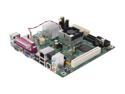
Intel BOXD945GCLF2 Atom 330 Intel 945GC Mini ITX Motherboard / CPU Combo
Pros: It's a good an improvement from the Atom 230. Dual core now and still supports Hyper threading. Gigabit LAN now. I like it still has a parallel port, as some people need this. I do with a few software packages that require a parallel dongle. A parallel port could be added anyway on a PCI but being on board, is a plus to me.
Cons: None really, but the next version could have a newer chipset, one that does not get this hot so it could also run without a fan and replacing the current video with a DVI-I would make this board really nice. Also, I would rather see few more USB on the back panel, repacing the old PS2 ports.
Overall Review: Overclocked? 2.07Gig? How did you get this on an Intel motherboard with a BIOS that has no voltage or timings to be customized? Please share the details. Your "Tech Knowledge" must be off the chart here, should be 6, 7 or 10.
11/2/2008See more detail
Hot
Intel BOXDG45FC LGA 775 Intel G45 HDMI Mini ITX Intel Motherboard
Pros: Small ITX factor, lots of sata 3gb/s, lots of USB, no old stuff like PS2, parallel and serial ports on the back, although you can use a on-board connector to export one serial port and the pci-1x for a parallel or anything else you may need. Digital video out only, on the back.
Cons: Hot. Everything is hot, the board, the ICH, the MCH. Make sure you have this mounted on a well designed and ventilated case. I've put in a Travla C138 with a laptop slim DVD-rw and 7200 rpm laptop hard drive, and all memory it can get at 4GB running at 800 MHz. It's all very tight on this case and very hot as it only have one 40 mm fan to expell the hot air from inside the case. I will replace the case with the new IN-Win BM369 which has a little more space without wasting the fact that this is a small factor board and I wanted it exactly to stay all small. But the IN-Win case has a much better ventilation design.
Overall Review: I am running this with a Intel E8400 using the Intel heatsink and fan that comes with it. But beware, this heatsink will bend this board beyond believe. I still use this heatsink but replaced the push pin clips with nylon screws, spacers and a set of four metal springs taken from another heatsink. Works like a charm. Just put a 5mm thick spacer in between the legs of the heatsink and the board. Make sure it's all nylon or it will short the tracks. This will give the perfect height and tight without bending the board. The fan barely makes any noise as the processor runs cold, around 20C idle. But everything else on the board is HOT HOT HOT. The chipset is way hotter than the processor, I even put a 40 mm fan glued on top of it, but the case needs to supply fresh air for all these fans and this is the problem with the Travla c138. It's just not for this board, but some VIA toy processor.
9/3/2008See more detail