
Your Browsing History


PAVEL P.
Joined on 02/23/04
0
0
product reviews
- 13
Good GeForce GTX 285 based product
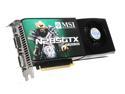
MSI GeForce GTX 285 1GB GDDR3 PCI Express 2.0 x16 SLI Support Graphics Card N285GTX-T2D1G-OC
Pros: Is based on what is currently, by far, the most powerful single GPU solution on the market, which consumes less power and generates less heat than it's predecessor, the GTX 280. This particular card features a decent factory overclock and is competitively priced, especially after the current rebate. MSI build quality and QC seem to be good. I've owned two MSI GPU's in the past and never had any problems with them. Performance-wise, this card completely blows away my old 8800GTX. I am playing FEAR 2 at 1920x1200, completely maxed out, with 4x AA and 8x Aniso and the frame rate never seems to drop bellow 60. Even Crysis is playable on Very High settings at 1920x1200 (forget about getting anywhere close to 60 fps there though).
Cons: This GPU actually costs nVidia less money to produce than the GTX 280, so I think that it's currently a little overpriced. Will be sort of obsolete by the end of this year, when Windows 7 with DirectX 11 comes out. MSI doesn't offer a life-time warranty like eVGA and BFG do.
Overall Review: Haven't played around with overclocking it yet.
2/19/2009See more detail
Seems to work like a champ
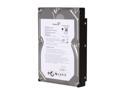
Seagate BarraCuda 7200.11 ST31500341AS 1.5TB 7200 RPM 32MB Cache SATA 3.0Gb/s 3.5" Internal Hard Drive Bare Drive
Pros: It's a fast 1.5 TB hard drive at an amazing price (as of early March 2009). Each dollar gets you almost 12 GB! There has never been a better value for a single magnetic storage device. I partitioned mine in two halves and have been using it to store various media for over a month without any problems. It came with the latest firmware.
Cons: It's still a magnetic drive, which, just like all the other hard drives, is based on 1970's technology and is painfully slow, presenting the biggest bottleneck in most modern systems' performance.
Overall Review: If you need high storage capacity in a single device - get this.
3/3/2009See more detail
Seems like great stuff.
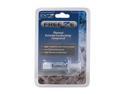
OCZ OCZTFRZTC Freeze Extreme Thermal Conductivity Compound
Pros: Non-toxic, long-lasting, contains no metals (no chance of an electrical short), doesn't need time to "set in" and seems to conduct heat with the best of them. I used to spread the paste before, but the "small drop in the middle of the heatspreader" installation method seems to work well with this stuff. What's not to love?
Cons: None that I can think off.
Overall Review: Don't see any reason to use anything else from now on.
2/20/2009See more detail
An attractive cooler than seems to do its job well
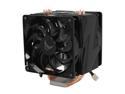
Vigor Monsoon III LT Dual 120mm Fan CPU Cooler Socket 1366 Ready
Pros: Great packaging. Cool and imposing physical design. After watching the instructional video, the installation was fairly easy and quick (I suggest wearing latex gloves while manhandling the motherboard though). The mounting method feels tight and secure enough. The fans feel like they move a lot of air, but are fairly quiet. The blue LEDs look cool inside the case. Seems to cool well.
Cons: E-mailed Vigor Gaming support with a question about a week ago. Still haven't heard any thing back. This makes me question their level of service.
Overall Review: In installation, I used the OCZ Freeze thermal paste, applying a pea-sized drop to the middle of the CPU's heatspreader. My i7 920 is currently overclocked to 3.6 GHz, using the default voltage. Using RealTemp to measure my core temps in Windows 7, I get the following results: Idle temp for core 0: 41-44 C Full load temp (after hours of Prime 95) for core 0: 72-76 C When I remove the side-cover from the case, the temps drop by about 5 C. These temps are lower then what I was getting with my old Zalman 9500, but when I replaced the cooler, I also replaced all 5 of my CoolerMaster Cosmos' case fans with more powerful ones. So, it's hard to say which of these is more responsible for the drop in temps. Still, this seems like a good cooler.
2/19/2009See more detail
Great but not pefect
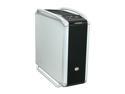
Cooler Master COSMOS 1000 RC-1000-KSN1-GP Black/ Silver Steel ATX Full Tower Computer Case
Pros: Looks great and feels very solid. Bottom-mounted PSU design. Use of sound-dampening materials and vibration-dampening techniques. Tool-less 5.25" bay device installation. Washable dust filters on every air intake. Very roomy, easy to work in, interior. Nice hard drive bay arrangement. Comes with a cool box for storing all the screws, keys and tight-strips. Decent cable management. 4 USB ports on the front, as well as 1 FireWire and 1 eSATA. The front door can be easily changed to open either to the right or to the left. Screwless side-panels. I like the legs/carry handles. Overall, this case is about as quiet as my old Antec P-180, which is a good thing.
Cons: The stock fan configuration made my components run a bit hotter than I like. I replaced all the fans with Antec tri-cool ones and installed an additional fan over the hard drive compartment. I set the 3 exhaust fans to run at 1600 rpm and the two intake ones at 2000 rpm. Even then, the CPU runs about 5C cooler with the side panel off, suggesting that the cooling capabilities of this cases are not that great. One of the "legs" was a little loose. I had to tighten its two screws. The VGA air duct thing seems pretty useless. The 3.5" drive brackets were a pain to remove, because of very small screws and tight spaces for those screws to get lost and stuck in. No removable motherboard tray. Not my clearance between the front door and the 5'25" bay devices. For example, the door wouldn't close because of the volume knobs on my soundcard's 5.25" bay front control panel. I had to push the panel deeper inside the case, making things a bit uglier.
Overall Review: To continue with the cons: The front door doesn't collapse to the side of the case, like the one on the P-180 does. On to the other thoughts: Like the other guy said, place this case on a solid surface. If you're going to run SLI, an overclocked quad-core CPU and 5 hard drives in it, put in more powerful fans. Overall, I am happy with this case and glad that I chose it. There's no perfect case out there. All of them have flaws. I definitely think that this is a great case for the money.
2/18/2009See more detail
Nice option
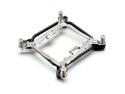
ZALMAN ZM-CS4A Socket 1366 Clip Support Kit for CNPS9500/9700
Pros: Fairly easy to install and does a good job of securing the cooler in its place.
Cons: The main retention screws are fairly weak and the springs make it harder to tell when you should stop. I overtightened one of the corners and ended up breaking the screw, leaving the tip of it stuck in the nut, rendering the who mechanism useless.
Overall Review: Works well, if you're careful.
2/18/2009See more detail