
Your Browsing History


Robert H.
Joined on 05/17/01
0
0
product reviews
- 12
Quite pleased
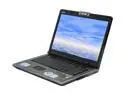
ASUS M70 Series 17.0" Intel Core 2 Duo T9300 4GB Memory DDR2 667 Windows Vista Home Premium M70SA-X2
Pros: Screen real estate is spooky large @ 1920x1200; processor is fast, and supports 64-bit; dual HD bays; ASUS driver CD (see other thoughts); finger print login; 4GB RAM; comes with a Targus carrying case and USB mouse. Windows (64) Experience Index numbers (with 7200rpm drive): 5.4/5.0/4.7/4.9/5.4.
Cons: Its 16"x11.5" footprint makes it a bit of a beast, won't fit in my backpack; Vista 32-bit; price dropped $50 the day after I bought it.
Overall Review: I purchased this notebook after weeks of researching, and based upon 0wen's review. I'm a Sr. Software Engineer, so gaming was not my primary concern, rather screen real estate, processor speed, and hard drive space and speed were the things I was after. I purchased a pair of Seagate Momentus 7200rpm drives at the same time, and replaced the 5400rpm drives that came with it. I then installed Vista Ultimate 64-bit, and the ASUS driver CD made the install completely painless, giving me all the notebook functionality under Vista64. Honestly, I've never experienced such a smooth install of an operating system that didn't come with the machine, but then, I've historically been a Sony VAIO user. I tried a couple of games (UT3 and Team Fortress II), and they seemed to run well. Admittedly, the machine is pricey, but had the features I wanted.
6/19/2008See more detail
Had high hopes
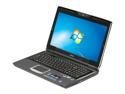
ASUS G Series 15.6" Intel Core i7-720QM 4GB Memory DDR3 1066 Windows 7 Home Premium 64-bit G51JX-X1
Pros: i7 processor, +1; 1920x1080, +1; DDR3 1333 upgrade, +1; 4GB RAM +1; lighted keyboard, +1; eSATA, +1; 500GB 7200RPM drive, +1; NVIDIA GTS360M GPU, +2
Cons: USB ports at the front instead of the rear of the sides, -1; no Blu-ray for the price, -1; White bleed on the display is the worst I've ever seen on a laptop, -2; EFI hosed by a restore (see other thoughts), -2.
Overall Review: My first ASUS laptop was a M70XA-X2 (bought from NewEgg), and it was the most perfect laptop I've ever had. So, I had high hopes for this second ASUS, but I was rather disappointed. The white bleed on the display equates to difficult viewing angles while you're using it. I never experienced this with the M70, being comfortably viewable from any angle. I was in the process of getting used to the machine, and my review may have been better had it not been for what appears to be a bad implementation of the machine's EFI. After backing up the system using Acronis 2010, I needed to restore that backup one day. After the restore, my machine will no longer power off or sleep. You have to hold the power key for 4 seconds to shut it down after Windows itself has shutdown. A Google search shows that this is a common problem, that ASUS knows about it, and doesn't appear to be in a hurry to address it. For the price, I cannot recommend this machine.
6/26/2010See more detail
Waited a year to review...
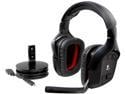
Logitech Wireless Gaming Headset G930 with 7.1 Surround Sound, Wireless Headphones with Microphone
Pros: - Best wireless computer headphones I've ever used - Very comfortable for long-term wearing - Mute control on headset (don't have to be at the computer) - Simulated 7.1 nicely enhances experience
Cons: - Not designed to last with regular usage
Overall Review: This purchase was made a year ago. Here's a cautionary tale... I bought the G930 headphones for myself when they first came on the market several years back (paid well over $100 for them). They are incredibly comfortable for long-time wearing, and the wireless lets me walk around the house during meetings. I can also control the mute from the headset instead of having to be at the computer. Mine still work perfectly, however, I typically only use them a few hours a week. Last season, we bought these for my son (which is the purchase I'm reviewing here). He uses them regularly--between 3 and 14 hours a day, 7 days a week. He always has them on when he's at his computer. They stopped working properly a month or two ago, before the default warranty had even expired. One side cuts out completely if he turns his head and causes any torque on the headphones. He contacted Logitech about warranty service, and submitted all the paperwork they asked for. After that, they disappeared and haven't responded to his further inquiries. To be fair, a working G930 headset is hands-down the best wireless computer headphones I've ever used in more than 30 years of computer usage. However, based on our experience with this most recent purchase, don't expect them to hold up to "regular" usage (-1 egg for being cheaply made) or expect a big corporation like Logitech to actively stand behind it (-1 egg for disappointing-but-not-surprising customer service).
11/28/2015See more detail
Got the job done
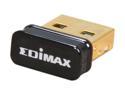
EDIMAX EW-7811Un 150 Mbps Wireless IEEE 802.11b/g/n Nano USB Adapter
Pros: Low profile Low power
Cons: None
Overall Review: I needed a low-profile, low-power WiFi dongle for my Raspberry Pi, so I purchased this particular product because of other feedback here. It worked perfectly for that use.
7/10/2013See more detail
Power user's tablet
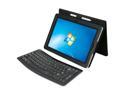
ASUS Eee Pad (Eee Slate) EP121-1A010M Tablet PC Intel Core i5 470UM(1.33GHz) 12.1" Wide SVGA 4GB Memory DDR3 1333 64GB SSD HDD Intel HD Graphics
Pros: I went through two Android tablets before I realized I'm not really an Android user. Since I'm a Sr. Software Engineer, and I need a tablet that accommodates my power-user needs. Well, this one does. :) Great viewing angles on the 12" screen (especially compared to the Archos 101); Quad-core i5 (although I don't know if it is truly four cores, or just two with HT); multi-touch-capable display that also functions with a stylus (I can't STAND fingerprints! :); 802.11n @ 150Mbs; interface is very responsive; hand-writing recognition is pretty cool; Windows Experience Index of 5.9 on the GPU; Flash isn't a problem :); more (see "Other Thoughts")
Cons: Bloatware; Physically heavy, but this is really more a laptop than a tablet; USB covers are a bit difficult to deal with; Windows Experience Index of 2.9 on the CPU; for the price, more than 2 USB ports would have been nice; I would have preferred an NVIDIA GPU solution with dedicated RAM; 64GBs fills up really fast on a Windows laptop (I hope it's upgradable); some application interfaces seem blurry, like they are being scaled somehow to fit the screen.
Overall Review: Basically it's a Windows 7 laptop, so pretty much anything you can run on a Windows 7 desktop, you can run on this. I'll try not to rehash the pros that have been highlighted in other posts; rather, I'll post the answers to the questions I had before I bought it: - 802.11n functions at 150Mbs out of the box (Buffalo RT-N12 with DD-WRT). Using an dual-band ASUS 802.11n USB dongle, I can get 270Mbs. - Backup and restore of the internal SSD drive works flawlessly using Acronis True Image Home 2010 from a USB stick. - Virtualization support! I was able to install VMware Workstation 7.1.3 and run a 64-bit Debian Linux image. Virtual keyboard does not work as an input; using the included Bluetooth keyboard works perfectly. - Using VLC 1.1.9, I am able to play 720p MVKs almost perfectly. There's some minor stuttering at the beginning, but it smooths out. I'm an existing ASUS customer, with two laptops, a 25" monitor, and a sound card, and this is yet another great ASUS product.
6/6/2011See more detail
Useful, but flawed

Archos - 101 Internet Tablet - 16GB Running Google ANDROID + Wi-Fi (501594)
Pros: Graphics acceleration; 10.1" screen size; light & thin; 16GB internal RAM; kickstand; user-selectable CPU speed ("Power Management Mode"); Android Market is easily installed
Cons: Screen viewing angle is disappointing; 802.11n is capped (see other thoughts); permanently rooting the device requires installation of a completely separate firmware image; hard to find accessories (e.g., screen protector)
Overall Review: I purchased this unit at another online reseller. For the purposes I intended, such as watching movies and web surfing, I'm fairly satisfied overall (it's a step up from the cheap Chinese 10.1" tablet it's replacing). However, there are two items that keep me from giving this 5 eggs: First, the screen has an irritatingly narrow viewing angle (as others have pointed out). There are situations where you must keep the unit at a certain angle while viewing or you wash out all colors. -1 egg for that. Secondly, the 802.11n speeds are capped at 54Mbs. Not only have a verified this with my 802.11n router, but I have also twice contacted Archos about this issue, and just yesterday, they confirmed what I suspected. I quote Archos Technical Support: "This unit does cap it's connection speed at 54mbps in order to preserver[sic] the battery life of the unit." C'mon! Who thought that was a good idea? -1 egg for that.
4/9/2011See more detail