
Your Browsing History


Bryan T.
Joined on 06/13/05
0
0
product reviews
- 7
O.o
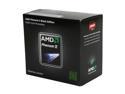
AMD Phenom II X4 955 Black Edition - Phenom II X4 Deneb Quad-Core 3.2 GHz Socket AM3 125W Processor - HDZ955FBGMBOX
Pros: C3 Stepping! Fast Proc, Big upgrade from 7750BE @ 3.0ghz I noticed it immediately. Overclocked to 3.8ghz on only 1.425v stable 24 hour test in prime95! All that power, and guess what, I am only using the stock hsf *lapped* Any game runs amazingly smooth! I get 9.3 MTrips/s in Tripcode Explorer, Win 7 is very quick now, Games are about 30-120fps faster depending on what I am running. (Counter Strike Source - Borderlands) Temps Stock no Cool and Quiet: 30c-55c Temps OC to 3.8ghz on stock fan: 42c-61c If your an serious overclocker, buy this chip, no need for X965BE if you want to have more than 4.0ghz buy a decent after market air cooler
Cons: I shouldn't have had to lap my hsf to make it flat, but thats to be expected with any Stock HSF.
Overall Review: AMD X4 955BE C3 Stepping @ 3.8ghz, 1.425v Stock Cooler Gigabyte MA78G-DS3HP F5e bios 4GB GSkill DDR2 Pi Series 4-4-4-12 EVGA 8800GTX (I wish it was ATI but I got it for free) Win 7 X64 Ultimate, Fedora 12 15,462 3D Marks on 3DMark06
1/8/2010See more detail
6 months later

RAZER DeathAdder RZ01-00151400-R3U1 Black Wired Optical Precision Gaming Mouse - 3.5G Infrared Sensor
Pros: Simple design, excellent performance, smoothest mouse I've ever owned.
Cons: Gets dirty.
Overall Review: Most people will try to tell you they die after 6 months, well mine is still alive, still loving it.
1/1/2011See more detail
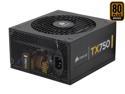
CORSAIR TX Series CMPSU-750TX 750 W ATX12V v2.3 SLI Ready CrossFire Ready 80 PLUS BRONZE Certified Active PFC Compatible with New 4th Gen CPU Certified Haswell Ready
Pros: Keeps me up and running, lots of power, active pfc, quiet, cool, Japanese capacitors, and awesome corsair sticker. Non Modular Design (I yet to trust a modular psu)
Cons: Lots of cables, if you have a mid tower like me, have fun trying to manage them all. I recommend having two 5.25" available drive bays to store all the wires.
Overall Review: Its a cosair just buy it. I know i could have used a psu with less power but, i figured since psu's loose a little bit of their capacity each year, i might as well buy a bigger one to future proof.
1/4/2010See more detail
Greatboard
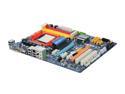
GIGABYTE GA-MA785G-UD3H AM3/AM2+/AM2 AMD 785G HDMI ATX AMD Motherboard
Pros: Great Board, Useful if you wish to unlock "hidden cores" 785g also makes a great counterpart for budject builds. The ATI 4200 HD runs games and helps to encode video.
Cons: ?
Overall Review: This is the board that I recommend to everyone that is on a budjet and wants a decent OC/core unlocking board. Voltages stay steady.
11/24/2009See more detail
Flash with Open Source Firmware First!
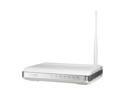
ASUS WL-520gU 802.11b/g Wireless Router up to 54Mbps with All-in-One Print Server/ DD-WRT Open Source support
Pros: The first thing I did when I received this router in the mail was flash to DD-WRT. After flashing with DD-WRT generic usb (Ver. 24sp1), adding further printer server and FAT32 Support this router Is plain awesome! I was able to increase the wifi signal from stock 71 to 125 (Max is 251 ACK timing), I have coverage in my whole 2 story brick home. I now have 4092 Max connections, torrents run amazing, as well as gaming (lowered my ping timing on most servers by 20), and other basic web connections such as Youtube and what not... I am currently sharing this router with my home network with three other ethernet connected PC's, One LG networked Blue-Ray Player, three wifi laptops, one wifi netbook, one iphone and one T-Mobile G1 phone. This router can handle all on a high demand easily.
Cons: Stock firmware, After reading reviews I already knew that this was not for me. However I bought this router for DD-WRT and for the hardware it has, not for the asus firmware. DD-WRT does not allow me to overclock this Broadcom, but I was not planning on OC'ing anyway.
Overall Review: After waiting 2 years for DD-WRT to finish its work in progress with my netgear 614v9 I gave up, I bought this router for DD-WRT. If you are scared of flashing your device to open source firmware, this may not be the router for you. I love this router I like it better than my old Linksys 54G version 1.0 with DD-WRT, the Asus workes better and has a USB port along with a newer broadcom chip.
10/14/2009See more detail
I know what I am talking about
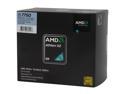
AMD Athlon 64 X2 7750 - Athlon 64 X2 Kuma Dual-Core 2.7 GHz Socket AM2+ 95W black edition Processor - AD775ZWCGHBOX
Pros: Alright lets get down to the basics, when I bought this CPU I paid 59.99 with free shipping the price has know gone up 5 dollars, As I see it, it is a great CPU from stepping up from a X2 4000, I run easily at 3ghz buy stepping up the multiplier from 14 to 15 easily (after I up the voltage by .5v) Other than that I am quite satisfied with this machine price to specs its all I could ask for. The BE Kumma also increased my FPS on games like HL2 *I used to have about 25-35fps and now get 85-110fps at full specs *1440x900
Cons: As most have said, they should have included the heatsink that was supplied with the Phenom series thermal copper piping would have been a bonus for us OCer's but hey its a cost proc, If you are really looking into OC'ing this thing well buy Arctic Silver and a good rated heatsink, setting the multiplier up here I am running about 40C idle after warm up and about 57C max load
Overall Review: If you are considering buying this processor due to budget but you just need some speed go for it! I most injoy the performance I have, GAMERS: This is not a VPU replacement! I was thinking the proc would help out my highly lacking bottleneck of a Nvidia8500gt on games DX10 games such as Crysis and Bioshock, I was WRONG! If you are really intreasted in high spec gamming, look more towards a newer video card like a HD4850, HD4830 or HD3850... *Make sure has a nice GDDR like 3,4,5 GDDR2 Blows. 8gigs DDR2 G Skill Pi Series 800mhz @4-4-4-12 AMD X2 7750BE Kumma [email protected] Gigabyte MA78G-DS3HP Winfast 8500gt GDDR2 512meg 400mhz
3/19/2009See more detail