
Your Browsing History


Alerick B.
Joined on 06/30/05
0
0
product reviews
- 6
Inexpensive - works
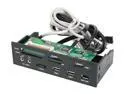
nMEDIAPC ZE-C98 All-in-one USB 2.0 Card Reader with USB/ IEEE 1394/ e-SATA Port/ HD Audio Ports
Pros: Easy to install. Worked first time. All internal cables were clearly labeled except for the SATA which is obvious. The internal connectors are all keyed which makes it harder to insert them the wrong way. Supports either HD audio or AC/97 connector. The panel fit in a 5 1/4" slot without a problem.
Cons: The mounting screws go directly into the plastic case. I was concerned about cracking the plastic while mounting but I was able to tighten enough that the panel is very stable with four mounting screws. The CF/MD connector is open on the top. If the panel is mounted sideways a CF disk could drop inside the chassis accidentally if you insert the CF at an angle. The connector has guides on the side which will reduce the problem if you are careful. The SD/MMC connector also has a gap in the top of the front panel above the connector large enough to accidentally fit an SD card. Microphone and headset connectors are very stiff.
Overall Review: Internal cable has a SATA II connector that goes to the eSATA connector on the front panel. (I couldn't tell if this was SATA or eSATA from the specifications.) Internal Cables are: One 1394 Firewire cable One HD Audio and AC97 (one cable with two connectors) Two USB cables each with 10 pin headers (4 USB ports) One SATA II cable Internal cables are about 2 ft long.
11/3/2009See more detail
Good Motherboard but HDMI does not work
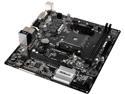
ASRock AB350M-HDV AM4 AMD Promontory B350 USB 3.1 HDMI Micro ATX AMD Motherboard
Pros: - Great price - Easy to configure and setup - Nice small form factor - Performs well with VGA and DVI output
Cons: - The HDMI output does not work with an A8-9600 CPU and latest BIOS (4.4)
Overall Review: I purchased this as an upgrade for a small, quiet media center computer. It is faster than my prior system and still very quiet but I cannot get anything on the HDMI output which is what I need for the TV. I've tried multiple monitors and TVs. VGA and DVI work perfectly but none will display anything when connected via HDMI.
6/9/2018See more detail
Inexpensive, works
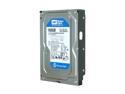
Western Digital Blue WD1600AAJS 160GB 7200 RPM 8MB Cache SATA 3.0Gb/s 3.5" Internal Hard Drive Bare Drive
Pros: Quiet, cool, reasonably fast. Worked without any problems. HD Tune shows xfer rate: Min 48.6 MB/sec, Max 101.9 MB, Avg 82.2 MB Access time 15.2 ms Burst rate 103.1 MB/s Runs at 29 deg C in a cool room.
Cons: None
Overall Review: GIGABYTE GA-P55-UD4P i5-750 Windows 7 64 bit G.SKILL Ripjaws 4 GB DDR3
11/28/2009See more detail
Worked great
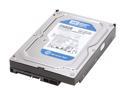
Western Digital Blue WD2500AAKS 250GB 7200 RPM 16MB Cache SATA 3.0Gb/s 3.5" Internal Hard Drive Bare Drive
Pros: Inexpensive, quiet, reasonably fast. HD Tune shows transfer rate: Min 45.1 MB/sec, Max 90.8 MB, Avg 74.7 MB Access time 16.0 ms Burst rate 102.2 MB/s
Cons: None
Overall Review: Runs at 33 deg C GIGABYTE GA-P55-UD4P i5-750 Windows 7 64 bit G.SKILL Ripjaws 4 GB DDR3
11/28/2009See more detail
Solid unit
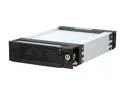
KINGWIN KF-811-BK SATA Aluminum Mobile Rack
Pros: Very easy to swap drives. I use the rack to switch OS and for removable backup drives. Key can be used to deactivate drive without having to remove the drive. Can also turn on a drive with the key to hot insert a drive. Most of the unit is aluminum construction. Front and rear panels are plastic. Good heat dissipation through the aluminum with just the one rack fan and no fans in the trays. Easy to insert the drive, the only tool you need is a screwdriver to mount the drive to the tray.
Cons: The rack is much deeper than a normal 5 1/4 drive. It is about 8.5" deep. I have a 19" deep desktop case and I could just barely fit two of these racks in the case. Other items are mostly minor items: * No drive activity indication. * Tray tends to bind lightly when it is inserted - aluminum on aluminum slide without any lubrication. This appears to improve with use. * The Key cannot stay in the lock so don't loose it. * Top cover of the tray easily slides on crooked. It is obvious it is crooked when you try to insert the tray and it will not fit in the rack. * Sometimes the bottom of the handle sticks out a little after a tray is inserted. If I push the drive in by hand a little farther (without the handle) the handle will then lay flat.
Overall Review: The top of the tray has a small hook you push to the side to slide off the lid and open the tray . Connecting drive: I just held the drive perpendicular to the tray and plugged the power and SATA connectors to the drive then laid the drive in the tray. This results in little stress on the cables or the drive connectors. WD 500 GB Caviar Black runs at 37 degrees C in tray with only the one rack fan. I ran HD Tune with drives in the rack and directly connected to the motherboard and there is no difference in the drive performance. GIGABYTE GA-P55-UD4P i5-750 Windows 7 64 bit, Windows XP 16 bit, FreeDOS WD Caviar Black 500 GB, Caviar Green 1 GB, Caviar Blue 250 GB G.SKILL Ripjaws 4 GB DDR3
11/28/2009See more detail
Solid Case
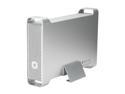
macally G-S350SUA Aluminum 3.5" SATA USB & 1394 & eSATA External Enclosure
Pros: Supports eSATA, USB and Firewire connections. Easy to assemble. Loosen two screws, slide open the case then mount the drive. The drive pushes onto a combined data/power connector that is fixed in the case. Fast transfer speeds with eSata cable. Case is very stable once feet are attached. Enclosure is quiet and cool with WD 250GB Caviar Blue drive.
Cons: Wires to front panel are easily pinched under the disk drive. I had to hold the wires to the side while mounting the drive. The drive is mounts directly on the case metal, no shock mounting.
Overall Review: Does not include an eSATA cable. No fan. Case is aluminum except for the back panel which is plastic. Has a power switch on the front with a blue light. The light turns on when the unit is on and flashes when the unit is active. Includes: FireWire cable - 41" USB cable - 28" Two types of feet: one set of feet screws to the bottom of the case, the other is a bracket that the enclosure can rest in.
11/27/2009See more detail