

Your Browsing History


Michael H.
Joined on 11/22/05
0
0

product reviews
- 28
Awesome Board!
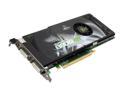
XFX PVT88PYDE4 GeForce 8800GT Extreme 512MB 256-bit GDDR3 PCI Express 2.0 x16 HDCP Ready SLI Supported Video Card
Pros: How did they do it? At this price, the performance is outstanding! Highly recommended. I am running Vista and the DX10 version of COH runs great.
Cons: Fan is a little loud, but not bad enough to make me want to replace it with a 3rd party cooler.
Overall Review: I can't really see any big deal with DX10 vs DX9 on COH, but then it was not really designed for DX10, just patched.
1/5/2008See more detail
Great Monitor - Rebate not working out
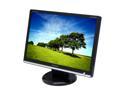
SAMSUNG 22" WSXGA+ LCD Monitor 2 ms (GTG) D-Sub, DVI-D 226BW
Pros: This is a great monitor. Absolutely beautiful. Nice touch: The monitor came with both VGA and DVI cables.
Cons: With the monitor - absolutely none. But the rebate is not working out for me. I sent in all the materials as required and a few weeks later got back a post card saying that I did not include the UPC/serial number barcode. Since I already did send it in, all I could do is send in the copy I made before mailing the original. I have little hope that I will ever get the rebate. Too bad this transaction on such a nice monitor has to be tarnished like this. Except for this, it would have gotten 5 eggs from me.
Overall Review: Be sure to make copies of your rebate materials! Why don't they just give a better price in the first place and save all the hassle? As always, NewEgg did their part!
2/18/2008See more detail
DC15 Dash Cam Review
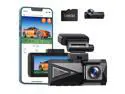
Campark 4K Dual Dash Cam 5Ghz WiFi GPS, 4K Front Camera and 2K Rear Dash Camera for Cars, 3.16" IPS Touch Screen, Voice Command,170° Wide Angle,Type C Port,Free APP & 64GB Memory Card
Pros: Good, solid, quality hardware with included installation tool. Nice features: WiFi, GPS, voice control, touch screen, etc. all work well. Really nice video quality. 64GB SD card is supplied! The kit comes with a 64 GB microSD card that functioned well. This is really a very, very nice touch that allowed me to immediately set up and begin using the cam. It is a little on the small side so I eventually replaced it with a new name-brand 256 GB microSD and that worked as well. I formatted the card on a Windows 10 PC and then again in the camera. A small orange pry tool was included that was quite nice and helpful when slipping the cables behind the car's trim. I installed the cam into a 2021 Ford Explorer (3-row, mid size SUV). There was plenty of cable. The excess was tucked behind the ceiling panel without difficulty. Except for the parking monitor hardware kit, installation was straight-forward and could be done by anyone. The Wi-Fi feature works well. The Roadcam app that I Installed on my Android phone works well once I got used to it. I was able to view videos directly on the phone and download them as well. It does take some time to download a 3-minute 4K video. It is possible to delete files using the Roadcam app as well. The only way I found to delete files in the Emergency folder (locked files) is to format the card and erase everything. Formatting can be done from the app. All other settings can be changed using the app as well. The camera features voice commands to operate (i.e. turn on and off the wi-fi). This feature works well but it needs to be enabled in the cams settings first. Audio recording works pretty well and I could easily make out normal conversations by the front seat passengers. This feature can easily be turned on and off on the touch screen, via button press, or using voice command.
Cons: Parking monitor activates only the front cam. Instruction manual needs some improvement. Front and rear views are out of sync during playback. Parking monitor hardware kit is not universal. Sadly, the parking monitor only activates the front camera. To me, this is a pretty big shortcoming and mostly negates this feature. Most people, most of the time, will park nose in, in other words will drive into a parking spot rather than back into it. This way, the rear of the car is exposed, and if it gets hit by another one in the parking lot, most likely nothing of any value will get recorded. So far, customer support does not have a solution for this issue. The English section of the instruction book was generally well done with only a few translation issues that did not cause me any real difficulty. However, it was totally misleading on downloading the viewing software to see GPS data and location. The instruction manual talks about downloading gxplayerv1.3.3 but provides a link to download gsplayer instead. gsplayer does not display any GPS data. While the GPS feature itself works well, it is possible to view the GPS information only with the application gxplayerv1.3.3 installed on a PC. This program is found on the microSD card after it has been formatted in the camera. This fact is not mentioned anywhere in the instruction book and I had to contact customer support to find this program. Front and rear views are not in sync when playing them back in any player I tried. Rear view is played several seconds too early. You see an approaching vehicle fading away in the rear view before you see it meet you in the front view or after stopping at a stop sign, the rear video starts moving well before the front view. This is really unnerving once you notice it. It took a couple attempts to get customer service to believe it. So far they do not have a solution. The instruction manual said to contact customer support to obtain the hardware kit for the parking monitor feature. I did so and one was sent to me directly. While waiting for it to arrive, I used the cigarette lighter socket power connector and it worked just fine. The parking monitor hardware kit has one fused connection to the car battery, one that is switched with the car's ignition switch, and a ground wire. There is a small voltage converter box and a long cable with a usb-c connector that plugs in to the camera. All this is typical. This kit, like others sold on line is intended to be plugged into spare slots in the car's fuse box. In my case it took some trial and error to find one open slot to the battery and another open slot to the ignition switch. This kit, while being well made, only had plugs (fused) that matched mini fuses. My vehicle uses micro2 fuses. I ordered 2 micro2 test plugs and cut and joined those onto the kit wires (using a new in-line fuse) after cutting off the provided mini fuse plugs in order to connect to the fuse box. Once connected, the feature worked well. I tested the parking monitor activation by slamming a door hard. The feature needs to be turned on in the cam's settings.
Overall Review: I previously purchased two trail cams manufactured by this same company and I was invited to review one of their new dash cams. I have been totally pleased with the trail cams so I agreed to do this DC15 dash cam review with high expectations. I have not owned or used any previous dash cams. FUll disclosure: The company has said they will refund the cost of the dash cam once I submit this review. The camera comes well packaged. It is small enough to be discretely mounted. The rear cam especially so. The front camera has a somewhat gaudy triangular shaped lime green insert on its front that is visible through the windshield. I may cover this with black tape or maybe even paint at some point. I installed the cam behind the rearview mirror on the driver's side so that I could access the SD card slot easily. The camera mount allows only vertical adjustment of the camera angle so the side-to-side view depends on the curvature of the windshield and how close to the center it can be mounted. In my case, the front view is very slightly skewed toward the driver's side, but this is hardly worth mentioning. The camera produced very nice daylight videos front and rear using the 4K front and 1080p rear setting. Night views depend on the ambient lighting including the vehicle's headlights and is adequate. File size for 3 minute loops are roughly 712 MB for the front view and 269 MB for the rear view. Overall this seems to be a very good first effort on a full-featured dash cam. The camera sells at a very good price point compared to others with similar features. The issues with the parking monitor, hardware kit, and the out-of-sync playback need to be addressed to make it a perfect product. Despite these issues, I will continue to use this camera.
8/23/2023See more detail
Fits the bill nicely
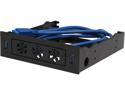
USB3.0 Front Panel HUBs Bracket for SSD/HDD/3.5" Internal Device
Pros: Fits nicely in an older case's 5.25 front slot. Easy to install. Easy to mount an SSD. Even came with screws to do so. USB cables are long enough to reach most any motherboard
Cons: OK, this is very nit picky, but the flower-shaped vent on the front are not exactly my style, but to be honest, I don't even notice this anymore. The cables join at the mother board connection instead of in the device, so you will have two cables to route, this was not a big deal for me at all but I wanted to mention it in case it is a factor for someone else.
Overall Review: I need to add USB 3.0 connections to the front of an older case. This fits the bill perfectly since I also wanted a mounting point for a new SSD as well. If needed, and with a little surgery, I think that one could even mount a small 40mm fan in one of the flower-shaped vents to add cooling for the SSD.
5/3/2015See more detail
Gorgeous Display
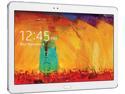
Samsung Galaxy Note 10.1 2014 Quad Core 3GB RAM 16GB Storage 10.1" 2560 x 1600 Touchscreen Tablet PC Android 4.3 - White
Pros: Stunning display. Operationally great.
Cons: None
Overall Review: No signs of any of the transitional slow-downs that some other reviewers have reported. Using with a third-party Bluetooth keyboard, but the on-screen keyboard is really quite good. Like any other Android device, Flash is not available.
1/2/2014See more detail
Nice monitor
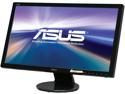
ASUS VE247H 24" (Actual size 23.6") Full HD 1920 x 1080 VGA DVI-D HDMI Built-in Speakers LED Backlit LCD Monitor
Pros: Perfect condition. No dead/bad pixels at all. Bright, vivid colors. Looks good right out of the box.
Cons: None.
Overall Review: This monitor compares quite well with the VE248 that I already own. I can detect no differences in the display quality. It drives me nuts that monitor manufactures all think that all anyone wants to do with a monitor is watch HD movies. I want more vertical space on my display! How about a 1920 x 1200 resolution in a 24" monitor like we used to have???
12/12/2013See more detail