

Your Browsing History


Edmund B.
Joined on 12/18/05
0
1
product reviews
- 14
Could easily be better
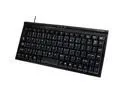
GEAR HEAD KB1700U Black 89 Normal Keys USB Wired Windows Keyboard
Pros: Small, cheap,not hideous to look at.
Cons: There is a useless FN key where the left Control key should be and no right Control key. Since the Linux kernel wouldn't even recognize this odd key so I could re-map it as a left control key I had to pry it out to keep my muscle memory from betraying me. If I only had 1 keyboard I'm sure I could retrain myself but I work on many keyboards all day long and this oddity is just annoying. I get a lot of missed keystrokes, but that may just be unfamiliarity and a weird hand position in this workspace. But I think it is the keyboard. The other weird thing is that there is a Home key where I expect to find my Backspace key, so when I mistype and try to correct it I end up at the beginning of the line. Conventions exist for a reason.
Overall Review: It set me looking for another cheap mini keyboard.
8/9/2013See more detail
Meh...
G.SKILL Ripjaws V Series 16GB 288-Pin PC RAM DDR4 3200 (PC4 25600) Desktop Memory Model F4-3200C16S-16GVK
Pros: It is RAM, it was reasonable when I bought it.
Cons: It kicks up errors unless I run it at 2800 MHz.
Overall Review: I tossed this RAM in my ASRock B450M Pro4. I dialed in the XMP profile to the rated speed of 3200MHz, which seemed to work, I could boot to my operating system. I had frequent weirdness, which I attributed to my refurb Nvidia GT 730 video card and the proprietary driver. When the COVID epidemic started I wanted to do my part by using my Ryzen 5 1600 AF to crunch some data to find a vaccine. I installed BOINC and had more trouble than I'd ever had before using the distributed platform, including VERY frequent failed tasks. After troubleshooting a fair bit I ran memtest and noticed frequent errors. I reset the RAM to the default 2133MHz speed and passed memtest. I found that the highest I could manually set the memory speed to was 2933MHz, and I could pass memtest, but still got some failed tasks in BOINC. I finally settled on 2800MHz and am no longer getting failed tasks, so the RAM works, just not very well with my admittedly low-end motherboard. I'm a little disappointed.
6/5/2020See more detail
A bit flakey

ASRock B450M PRO4 AM4 AMD Promontory B450 Micro ATX AMD Motherboard
Pros: It fired up my Ryzen 5 1600 every time and seems pretty stable so far. It was on the less expensive side of AM4 boards, especially for a 450 chipset board.
Cons: It was picky about RAM. The first M.2 slot doesn't seem to work.
Overall Review: After I installed the board in my case I fired it up with a single DDR4 3200 stick in the first RAM slot next to the CPU. Of course by default it ran at the default DDR4 speed, I believe 2133MHz or so. But in the BIOS is recognized the correct speed of the RAM in the single XMP profile. But whenever I tried to choose that speed the system would reboot a couple of times and finally boot to the low default speed again. I tinkered with the setting in the BIOS a fair bit and was able to get the RAM up to 2800 MHz, but I've had this stick in a couple of other systems and it never had a problem running the the XMP profile speed. So I put the stick in the next slot over and chose the XMP profile, and now everything is ducky. Not a huge deal, but still a PITA and not the easy experience I'd had with my ASRock B450M-HDV R4.0 or my MSI B450-A PRO. But recently I got a 128GB M.2 SSD and put it in the first M.2 slot. It wasn't recognized by the BIOS or by the Debian on my 120GB SSD. Simply wasn't there, even when I unplugged all the SATA cables. So I put the drive in the second M.2 slot, and it booted up fine, but my 2.5" 120GB SSD was gone, because I had it plugged into the third SATA port on the board. This was expected because using the second M.2 slot disables the 3rd SATA port. I switched the 2.5" drive over to another SATA port and everything booted normally. But this was very disappointing, one reason I bought this board was because I wanted to be able to run 5 drives, 4xSATA and 1xM.2, which should be possible. I would have preferred a board with 6 SATA ports, but I was trying to keep the price down, and boards with that feature tend to be pretty spendy. This isn't enough to get me to RMA the board, but I wouldn't recommend it to a friend either.
2/28/2020See more detail
Noisy
CORSAIR CX Series CX430 430W 80 PLUS BRONZE Active PFC ATX12V & EPS12V Power Supply
Pros: It lights up a 6 watt maximum SoC CPU/motherboard with a stick of low voltage 203 pin DDR3 and a SSD. No smoke or sparks yet. Inexpensive.
Cons: Annoyingly noisy. It is the only moving part on this rig, the CPU is passively cooled. Probably this means one of the bearings is defective. It will probably fail at some point. But the power draw on this rig is so low it will probably keep on plugging away after the fan has failed completely.
Overall Review: At least the good news is that at least I'll know when its on. It will be tucked away in a cubby hole where I won't be able to see the ITX case power LED.
10/5/2015See more detail
Something missing?
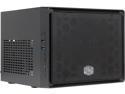
COOLER MASTER Elite 110 RC-110-KKN2 Midnight Black Steel / Plastic Mini-ITX Tower Computer Case
Pros: Small, cheapish, allows mounting 3x3.5" drives black. Gives you the choice of USB 2.0 or 3.0.
Cons: Mine didn't come with a power on button connected. I thought something was fishy when I pushed the button before I mounted the motherboard, and didn't feel like I was connecting to anything. When I hooked up the motherboard I found that it wouldn't light up. I took off the front plate and looked and there was nothing connected to the power on button. I finally ended up wiring the reset 2-pin cable to the power header on the motherboard, so I have to remember to turn the machine on with the reset button. Pretty sloppy quality control, I'd always had good luck with Cooler Master cases before (normally the Elite 120). The instruction page was, of course, multilingual gibberish, but I wouldn't deduct an egg for that, it is par for the course. Also, it would be nice to have to had the option to mount an external optical drive, or at least a 3.5" card reader.
Overall Review: I guess I just got a defective one. Weird.
10/5/2015See more detail
Way More trouble than its worth
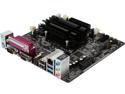
ASRock N3050B-ITX Intel Dual-Core Processor N3050 (up to 2.16 GHz) Mini ITX Motherboard / CPU / VGA Combo
Pros: It is small, quiet, and when it is working it seems to have sufficient grunt for desktop tasks, it can more or less play 1080p video, plus it is very low energy (~6 watts for the CPU, apparently). And it wasn't too expensive. It boots quickly with a SSD. And there is a header for USB 3.0, so many cases only have front USB 3.0 ports these days. PCI Express x1 instead of a full sized PCI-E slot. Who would put a real video card on an underpowered Celeron.
Cons: This board is very picky about RAM, even after applying a UEFI update that was supposed to correct this problem. The update was a pain, it kept stalling out in the "BIOS", requiring me to restart the machine and process about a half dozen times. I had to pull another stick of RAM out of a computer to boot. Then the board gave me piles of grief booting from a USB stick using unetbootin, multisystem, & YUMI. I used a USB DVD-RW, which seemed to put the fear of Dog into the thing, the next time it booted from a unetbootin 15.10 Ubuntu 64 bit beta, and I installed. And yes, I checked, Secure Boot was disabled. Once I got Ubuntu installed I found that the VGA kept flicking off at irregular intervals, in some cases staying off, necessitating a hard reboot or use of the MagicSysRq sequence. So I installed XFCE, figuring it would be less finicky than Unity, which uses some funky compiz wizardry. And the problem was better, but still there. I hooked up a HDMI monitor to the unit as well, and the problem has not reoccurred in about 45 minutes, the board will eventually be hooked to a HDMI TV if I keep it, but that is still a major black mark. I know I'm using a beta release on a very new 8th generation Haswell chipset, but the very recent (4.2.0-11-generic) kernel should handle it and I've installed this image on another machine (Macbook Air 4.2) without artifacts. The panel header is crammed right next to the right SATA port, which made it a pain to jumper when I was testing the board outside of the case. However there was a serial header that looked just like the FPANEL header in a good location next to the Clear CMOS pins (which I actually needed a couple of times). Speaking of which, what's the deal with all the legacy gunk on the I/O panel? I can kind of understand PS/2 mouse & keyboard ports, and maybe even a serial port, but really, a parallel port? At least confine that to a header on the board and give us something we can use, maybe some extra USB ports or a DVI output. Also, it vexes me that Intel has seen fit to burden this class of motherboard/CPU with only 2 SATA ports. From what I can tell these Celerons are largely used as low-powered home servers and HPTVs and would benefit from a couple more SATA ports.
Overall Review: I still might return this motherboard if the screen flickering comes back. I've had trouble with Asrock Celeron boards before. One reboots often, one has a defective VGA port. I've only had 3 Asrock boards, so that is beginning to be a pattern. I may shun this company in the future.
9/29/2015See more detail