
Your Browsing History


Joseph Q.
Joined on 10/27/05
0
0

product reviews
- 11
Comfy Comfy Comfy
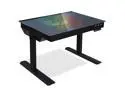
LIAN LI
Pros: Pros: - Rock-solid case materials and quality that you'd expect from Lian-Li. - TONS of room on the inside of the case. - Fairly easy assembly (even with Lian-Li's sometimes archaic instruction manual) - Great cable management space due to interior size. - Outside panel is easy to use. - Good spacing for my water cooling radiator. - Glass is just freakin' cool. - The standing desk system feels rock-solid.
Cons: Cons: - Pre-installed fans were a bit loud for my taste. Replaced them with ones from my previous build and had to order more for the other available slots. - HDD/SSD cage near the power supply had to be removed for my setup to allow for the power supply's cables to be used. I wish it'd been installed on the right side of the case, where there is plenty of unused space, instead of the left. - Fan control on the front panel was kind of useless for me. I have plenty of fan controllers on my motherboard to support the whole case. I ended up not using the Lian-Li fan controller because of it.
Overall Review: Other thoughts: - I don't over-RGB my builds, so the RGB system for the case was useless for me. I kept the RGB strips for a day that I might want to experiment more with them. - I wish the surface area of the desk top was a little larger. I have a boom mic that I have clipped onto the side at a strange angle because the desk isn't quite as large on the top as my old one. I also wish there was a little more room for putting a coffee cup in front of me without blocking the bottom of my screens. - I don't have enough USB3.0 headers on my motherboard to take advantage of the case's external ones currently. I also don't have a USB3.1 header. Hoping I can get a motherboard that can take advantage of these in the future.
10/11/2020See more detail
Good System, Loud Fans
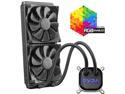
EVGA CLC 280mm All-In-One RGB LED CPU Liquid Cooler, 2x FX13 140mm PWM Fans, Intel, AMD, 400-HY-CL28-V1 LGA 1700 Compatible
Pros: - Fits well in my case (full tower EATX) - No complaints about cooling under normal stresses and while gaming. - Overclocking with other EVGA components is a breeze.
Cons: - The included fans are LOUD under load. I substituted the default fans out for a quieter system without reducing airflow. - Included fans also need to be updated to use braided cable sleeves.
Overall Review: A solid addition to my i9 build. No real complaints other than the mediocre fans.
11/25/2019See more detail
Great ITX Build
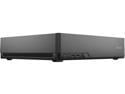
Fractal Design Node 202 Black Slim Profile Mini-ITX Computer Case
Pros: Great little case for an ITX build that blends in well next to my PS4. - Good cable management. - Great sizing for a standard sized graphics card. - Plenty of air space with room for upgrading the fans.
Cons: - Little tight for the PSU I bought. - Working in the case after all parts have been put in can be a little tight.
Overall Review: Would highly recommend Fractl Design to anyone, and this case in particular for an ITX build.
4/24/2020See more detail
Premium != Colors
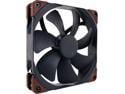
Noctua NF-A14 iPPC-3000 PWM, Heavy Duty Cooling Fan, 4-Pin, 3000 RPM (140mm, Black)
Pros: Nice and quiet. A significant upgrade over the stock 140mm fans on my EVGA closed-circuit unit.
Cons: I should not have to pay a premium for non-garish colored plastic casings on a PC fan.
Overall Review: Given Noctua's reputation, I'm fine with the purchase. But given the choice of a lower-priced competitor in the future with perhaps similar or slightly less quality, I will purchase from someone else.
12/14/2019See more detail
An excellent Skylake-X platform
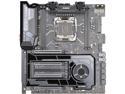
EVGA X299 DARK, 151-SX-E299-KR, LGA 2066, Intel X299, SATA 6Gb/s, USB 3.1, USB 3.0, EATX, Intel Motherboard
Pros: - No issues with installation of components. Plenty of room on the board. - The inclusion of the plastic board layout is a great addition. Saved me a bunch of time looking up things in the manual. - The instruction manual is high quality, very well detailed. - I don't own a PC with a side window, so RGB makes no sense for me. The onboard lighting minimalism of this board is perfect for me. - The extra headers for increased power stability are comforting to me while I have my components overclocked.
Cons: - It's 2019; PS/2 is dead. I would have preferred the space taken for the connector to be more USB connections. I took off a whole Egg on this review for an incredibly wasteful "feature" of the board. - Rear-facing I/O plate in my case seems to be buckling out a bit with the board properly seated.
Overall Review: Other thoughts: - I wish the onboard audio supported true 7.1 instead of me having to keep bouncing my PCIE audio card around between builds. - I personally believe the ASMedia SATA ports are a waste of perfectly good SATA space. I would question the sanity of anyone using Windows XP at this point of its EOL. - I don't see U.2 having the same market saturation as SATA or M.2, nor are their options really available in the consumer market for the ports. This board was an update for me from an EVGA Z170 Classified which had (completely unused) SATA Express ports, which leads me to believe EVGA would do better for its customers if it didn't jump on every bandwagon connection that comes out and instead tailored its boards to what is actually usable or gaining traction. - If you're looking at this board for a Kabylake-X: stop now. Kabylake-X is dead as a platform. Go with the Skylake-X. - The motherboard manual, description, and EVGA's website clearly state what DIMMs are available for each CPU. In a similar line of thought: don't think you're going to fit an EATX board into a medium tower with any degree of good wiggle room. - I don't like the look of EVGA's UEFI BIOS. It reminds me too much of what you'd see on a late-90's, early-2000's "techy" website. I would love to see something more flat, sleek, and modern at some point. That being said, EVGA's BIOS are top-notch with how much information they present and how customizable they are.
10/26/2019See more detail
It's Seagate, it'll break
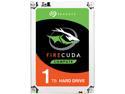
Seagate FireCuda Gaming SSHD 1TB SATA 6.0Gb/s 2.5" Notebooks / Laptops Internal Hard Drive ST1000LX015
Pros: - Decent performance for an SSHD drive. Noticeably better than a traditional HDD.
Cons: - Drive is dead within a year of use in a low-read/write setting. Completely dead, no chance of data recovery from the drive itself (praise be to good backups).
Overall Review: Would not purchase again. I'd hoped Seagate had turned around since the last time I bought one of their drives, but a consistent <1yr lifespan on every purchase is poor quality.
8/13/2017See more detail