

Your Browsing History


Mark B.
Joined on 01/04/03
0
0


product reviews
- 38
Decent sub $150USD card with room for improvement
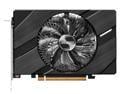
ASRock Challenger Arc A380 6GB GDDR6 PCI Express 4.0 ITX Video Card A380 CLI 6G OC
Pros: Oversized fan and aluminum heatsink for cooling Runs relatively quiet Decent overclocking room Full Asrock support Good performance for price point compared to AMD and Nvidia equivalents
Cons: Buggy drivers still need improvement
Overall Review: This product has intrigued me since launch so when I was able to finally pick one up I did. The card itself is slightly bigger than most "ITX" cards I've encountered with a pretty beefy aluminum heatsink and a slightly larger than average fan. There is zero RGB on this card and it requires one PCIE lead for aux power. Using the newest (as of 8/27/2022) BETA drivers there are still some bugs to work out. I got a few errors trying to run the control software and certain benchmarking programs are problematic like Superposition which stutters quite frequently. Using Timespy, performance is right around 4400 GPU which places it solidly between a 1650 and 1650 super which actually is a good price:performance for this card. This was tested with an 11400 + 2x8GB 3200 ram. I played a bit of World of Warcraft and Fallout 76 at 1080p and performance was right in line which means solid but nor remarkable. 6GB of memory is very capable for 1080p. 1440p is a stretch for many titles depending on settings and 4k is unrealistic obviously. If you're looking for what I think is a solid 1080p card that is still ironing out early adopter bugs and issues, this is a solid choice for what it provides. If you want mature drivers and something that is ready to go across just about every game and suite and/or you seek greater than 1080p gaming, you might do better to look elsewhere. Solid 4/5
8/28/2022See more detail
Beware
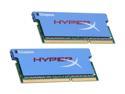
HyperX 4GB (2 x 2GB) 204-Pin DDR3 SO-DIMM DDR3 1066 (PC3 8500) Laptop Memory Model KHX8500S3ULK2/4GX
Pros: Nice heat spreaders. Passed memtest at rated SPD. Works great as 7-7-7-20 memory. Works fine in an OCZ Whitebook Xfire config.
Cons: Unfortunately adheres to JDEC SPD which is 7-7-7-20. Does not boot at rated XMP-1066 profile (5-5-5-15). As a result, your laptop needs to have a BIOS capable of manually adjusting BIOS memory times which is rarely the case with laptops.
Overall Review: BEWARE: Make sure to check your laptop BIOS to see if you can manually change your memory timings or you are potentially stuck with very expensive 7-7-7-20 memory which can be had for much cheaper. Intel's "Extreme Tuning Utility," is supposed to allow manual adjustments of memory profiles in Windows and is custom released by vendors, but there is no version available from Kingston (who sells this memory), and you are at the mercy of your laptop maker.
4/28/2009See more detail
Great game bundle and amssive improvements from Intel

Intel Gift - Intel Arc 5 & 7 AIC/IBC Graphics Card Game + Creative Offer Bundle
Pros: Full game license for MWII Plays well on Intel Arc cards now
Cons: None
Overall Review: Pack in bundle/code for Arc cards worked well and I must say Intel is really REALLY making fantastic driver improvements since launch. I was one of the early buyers of the Arc cards buying an A380 on launch almost two years ago and the driver improvements from then to now are staggeringly good.
6/13/2024See more detail
Solid, well priced budget case

Raidmax X922 ATX Mid Tower Gaming Case with ARBG/RGB Light Fans, Tempered Glass Side Panel, 3.0, Compact and Budget Case (4 ARGB Fans pre-instaled))
Pros: Solid build quality at this price point Easy to work in LEDs can be controlled externally with selector button LEDs can also be controlled via aRGB if desired 4 case fans Compact and Light weight Drive cage is removable allowing larger PSUs
Cons: Drive cage and overall compact size limits PSU selection if you want to also use the drive cage
Overall Review: I needed a case to build out a pile of parts that had accumulated over the last 6 months and this case checked all the boxes as it has a full array of front and a rear fan, tempered glass and priced very well. It is very light weight and a nice compact mid sized ATX case. I built out a B660 Prime, 3060ti, 12400 system and it was very easy to build in and I had the system up and running within the hour. There is a drive cage on the bottom to allow use of 3.5 and 2.5 drives but if your PSU is on the bigger side or a mass of longer cables, you may have to remove it as the case overall is thin and compact. Luckily, removing it only requires two screws to be removed and out it goes. Overall, I am very pleased with the case not only the ease of build but aesthetically too.
6/13/2024See more detail
Beastly card
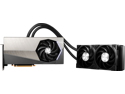
MSI Suprim GeForce RTX 4090 24GB GDDR6X PCI Express 4.0 Graphics Card RTX 4090 SUPRIM LIQUID X 24G
Pros: Minimal to no coil whine Game boosts to 2835 right out of the box OC to 3100+ gaming and benching Love the aesthetics Fantastic Temps
Cons: Pricey (but what 4090s are not?) AIO could be a bit bigger
Overall Review: Monster card, fantastic performance and quiet under load. This beast is clocking at 2835-2820 under gaming and benching right out of the box. MSI AB allows it to run rock solid at 3120 no problems gaming and benching too. I love the aesthetics and I know others have said theirs have major coil whine but mine has none unless you push fps over 200 and then it is very low (I have to audibly look for it). I wish it had a 360mm AIO but the temps are great and allows me to dump that heat out the top of my case easy.
3/6/2023See more detail
As good as a DDR4 board gets unfortunately Armory Crate is still bloated
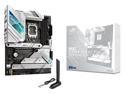
ASUS ROG Strix Z690-A Gaming WiFi D4 LGA 1700(Intel® 12th&13th Gen) ATX gaming motherboard(PCIe 5.0, DDR4,16+1 power stages,WiFi 6,Intel 2.5 Gb LAN,Bluetooth v5.2,Thunderbolt 4,4xM.2/NVMe SSD and Front panel USB 3.2 Gen 2x2 Type-C connector
Pros: Good build quality Handles 4000+ memory 1:1 no problem Handles a 5.3 all core OC (12900k) no problem Asus BIOS
Cons: Armory Crate required for RGB MB does not retain RGB settings with newest BIOS update forcing Armory Crate to be installed and run at all times ArmoryCrate
Overall Review: I have been using this motherboard for over a year now with no problems. Classic Asus BIOS, subsequent BIOS updates working better and better. Full 12900k, 12900ks, 13900k and 13900ks support enabled. It has handled every memory type I've tested and has worked great with 2x16GB B-die sticks running at 4133 1:1 (CPU IMC limit). My only complaint being previously once you set the RGB on the motherboard it retained the settings (unless all power was removed even off) regardless but with the newest BIOS updates suddenly it won't retain them and they have to be set again during each power on with Armory Crate. This same problem is also happening with my other Asus B660 motherboard. Luckily OpenRGB is fully compatible for settings so still no need to run ArmoryCrate if you do not want to but this is a poor move on Asus's part to force their software down your throat.
2/13/2023See more detail