
Your Browsing History


Russian W.
Joined on 11/14/03
0
0
product reviews
- 8
Excellent Card
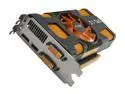
ZOTAC GeForce GTX 560 (Fermi) 1GB GDDR5 PCI Express 2.0 x16 SLI Support Graphics Card ZT-50701-10M
Pros: Quick, painless installation. Plugged in the HDMI cable to my HDTV and the DVI cable to my monitor and it recognized both without any issues or need for adjustments. Runs all my games smoothly and allows me to play Age of Conan with high settings (or turn everything all the way up for an indoor raid) and still get 40-110 fps.
Cons: None at this time.
8/8/2011See more detail
Good sound
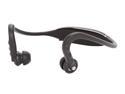
Motorola Behind the Neck Stereo Bluetooth Headphone High-Definition Audio Black (S9 HD)
Pros: Easy to connect to bluetooth enabled phone, controls are easy to master. Great sound with little bleed over. Unless sound is maxed out people next to you cannot hear what you are hearing. Works great indoors with small or large rooms.
Cons: Works okay outdoors but signal will drop at random times. When walking I keep the phone about 1-1.5 feet from the receiver on the headphones (front left breast pocket), but if I turn my head so that the receiver is over my right shoulder (or even nodding) the signal will cut out.
Overall Review: If the transmitter were more powerful this would be an incredible find. For playing indoors as long as the source is in the same room it runs perfectly, going outdoors however is a roll of the dice.
7/14/2010See more detail
Excellent storage with quirks
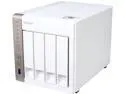
QNAP TS-451-US 4-Bay Personal Cloud NAS with HDMI output, DLNA, AirPlay and PLEX Support,Intel 2.41GHz Dual Core CPU with Media Transcoding
Pros: Fast, easy Initial setup. The device auto selected Raid 5 based on the number of drives I had (which is what I wanted). And setting up the ~12TB raid was fast. I started it when I went to bed and it was done before I woke up the next morning. My previous NAS took 3x that long to do ~4TB It runs quiet, even with high CPU load and long data transfers it is easy to ignore. The interface is clean and easy to understand, even for my non-technical users. Setting up accounts and getting the NAS connected to the dozen or so devices on my network that will look for it was done before I had finished playing with all the options. Most devices can find the Twonky/DLNA servers immediately upon activation. My Samsung TV found the NAS and my video files in a heartbeat. Reboots cause less than 5 mins of downtime even at 50% capacity. Cloud setup is a breeze, so is getting things to stream to mobile devices. Gives many options for NAS to NAS transfer. FTP transfer speeds are good and (when it works) USB transfer speed can max out the channel. Its child play to get team the two Ethernet ports together and get improved transfers. Updates are quick and painless. I've had 3 (one to the OS and two to the apps) so far and I don't recall any real downtime.
Cons: USB transfer died about halfway through copying 1 TB of data from an external hard drive and none of the USB ports have worked since. I turned on Transcoding on an empty directory, stuck a file video file in there and CPU spiked at 99%. I've since turned it off and emptied the directory CPU seems to hang around 80-90% even when most of the devices on the network connected to it are in sleep mode. It is persistent even after a reboot. Luckily it is in a very cool location so no worries about overheating. If the video stream has subtitles that aren't embedded in the image use a 3rd party player and don't bother with mobile, you'll never see them. The players included with the NAS can't handle odd-ball encoding, so stick with mainstream video encoding or use 3rd party players on your device. When transferring data from my old NAS it took a few tries to figure out which protocol is most compatible, my first few tries ended up with transfers aborting and no real info given. Not all of the Apps available from the OS are compatible for this NAS but I'm sure that will
Overall Review: Still trying to figure out the whole HD station thing. It seems more like setup, but I can't seem to get the Video station to work consistently. And there seem to be two programs that are both labeled Video station but with different icons. Darn WD came out with the 6TB NAS drives after I got everything setup and working nice...grrr if only I had waited a month
8/19/2014See more detail
No longevity
Motorola Behind the Neck Stereo Bluetooth Headphone High-Definition Audio Black (S9 HD)
Pros: When it worked, it sounded really great.
Cons: This is an update to my previous review. After little more than a month of use the receiver started to weaken to the point where the only time I can get a stable reception inside or outside is if I tuck my player behind my neck, inside the collar of my shirt directly under the device. Anything more than a few inches of distance between the player and headset and it will drop the signal so often you can even get through the hook of a song without a couple of breaks. This happens even after you charge both devices fully. Also the little rubber ear buds pop off way too easily and take a bit of wriggling to get back on. Nearly every time I put it in my pocket they would pop off unless I took extra special care when sliding them in.
Overall Review: Going to RMA it and hope the next one works longer.
8/13/2010See more detail
Excellent boot drive
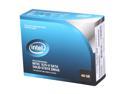
Intel X25-V 2.5" 40GB SATA II MLC Internal Solid State Drive (SSD) SSDSA2MP040G2R5
Pros: Fast, quiet and did I mention fast? I purchased two of these and put one on a laptop the other on a PC. OS is up in 30 seconds or less from a cold boot and applications open up really quickly. Put the windows 7 home premium DVD in the drive and less than 30 minutes later I was surfing the web while stuff downloaded in the background.
Cons: Only enough room to use as a OS boot drive any serious games have to go on a larger drive.
Overall Review: Hardest part is finding a CD-R to update the firmware. Fair warning: Once you start using an SSD its going to be hard to go back to a normal hard disk.
4/12/2010See more detail
Not Bad
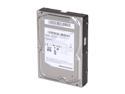
SAMSUNG EcoGreen F2 HD154UI 1.5TB 7200 RPM 32MB Cache SATA 3.0Gb/s 3.5" Internal Hard Drive Bare Drive
Pros: Decent speed, quiet and doesn't run too hot. I purchased five of these to run in a four disk raid-5 NAS (a spare just in case) and it was plug and play with no initial issues and they survived the ~30hr sync period.
Cons: It took little less than 2 months for the first drive to fail in the raid. Luckily, I had purchased a spare and swapped it in. It lasted longer than some of the 1.5TB drives I've read about, but I was hoping to at least get a good 6 months out of these before I had to start replacing drives. Most drives that I've owned that were up to 1 TB in size have lasted for years. Its a shame these didn't.
Overall Review: The NAS is not overly active I upload large files to it maybe once or twice weekly, so its not from high usage that the drives are dying. I got them when they were discounted so it was a good deal.
4/12/2010See more detail