

Your Browsing History


Alexander P.
Joined on 11/06/08
0
0
product reviews
- 25
Huzzah!
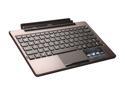
ASUS TF101 Docking Station with Keyboard and Built-in Battery for Transformer Tablet
Pros: -A tablet with no USB ports suddenly gets two USB ports -A tablet with no keyboard suddenly gets a keyboard -A tablet with no mouse suddenly gets a mouse -Battery adds 8 hours to life (some times more) -When folded, looks neat (as in tidy) and protects the screen well -Widdle baby feets on the bottom prevent slippin' -Handy SD card reader and the ONLY light the tablet truly has on it
Cons: -Even after >3 firmware updates, I still have issues with the keyboard forgetting it's attached to the tablet and refusing to take keystrokes -Android is not setup to handle a mouse very well. I'm using a touch surface to use a touch UI without touching the UI. UR A GENIUS. Makes sense to add, but why? -Although handy at first, when the battery in the keyboard is at 5%, the indicator flashes this bright orange/amber light every second that bugs the heck out of me -Not very heavy so don't put it on your lap and expect that to stay on your lap. The tablet part is considerably heavier.
Overall Review: This piece of hardware is what sets this tablet apart from the other Android tablets. When I have this attached, my slightly bulky Android tablet suddenly is a netbook that outlasts the most conservative battery-using iPad2. I left this on in my backpack for two days, by accident, and still had enough juice to check my e-mail and update facebook before plugging it in (with time to spare.) It has its short comings, no doubt about it, but ASUS has been very kind to me and the updates have been steady with noticeable improvement of response time, battery use and reliability. Getting the tablet without the dock is okay, I suppose. It seems to hold it's own but getting the dock without the tablet...
11/7/2011See more detail
Quality control
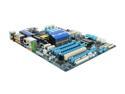
GIGABYTE GA-X58A-UD3R LGA 1366 Intel X58 USB 3.0 ATX Intel Motherboard
Pros: Fancy Lots of features
Cons: RMA'd 3 times, never got a working board
Overall Review: Newegg seemed okay with refunding me my money after I RMA'd it all the way across the country three times and left myself without a fully working computer for over two months Gigabyte seemed satisfied with blaming the issue on me, despite the fact that my crummy Intel board (that I swapped out repeatedly to have some sort of a working computer after each board failed) worked fine with the same handling I was giving the Gigabyte board. I picked memory from the compatibility list, I used a processor I KNEW worked because it worked in a buddy's machine. If you get a working board, I'm SURE you will love it. I never got the chance and I will be using my refunded money on a different brand.
3/3/2011See more detail
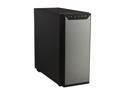
Antec P280 Black Aluminum / Steel Super Mid Tower Computer Case
Pros: -Lots of space -Included fans need one molex connection only -Bottom PSU -USB 3.0 on the front(!!!!) -Visible, but not blinding Power LED -Fancy little door to cover the front -Power button is reachable but still out of the way to prevent unwanted pushes -I can't hear them fans
Cons: -Included HDD screws leave more wiggle room than I'm comfortable with -Generic stats about what fans can be installed make it confusing -USB 3.0 connection for the front panel is bulky and gets in the way (my first experience with USB 3.0 on the front panel so take that with a grain of salt) -HDDs need to be mounted in reverse, IE you need both panels off to install and uninstall HDDs
Overall Review: I'm using this case for my ESXi server. For all the cons, it's not because the CASE is bad but that it doesn't fit MY need, so I only took off one egg. The HDDs going in connections first means cable management is a breeze, but makes adding and removing HDDs a pain in the rear. My previous Antec case had them facing front which meant I didn't need to move the computer much to drop another one in there. The included paper says that two more 120mm fans can be included in the front, but I can't for the life of me see where this is supposed to be. If you want a spacious case, with quiet fans and a subdued look, this is the case to get. Easily fit an ATX mobo in here and had enough wiggle room to get lazy with the cable management. If you are into it, there are the standard holes to help with cable management. Good case.
9/12/2012See more detail
Cold and quiet
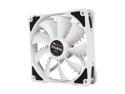
ZALMAN SF3 120mm Shark's Fin Blade ELQ (EverLasting Quiet) Bearing Case Fan
Pros: -Quiet -Pushes a lot of air -Not hard on the eyes -Silicon plugs instead of metal screws
Cons: -Silly little nubs on the blades are sharp :(
Overall Review: This fan pushes so much air that it actually forces my other fans to move a little faster. On max RPM, I can't hear it. I don't know what other users are talking about. It comes with a resistor plug, but I'm not using it.
5/30/2012See more detail
When quiet matters

Rosewill RCX-Z775-LP 80mm Sleeve Low Profile CPU Cooler
Pros: -Tiny -Quiet, even at max speed -Dirt cheap
Cons: -Aluminum blades bend EXTREMELY easy -Does a poor job of cooling
Overall Review: When it's more important for the computer to be quiet than cool, and you don't have a lot of money, this is adequate. It is no joke when I say the blades bend easy, I bent three getting the box open. Because its tiny, it does a very poor job of keeping it cool. I'm using this in a home server that sits next to my desk, so I wanted it to be quiet. I do not overclock my server, nor do I demand much in the way of CPU use from it, so it's okay. My operating temp jumped 2 degrees Celsius after I put on this cooler (compared to stock) but even when it's on the max, I can't hear it over other fans.
5/30/2012See more detail
Nice
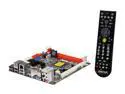
BIOSTAR TH61ITX+RCH LGA 1155 Intel H61 HDMI USB 3.0 Mini ITX Intel Motherboard with UEFI BIOS
Pros: -Tiny -Sturdy -Easy to install -Very straight forward labeling for the motherboard (anything the actual board could not accommodate the included instructions labeled very clearly)
Cons: -Location of the 24 Pin connection
Overall Review: This is my first Mini ITX board and I'm reasonably impressed. Check the length of your power cables (and triple check the size of your cooler if you're getting an aftermarket cooler!) because my 24 pin connection could not reach over everything to where it was located. This was used in my new HTPC, which put the 24 pin connection as far as possible away from the PSU. Also, I made a poor choice in cooler and blocked one memory slot and the PCIx slot. I'm going to go just deal since it's more important for me to have it cool and quiet than have a lot of RAM.
5/30/2012See more detail
seller reviews
- 1
Great seller
Item shipped fast, I got my tracking number very quickly and it was bundled appropriately for the trip. Everything stated in the part list came and I haven't found a single missing/broken part so far. (I bought an arduino starter kit, lots of little bits) Keep in mind this seller is in China. Your item has to be delivered via truck then ship, then truck then another truck. My personal shipping time was <3 weeks, but I think it's reasonable for something coming from the other side of THE PLANET. If I ever order cheap/good electronic parts for future projects, you can bet I'll be looking for this seller. What I'm saying is I had a good experience.
On-time
Delivery
Product
Accuracy
Customer Service
Satisfactory
2/23/2015See more detail