




 here!
here!
I’m your shopping assistant for PC builds, upgrades, and everything tech.
Got questions? Ask away!
Start a conversation
here!
I’m your shopping assistant for PC builds, upgrades, and everything tech.
Got questions? Ask away!
Start a conversation

Joined on 12/10/05
High quality ATX 3.0 PSU
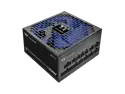
Pros: This is one of the few available native ATX 3.0 PSUs. Based on all the reviews, this one looks to be quite high quality with near-Platinum level efficiency despite only being labeled as Gold. Included cables look high quality, although somewhat stiff. The fan on this is very quiet, and I can't even hear it spin up at higher loads. The included 10 year warranty is always a plus. Absolutely no coil whine on this unit, even when paired with a 4090. This is a big difference compared to my previous unit which always had a bad coil whine at high load.
Cons: The first unit I received powered on just fine, but made a terrible high pitched squeal sound that could be heard even 5 feet away. This reminded me of the dreaded "capacitator squeal" that occurs once the caps are about to fail. I decided I didn't want to risk my brand-new build to a faulty PSU, so promptly turned it off and got a replacement. The replacement unit I received works perfectly, with no audible squeal. The included cables are quite stiff, particularly the 12VHPWR cable and doesn't bend easily at the connector. Due to how the GPU connector is positioned on most of the 4090s, this might make it difficult to close the side panel because the wires can't bend until a few centimeters above the connector.
Overall Review: Lots of reviewers are including a negative comment regarding only receiving a 450W rated 12VHPWR cable with their 1000W PSU. Please be aware that the PCIe spec requires a >1200W PSU to use the full 600W 12VHPWR cable, and will be limited to 450W on the 12VHPWR when using a 1000W PSU. Perhaps some reviewers should have paid more attention when purchasing. This is actually by design, and not an oversight from Thermaltake.
One of the best 5090 out there
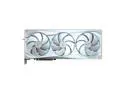
Pros: - Overall design and build quality are excellent (must have for white builds) - One of the best VRM designs for a 5090 - Excellent thermals and very quiet fans with stock fan curve - Surprising amount of overclocking headroom - +150 to 200 core offset should be easily doable - Included stand looks far better than a simple GPU stand
Cons: - Large, but you probably already know this - Vertical mounting might be problematic due to thermal putty movement (see below) - Included fourth fan only lowers temperature by ~1c - not really worth it
Overall Review: The Aorus lineup for Blackwell is easily among the best among the AIBs. The VRM on the Aorus master is especially well made and high quality, which will help with better voltage delivery and potentially better overclocking. Gigabyte going with a composite compound on the core and thermal putty for the rest of the components definitely helps with temperature. Compared to my prior Gigabyte 4090, it's on average ~10 to 15c lower for the same power draw. My prior 4090 would sit ~75 to 80c at 600W, and this thing barely cracks above 65c at 600W on the stock fan curve. Gigabyte going with thermal putty instead thermal pads seems to have paid off in terms of lowering temperature, but be aware about the current drama regarding the thermal putty moving or sliding down when vertically mounted. Gigabyte claims this had been "fixed" with the recent batches. However, I would still think twice about vertically mounting these. Overall Blackwell is an impressive architecture. Despite it having the same process node as Ada Lovelace, it's more efficient. It gets negativity around the default power limit at 575W, but keep in mind it's also a bit more efficient than the prior generation. I would say on average compared to my prior 4090, it offers the same performance with ~100 to 150W lower power draw than my 4090.
Ridiculously easy to overlock
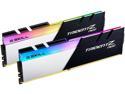
Pros: - Looks great - Overclocks easily to 3600 Mhz using an AMD Zen3 processor - Good heatsink - Specifically for AMD Ryzen
Cons: - Might require updated BIOS version to be stable for Zen3 processors
Overall Review: Paired with an AMD Ryzen 5950x and ASUS TUF Gaming X570 PRO, this thing was extremely easy to overclock. Literally after first power up, memory defaulted to 2133 Mhz as expected. I tried to enable the DOCP/XMP profile using the included BIOS with the motherboard, and PC failed to POST due to memory. I updated the BIOS to the latest version, enabled DOCP, and now it successfully boots up to 3600 Mhz with no more issues. Ran a few stability tests and no immediate issues. All around great memory and easy to overclock.
Excellent
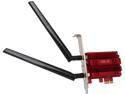
Pros: - Slim profile (fits with 2x Nvidia 980 SLI) - External attachable antenna - Great reception & link speed - Plug & play drivers
Cons: Cable length for the external antenna could be longer. Currently ~2 feet; would be optimal if it was at least 4 feet so you can mount it high or reach the other side of a desk.
Overall Review: I purchased this because I got tired of my USB wireless adapter not performing well. The one I bought had an issue with being stuck in USB2 even though it's advertised as USB3. This capped my download speeds at ~300 Mbps, not very ideal considering I'm pay for 400 Mbps internet service. I decided to go with PCI-E to eliminate the issues associated with USB dongles. Even with the router 20+ feet away and behind at least one wall, I can achieve almost maximum link speed of ~800 Mbps on the 5 Ghz band. Speed tests always show this is downloading at ~430 Mbps, the same as if connected via Ethernet. Of course Ethernet is superior than wireless, but it's amazing that modern wireless speeds are approaching gigabit speed. The best drivers are actually the Broadcom drivers installed by Windows when first plugged in. I would stay away from any ASUS drivers found online. The ones I found online caused this to have terrible performance, with link speed limited to ~200 Mbps. Not very ideal considering this can perform 800+ Mbps. Driver rollback instantly fixed the performance issue. On most full-size ATX boards, the smaller PCI-E slot this fits in is right in between the two larger PCI-E x16 slots. Contrary to what another reviewer said, this DOES fit with 2 large modern graphics cards. I have 2x Nvidia 980s in SLI format with a large aftermarket cooler (EVGA ACX 2.0 coolers) and this fits in between them. It's snug, but it fits. After installing this, there's not much space between, maybe 5 mm between the adapter and graphics cards.
Beast router
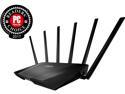
Pros: Great signal thanks to its 6 antennas. I live in an apartment complex, and I feel this router completely swamps out the rest of the signals around here. I have my router setup at the farthest room in my apartment, and even on the other side of my 2 bedroom apartment, the 5 Ghz band is still at excellent signal despite several walls. Tri-band gives a lot of flexibility to select the desired band with the desired performance. Default options make one 5 Ghz band AC mode only, the other being mixed for legacy components. I haven't yet tried to use the SmartConnect rules, so I can't comment on how it works. However, with it disabled, I have not had any disconnects or signal drops. Easy setup and innovative interface. I never felt lost when setting up, but average users might find it intimidating. Advanced options sure to satisfy the enthusiasts. AiProtection options are a nice addition. Dual-core processor ensures best performance during high-traffic scenarios.
Cons: It's quite large, and although I think it looks awesome, it's aggressive design might turn off some people. Also quite expensive, although Newegg offers some significant discounts.
Overall Review: This is by far the nicest router I've owned. Just the shear size of this router is quite amazing: I've seen nice laptops smaller than this thing. That being said, this is a lot of router for the average user. I'd recommend this for enthusiasts or people that need a strong signal from their router.
Quite the beast
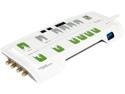
Pros: - 12 outlets to connect an entire entertainment or desktop system - Oversized outlets, so you can connect the bulkiest plugs - Ethernet, coaxial, and telephone line protection and noise filtering - Long wall cord (this is important) - "Master-controlled" outlets (see other thoughts)
Cons: Bulky, make sure you can accommodate such a large strip. Also, some of the outlets were tight when first plugging in my cords. I was actually worried about breaking the prongs on the plug it was so hard to plug in. However, once plugged in, it could be removed and reconnected easily.
Overall Review: The description isn't really clear about what exactly a "master controlled" outlet is. Basically, there is one outlet identified as "Master" and additional "Master-controlled" outlets. If the appliance connected to the Master outlet is off, there is no power supplied to the Master-controlled outlets. This is great if you want to plug in your desktop to the Master outlet, and all of its peripherals (monitors, speakers, etc.) into the Master-controlled outlet. This means once you turn off your desktop, your peripherals are no longer using power. There are also several "Always on" outlets that aren't affected by this behavior (for things like modems, routers, etc). I got this guy when it had a hefty discount as a shell-shocker deal. I doubt I'd spend full price on this, but if you can grab it on discount it's actually quite the steal.


