
Your Browsing History


Miles K.
Joined on 05/20/07
0
0
product reviews
- 9
Wow
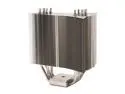
Thermalright Ultra-120 CPU Cooling Heatsink
Pros: Ok, this is the heatsink to have! I'm currently running my Intel e6600 2.4Ghz Core 2 Duo at 22 degrees Celsius at idle and 32 under load. I'm thinking about over clocking it.
Cons: None
Overall Review: Some may say the size is an issue, but it fits just fine in my Antec p180 case and on my nForce 650i motherboard. The heatsink is big, but I wouldn't consider that as a Con. I put a 120mm fan on it and didn't really drop my idle temp that much and only cooled my load temp by a degree or two, so you really don't even need a fan on this thing!
6/21/2007See more detail
Another Defective Unit - HDMI board
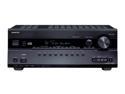
ONKYO TX-SR608 7.2-Channel Home Theater Receiver
Pros: Great receiver, but see other reviews for the "Pros," because my unit didn't last long enough.
Cons: Worked great the first week or two, then had an HDMI problem. There seemed to be a handshaking issue with my monitor, troubleshooted by taking the receiver out of the path and no issues from Playstation 3 to Monitor/HDTV. Tried all HDMI ports and the receiver kept giving a flickering signal to my Monitor (No handshaking issue). Also the OSD showed the "HDMI" flickering as well on the unit. Research showed a consistent problem for other Onkyo owners with units between 606-608 and HDMI. Before my review, there are 2 others that have defective units. If you buy, make sure you use this unit extensively before the 30 day NewEgg return policy runs out! Try ALL HDMI ports and run it as much as possible. All in all, the HDMI board seems to be bad, particularly the capacitors? All other functions work great.
Overall Review: Luckily mine failed within the 30 days, contacted NewEgg and they are paying for the return shipping. Very helpful. Could there be a "batch" issue here since this is the third consecutive review with a defective Onkyo TX-SR608?
4/13/2011See more detail
Samsung ML-1630 Monochrome Laser Printer
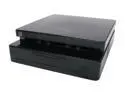
Samsung ML Series ML-1630 Personal Up to 17 ppm Monochrome USB Laser Printer
Pros: - Silent - Fast printing from standby (10-15 seconds to print first page) - Attractive appearance and aesthetics are superb - Prints machine report with a touch of a button (machine info, toner status, toner info) - Software package is very easy to use and very customizable - Can easily change between dpi setting, quality, Toner Save Mode, Darkness, Grayscale Enhancement (for photos), Normal print (1,2,3), reverse print (3,2,1), print odd pages, print even pages. And not just that, but you can set and name profiles according to your settings! - Software package features: machine quality option, poster printing option, multiple pages per sheet, fit to page printing, scale printing, watermarks, and overlays. - Did I mention that the blue LED display on the top of the printer is simultaneously informative and stylish?!
Cons: - 100 sheet paper tray (One of the smallest for laser printers, but from the size of the printer, you can't expect much more)
Overall Review: I have a Samsung 226BW 22 inch monitor that will go nicely with this when I get it back on campus in my apartment. Great for a college student like myself who needs to conserve desk space, print black for school papers and projects, and wants a unique look while not compromising performance. This printer does the job great! I don't think I could have found a better printer that fits my needs. If you're on the fence about buying this printer, jump over and purchase it especially if you are intrigued by the design to place something on top of it. I can't say anything bad about this machine.
1/21/2010See more detail
Great Monitor
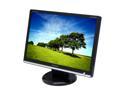
SAMSUNG 22" WSXGA+ LCD Monitor 2 ms (GTG) D-Sub, DVI-D 226BW
Pros: Vibrant colors and awesome clarity on this 22 inch monitor with a 1,000:1 contrast ratio. Best bang for the buck. I play Call of Duty 2, Red Orchestra, IL2 Sturmovik 1946, Counter Strike, MS Flight Sim 2004 and many other games that look beautiful on this monitor.
Cons: Hooking up a Playstation 3 will cut off the left and right edges by about an inch or so, because of the aspect ratio difference. XBox 360 may be able to correct for this ratio, however. Other than this? NO!
Overall Review: Was not able to find out which panel I have by looking at the back of the monitor, but I believe I got an A panel. There is some bleed through the top and bottom, mostly the bottom, but you can not notice it if the screen isn't displaying black. Had to adjust the color settings by running WinColor and then downloaded a preset off of the internet to fix the colors. Other than this incorrect color settings from the factory, I couldn't see anything wrong with the monitor that other people have been disputing about. The color correction is so easy, it will only take you 30 minutes max for someone who has never used WinColor. After you load the custom color preset, it loads on start up and performs the same as the "S" panel if there is such one. My Playstation 3 hooks up just fine with HDMI to DVI adapter. Does not display the correct ratio of course, but I'm not too worried about missing an inch on each side for a savings of 300 dollars by buying a monitor vs an HDTV.
2/10/2008See more detail
Best Bang for your Buck
SAMSUNG 22" WSXGA+ LCD Monitor 2 ms (GTG) D-Sub, DVI-D 226BW
Pros: Well first off, the brightness and contrast level of variability is unbelievable. If you need a bright monitor, here ya go! If you don't, simply change it in the MagicTune Premium software or in the OSD! 2ms response time is a plus - I feel like I'm back on a larger CRT with no ghosting that I can see. The contrast ratio is pretty nice I suppose. Hooked up my Playstation 3 with an HDMI to DVI adapter and played pretty well in 720p. Swivel and tilt is effective and easy to use. MagicTune Software makes it easy to adjust any settings for your monitor without using the panel buttons. There is also a ton of customization and calibration tools.
Cons: If you want to hook up a game console, max resolution will be 720p. Graininess was more noticeable on this Samsung LCD Monitor than on my Samsung 40inch LCD HDTV. No height adjustment.
Overall Review: Upgraded from a 17inch CRT. Running an Intel E6600 @ 3.2Ghz, GIGABYTE N650SLI-DS4 motherboard, 2GB G.Skill DDR2 800 RAM, eVGA 8800GTS 640MB overclocked, OCZ GameXStream 700W, Antec p180 Case. I do not know the "panel type" of my Monitor since the back did not reveal any indications of A or S. My colors may have been a bit off, but I was able to correct them by using a highly recommended and credible color profile.
1/2/2008See more detail
VERY Nice Card
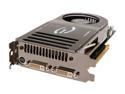
EVGA GeForce 8800 GTS 640MB GDDR3 PCI Express x16 SLI Support Graphics Card 640-P2-N821-AR
Pros: This thing runs extremely well and never bogs down. Easily overclockable. Stable card.
Cons: None, other than I don't know how well it will perform on DX10 games... Runs hot! 60 degrees Celsius while idle, are you kidding me! Yeah it runs pretty hot, but there isn't much difference while it's under a load to my amazement. Even when I'm running graphically intense games, it never passes 80, even at my clock speeds.
Overall Review: Overclocked right now to 610/1020, from stock. Haven't even seen any artifacts even at those clocks.
6/8/2007See more detail