
Your Browsing History


MARC F.
Joined on 05/06/05
0
0
product reviews
- 7
hotkey not so hot
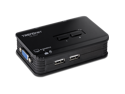
TRENDnet 2-Port USB KVM Switch And Cable Kit, 2048 x 1536 Resolution, Device Monitoring, Auto-Scan, Audible Feedback, USB 1.1, Compliant With Windows And Linux, Hot-Pluggable, White, TK-207K
Pros: Sharp display (maybe due to short cables), easy to setup and use, works with extra mouse buttons (Logitech MX510) and keyboard buttons (MS Natural 4000). The name and button of selected computer light up. Switches faster than expected (< 1 sec.) between XP and Linux.
Cons: Short cables (~4 ft), hotkey doesn't work until OS loads, hotkey doesn't work from Linux (FC4). Because the hotkey doesn't work at all times you need to keep the box close at hand to manually switch, but the short cables make it hard to keep within reach.
Overall Review: For the price (and rebate) I figured I couldn't go wrong. The product is not perfect, but exceeded my expectation based on price. When both computers are off, it auto switches to the one you turn on. When both computers are on and you turn one off, it does _not_ auto switch to the powered on one - hotkey doesn't work and you have to manually switch to powered PC. Interestingly, the hotkey does not switch based on the scroll lock keypress, but rather changing of the scroll lock LED. I configured a mouse button to emulate a scroll lock key press so my mouse button can be used as the hot key. Also, in Linux you use the "setleds" or "xset" commands in scripts to switch PCs - helpful since the the scroll lock hotkey doesn't work in Linux. If they made a 4 port KVM with a similarly low price I would buy it.
5/17/2006See more detail
mixed feelings
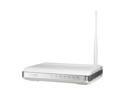
ASUS WL-520gU 802.11b/g Wireless Router up to 54Mbps with All-in-One Print Server/ DD-WRT Open Source support
Pros: I bought this mostly for the print server but also to upgrade to 802.11g from 802.11b. Hasn't needed a reset in 10 days using the latest ASUS firmware (3.0.1.3). Using the Tomato firmware sounds promising if I need to go that route.
Cons: When contacting the ASUS website to print the rebate form, the UPC of the product Newegg shipped didn't match the products supported by the rebate. You have to go through a 5 step registration process just to print the rebate form, which I had to restart 3 times to be successful because of website problems. I have little confidence that I'll receive the rebate. Printing the rebate form through the device's print server wouldn't print the 2nd page of the rebate form. In windows ASUS wants you to use a separate program to setup the printer. So far, I'm not too impressed....
Overall Review: The first thing I did was to update the firmware to the latest ASUS version (3.0.1.3) to see how it does. It hasn't hung or required a reboot yet, but the printing problem is concerning. It is comforting to know that I could always use the Tomato firmware, but it is too bad a vendor has to resort to 3rd party firmware to make their product stable/functional/usable.
5/21/2010See more detail
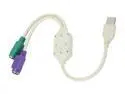
Adapter
Pros: none
Cons: Keyboard worked for about 30 minutes, mouse never worked.
Overall Review: I'm glad I didn't pay more for it. Could not get it working after the initial 30 minutes. Tried several different computers and PS/2 devices.
8/20/2009See more detail
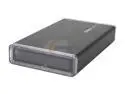
Koutech IO-EEU328-B Aluminum 3.5" Black IDE USB 2.0 External Enclosure w/ One-Button Backup
Pros: Good looking case, tool-less assembly, power supply not an inline multivoltage type. Works without a problem.
Cons: A few minor things that keep it from getting 5 eggs. There is no case stand. There are no feet on the case so it will scratch/slide when you set it down. With clear plastic on the front, you might think (as I did) that the power and activity lights would display on the front of the case. This is not so - they only shine out of the back of the case (reducing the bling factor). As another person said, the blue power LED far outshines the red activity LED. Wall wart is kind of bulky and covers adjacent outlets in power strip.
Overall Review: Works with a Seagate 300GB drive set on CS. Power supply is generic 12v type so if it dies, it will be easy to replace. I did not try the backup software. Shipping box was crushed during UPS shipping - product not harmed thanks to New Egg's generous use of packing peanuts.
1/30/2008See more detail
HP Omnibook 6000
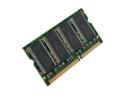
AllComponents 256MB 144-Pin SO-DIMM PC 133 Laptop Memory Model ACSO133X64/256
Pros: Probably would have been fine if it was compatible. A Newegg user review of the PC100 version says it works in a HP Omnibook 6000. The price was good so I took a chance.
Cons: Not Compatible. Nobody's fault but mine.
Overall Review: Did not work in HP Omnibook 6000. This laptop specifies PC100 memory although a 128MB PC133 sodimm is currently working in it. I was hopeful and knew I was taking a chance, but it didn't work out. The return through Newegg was easy and hassle free.
10/5/2006See more detail
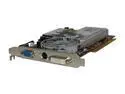
SAPPHIRE Radeon X1600PRO 256MB GDDR2 AGP 4X/8X Graphics Card 100148L
Pros: Good display quality, decent performance, stable in directx, looks like it can O/C fairly well
Cons: some directx objects seem like the texture doesn't get applied (they remain grey). This seems to happen most when looking into the "sun". A driver update may help this.
Overall Review: Performance is only a little better than the nvidia 6200 it replaced, but the directx is much more stable than the 6200. I needed stability which is why I bought the card.
9/22/2006See more detail