
Your Browsing History


Aaron B.
Joined on 10/03/05
0
0
product reviews
- 9
Worked
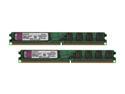
Kingston ValueRAM 2GB (2 x 1GB) Unbuffered DDR2 800 (PC2 6400) Dual Channel Kit Desktop Memory Model KVR800D2N5K2/2G
Pros: Finally found memory that worked with my Intel DG965WH
Cons: none
12/20/2006See more detail
so so
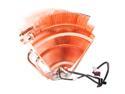
Thermaltake V1 Max-Performance CPU Cooler with Massive 110mm Blue LED Full-Range Variable Speed Fan CL-P0401
Pros: Keeps my i7 920 @ around 49 degrees idle.
Cons: Keeps my i7 920 @ around 49 degrees idle!!!!!!!!! around 70 while gaming. This thing does not do its basic job of keeping the cpu cool! I was getting those temps with the stock cooler. You would expect ALOT more from a $60 item.
Overall Review: Yes i know how to set the mounts on the 1366 socket and yes i reset it multiple times with Artic Silver 5. And yes i have a full sive tower with 5 fans! It just does not perform as advertised. Sending it back for a Vigor Monsoon III.
2/5/2009See more detail
Awsome
Microsoft Windows 7 Home Premium 64-bit 1-Pack for System Builders
Pros: Stable
Cons: None
Overall Review: Blows Vista out of the water!
11/16/2009See more detail
OUTSTANDING!!
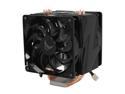
Vigor Monsoon III LT Dual 120mm Fan CPU Cooler Socket 1366 Ready
Pros: COOLS!!! I sent back my Thermaltake V1 for this baby and boy am I glad I did!! I idle at 35 degrees celcius.
Cons: Pretty big but looks awsome once it is hooked up and doing its job.
Overall Review: I Google and asked Jeeves and Yahoo'd and every other search engine out there and I couldnt find the answer I needed!! Well I'll be the first one to say it......the Vigor Monsoon 3 fits PERFECTLY in the Thermaltake Armor Series VA8003BWS Black Full Tower Case w/ 25CM Fan. Almost as if it were made specificately for it. I DID NOT have to remove the 250cm fan on the side. The top prongs actually fit inside the fan cage with about 1/2 inch clearance from the spinning blades. It does not interfere with and fan operation in this case!!!
2/10/2009See more detail
GRRRRRRRRREAT
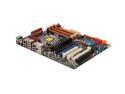
ASUS P6T Deluxe LGA 1366 Intel X58 ATX Intel Motherboard
Pros: worked on 1st boot right out of the box!!!! Ensure you load you DIMMS i the correct slots (the orange ones if you are using 3 DIMMS) so you do not receive a boot error. I bought the combo deal with CORSAIR XMS3 6GB (3 x 2GB) 240-Pin DDR3 SDRAM DDR3 1600 (PC3 12800) Triple Channel Kit Desktop Memory and saved $30 bucks!! No errors what so ever. Cant wait to overclock!
Cons: Non so far. I will post if something happens.
Overall Review: This is my 1st board from ASUS. I always bought Intel for some reasons but the DX58SO was getting horrible reviews from all over the internet. ASUS has got me!!
1/31/2009See more detail
One Word... AMAZING!!!!!!
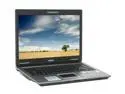
ASUS F3 Series 15.4" Intel Core 2 Duo T7200 1GB Memory DDR2 667 Windows Vista Home Premium 90NL0A2132934CAL600Y
Pros: Before I say anthing, 1st thing is BUY 1 MORE GIG OF RAM!!! It runs beautiful on Vista. I bought: Kingston 1GB 200-Pin DDR2 SO-DIMM DDR2 667 (PC2 5300) Notebook Memory Model KVR667D2S5/1G - Retail Next download the upgraded bios from ASUS (VERSION 208,use winflash 2.2 to flash) . This will fix the grainy resolution when you 1st get it. Yes Vista comes with alot of bs software but you can easily uninstall these programs. I did my research and figured out what needed to stay and what could go. For professional users who life full control of their system you can disabble the annoying pop ups from User Account Control by going to search, type in UAC and the option will be there to turn it off. It is not recommended by Windows but they always recommend their own protection vs going to a 3rd party protection. You can also control how many programs come up on startup by downloading a-squared HiJackFree and going to autoruns and deleting programs that start up in your windows registr
Cons: THIS IS CONTINUED FROM ABOVE!! Do not delete anything unless you do your research. Not including the programs I put on, the only thing I left to start up was ATKMEDIA, Sidebar, StartCCC, and SynTPEnh. DO NOT DELETE THESE YOU WILL NEED THEM!! www.liutilities.com or www.processlibrary.com are good websites to figure out if you want to keep the start up programs or not. Another good little program is CPUZ. Tells you all the stats of you comp and what they are running at.
Overall Review: Once you customizes it the way you want it is an awesome little laptop for a great price!! I wasn't disappointed at all! The video card alone makes this a good buy. I can play BF2 at full graphics with no problem. It stays extremely cool so it wont burn your leg like a lot of other notebooks. P.S. You do not need to install the updated drivers cd that comes with the laptop. Everything is already updated with the exception of the BIOS. Make sure you download the Windows updates as well.
7/23/2007See more detail