
Your Browsing History


Jeremy R.
Joined on 12/29/01
0
0
product reviews
- 2
Extremely Satisfied
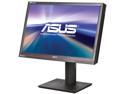
ASUS ProArt Series PA246Q Black 24.1" 6ms P-IPS Height/Swivel/Pivot Adjustable LCD Monitor w/2 USB hub, Card Reader & Display port 400cd/m2 50000:1 DCR
Pros: This monitor is amazing! It's large and bright, sharp and precise. I love that is has the ability to adjust for sRGB or Adobe RGB on the monitor as I do both web and graphics design and can trust what I am seeing. I have not done any calibrating of this monitor yet with my Spyder coloromiter but even out of the box with no adjustments it's worlds better than my previous monitor after calibration. Comparing it with some printed pieces I have from the press it is very close to what was printed which is a relief, it's no fun trying to get a precise color when you can't trust monitor output. I will most likely not use many of the accessory features of the monitor but it includes many useful inputs. While I am excited for the design benefits, this would be a beautiful monitor for gaming or high end users who want a great picture. It may not be able to compete with the top end monitors for design but at this price I am extremely happy with the performance. A real bargain!
Cons: I have very little negative to say about this monitor. I guess if I wanted to be picky I am not crazy about the design aspect of the bezel/frame. The measurement notches on the edge don't bother me, I tend to work in a dark or dimly lit room and I can't even see the notches at my usual light level. The design is a little old fashioned for me though. I am used to seeing the sleek modern looking frames like from Samsung on a nice new monitor and this one looks blocky and slightly retro in comparison. Also it would be nice if there was a built in software that would allow you to plug your coloromiter directly into the monitor and calibrate that way as with the boutique monitors. At this price point though that is not a reasonable expectation, it would just have been nice. These slight flaws are more than liveable to me though and matters very little, especially since the display delivers on it's promise of quality!
Overall Review: My monitor worked great right of the box, powering up with no visible dead or bright pixels. There was a slight gradation on the right side compared to the left but after just a couple minutes of the monitor powering up that disappeared. I am a freelance graphics designer and have been using color calibrated budget monitors. While OK they simply aren't physically able to adjust to the level that is needed for accurate design, even when calibrated. It's nice to see someone is finally acknowledging the needs of a mid priced upper class monitor. I have seen other brands with nice panels in this price range, but lacking key features like the Adobe RGB coverage of this Asus. While I would love to own a monitor like an Eizo, the realities of profit margins make those out of my reach for the moment, even doing moderately well. I can do my work on this monitor with confidence and the price point is pleasantly accessible. Two big thumbs up to Asus for such a great solution!
4/6/2011See more detail
Great case for wall mounting

Thermaltake Core P3 TG Pro Snow Snow SPCC ATX Mid Tower Computer Case
Pros: - Lots of space for a mid-tower - Well thought out for cable management - Versatile mounting options - Great build quality - Looks great when the build is done; on the wall or on a desk
Cons: - Directions are vague and sometimes misleading (also need to show more steps) - Some cable openings could be a little larger or shaped differently
Overall Review: Very happy with this case overall. It is flat packed, and so you have to assemble it from scratch. The instructions could use a lot of help, but this is a known issue with this case if you check tech reviews and build videos. I wouldn't recommend it for a first time builder because you have to fill in the blanks so much, but for someone used to building PCs it isn't too bad to figure things out. Fortunately the parts make sense and the parts list pics in the manual go a long way to sort out any confusion. The quality of the materials are very good and everything feels durable and solid. I was a little unsure of how the wall mount would work and how steady that would feel on the wall, but I am happy to say that the structure if very firm and with a decent TV mount or similar everything feels rock solid when wall mounted. I really liked building in an open air case for the first time. It was very easy to move around in and I liked being able to pick and choose the parts that I wanted/needed and reduce the clutter of the case. The cable management space on the back is good and there are a decent number of places to use cable ties to further organize things. Really the only thing I would wish for other than a better manual is for more, or at least more flexible cable openings from the back to the front. Especially in the power supply and GPU area. I got some custom cables with combs and really like how much cleaner they look. The cable slot for the GPU area is just a vertical slit though, so whether you mount the GPU horizontal or vertical the slot isn't shaped right to line up with the GPU power cables for a nice clean inline look all the way. The cables have to be stacked and twisted. It looks OK, but doesn't look as clean as it could. The power supply area shape isn't too bad, but not really large enough to keep all the cables looking really clean. You can manage it, but you really have to work at it and the cables need to be a little longer than is typical to give you the flexibility to keep things neat. I would have liked to see that slot be almost double the size anyway. Depending on our power supply size you could block some of the opening which could make things a lot worse. Still a great case though and those are minor gripes. I will probably keep this one a long time barring some substantial revision of this design that improves things. With a little minimalist RGB in the mix, a PC makes a great display piece in this case and allowed me to make probably the nicest looking build I have done.
3/31/2024See more detail