
Your Browsing History


Stuart H.
Joined on 11/19/05
0
0
product reviews
- 35
it works
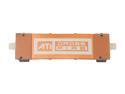
HIS CrossFire Bridge Interconnect Cable Model HCFBC4065
Pros: It works. Connect it to your 2 crossfire cards and enable crossfire using AMD Overdrive. Didn't even need to restart my computer, started working instantly.
Cons: It costs more than $3 and doesn't always come with crossfire-ready mobos?
Overall Review: Didn't see anyone else mention it (or you may need to scroll down farther than you'd like to get the info): it can reach far enough to connect 2 pci-x16 slots that are 3 pci slots apart. If the 2 slots that you have your video cards in have more than 2 pci slots in between them, this connector is not long enough for you, you will need to buy the extended connector elsewhere. Also, unlike most (all?) sli bridges, this bridge (all xfire bridges?) is flexible, so if your vid cards are less than 3 slots apart you're fine.
5/12/2011See more detail
Good... for the price.
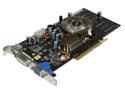
ASUS GeForce 6600 256MB DDR AGP 4X/8X Graphics Card N6600/TD/256
Pros: Low price Handles new games on low settings Overclocks well Runs at low temperatures
Cons: Terrible stock cooler
Overall Review: I upgraded from an fx5600 cuz my comp was having trouble with doom 3/quake 4. With this card, I've noticed it dominates older games (including ut2004), but it only gave me maybe a 5 fps average increase on D3 and Q4. Not very good considering I'm still running both games on minimal settings. Also, the cooler it comes with (both for the core and the hsi chipset) aren't even made out of aluminum. I don't know what the hell that stuff is, but a welder i know thinks it's some kinda "pot metal". I upgraded that to a vantec iceberq 5 and now I have this card OCed to 420/570. Ok card, but if you're goin for a serious upgrade, I suggest a 6800/x800 or higher.
1/8/2006See more detail
Beautiful monitor
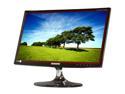
SAMSUNG 21.5" TN LCD Monitor 2ms GTG D-Sub, HDMI B350 Series S22B350H
Pros: VERY bright screen HDMI hook-up Excellent viewing angles Very light and thin
Cons: Not 3d Not 120hz Not 2560x1600
Overall Review: I'm definitely happy with my purchase. I was going to get an Acer even though my last Acer (about 5 years old) broke down on me, but then I saw this go on sale on Newegg. Samsung may suck at programming a phone but they make excellent screens, and this is definitely no exception. Also the cons aren't really cons as there really is almost no demand for a 3d computer screen and 120hz is really overkill for gaming (2560x1600 would be freaking awesome if I could afford it). Other than that, assuming this monitor don't break on me I highly recommend it.
7/20/2012See more detail
it blows
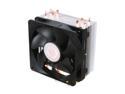
Cooler Master Hyper 212 Plus - CPU Cooler with 4 Direct Contact Heatpipes
Pros: Pulls the heat from the cpu to the fins more efficiently than any comparably priced competitor. Very quiet.
Cons: None.
Overall Review: Thought I should mention it fits on an MSI 890FXA-GD65 with the fan blowing toward the rear of the case without giving up a dimm slot. This was important to me for dual-channel memory and good airflow setup. However, the nearest stick of g.skill BARELY fits. The stick is actually going in the slot at a slight angle though I don't think it will affect the memory in a bad way at all. As far as I can tell MSI put the cpu as close to the dimm slots as they could... *sigh* So this cooler will probably work for anyone who's worried about having the same issue.
5/12/2011See more detail
Works Good
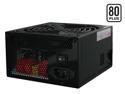
Thermaltake W0106RU 700 W Complies with ATX 12V 2.2 & EPS 12V version SLI Certified 80 PLUS Certified Modular Active PFC Power Supply
Pros: Insanely quiet. Very pretty psu. gives me all the power I need.
Cons: Doesn't vent the hot air very well. That big fan spins slow and it probably keeps all of the psu components cool enough, I just wish they put another fan on the back like my old antec psu. The air doesn't get pushed out the back as much as I'd hoped. It just kind of 'wafts' hot air out slowly. Not really a terrible thing as long as it doesn't overheat though. Also I thought it was weird that this has 3 6-pin pci-express connectors; 1 next to the 24 pin, the other 2 modular.
Overall Review: I got this to replace my antec 600w because I was experiencing serious performance problems on some older games with my brand new 8800gts. Supposedly the antec psu doesn't have enough amps on the 12v rail whereas this one is approved for dual 8800gts cards. The problems are still there, and probably due to either the game needing a new patch, the 8800 needing better drivers, vista needing a service pack release or any combination of the three. I do hate computers.
4/13/2007See more detail
Vista x64 beware!
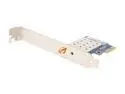
ABIT AirPace Wi-Fi Wireless Adapter IEEE 802.11b/g, Wi-Fi compliant PCI Express Up to 54Mbps Wireless Data Rates
Pros: The only wireless adapter with a pci-express interface. Also fits my gigabyte 590 mobo without hitting the northbridge heatsink.
Cons: Doesn't work for vista x64 yet. Or should I say it only works for some people. I've tried several different drivers they said will work, none of which will recognize that I have the adapter installed. I've also tried turning off driver signing verification, which also doesn't work.
Overall Review: Abit was very prompt and e-mailed me back with a link to one of their new drivers (which didn't work). They're forum moderators also suggested a few things, so hats off to their customer support. They just need to write some decent drivers.
4/13/2007See more detail