
Your Browsing History


Larry H.
Joined on 10/18/04
0
0
product reviews
- 8
Great fans

Noctua NF-A14 iPPC-2000 IP67 PWM, Heavy Duty Cooling Fan, 4-Pin, 2000 RPM (140mm, Black)
Pros: First off, my initial concern was that these were 2000 RPM vs the 1200 - 1500 RPM non-industrial Noctua fans. Being a quiet freak, I didn't want the noise. But if your motherboard supports PWM, the 'capability' of running at 2k is irrelevant. After running fan tuning on my new x99 mobo, the fans run between 300 and 1200 RPM. Also consider the noise rating is based on running at full RPM. I would guess that this fan running at the same RPM as the regular Noctua model would rate the same. I initially bought two 140mm fans to replace the stock fans on my new Corsair H110 radiator. The stock fans caused so much vibration that my case buzzed. After installing these fans, not only did my CPU temp drop by 4C, the noise level went to dead silent. In fact, I was so impressed with these fans, I bought five more to replace all my case fans. My case is a Lian Li PC-V2130 full tower high-end case, so the stock fans were certainly not low quality. My CPU is the Haswell-E 5960x on an Asus x99-E WS mobo OCed to 4.4GHz. My idle CPU temp is 28C, and under full load running AIDA64's stress test, it never gets above 56C. Now that's impressive. When running the stress test, I can barely hear the system. When running idle or gaming, the system is dead quiet. In fact, when I sit down at my computer, I have to put my hand on the top mounted radiator to see if it's even on. Since there's no vibration, airflow is the only way to tell that it's running. My first thoughts on the IP67 waterproof rating was that it doesn't apply to a computer. But waterproof also means dustproof. And all fans in my previous builds got louder over time. I'd guess that's because the bearings became compromised by dust. Only time will tell with these fans, but I don't anticipate any problems.
Cons: None other than price.
Overall Review: I watched many video reviews on these and read many reviews before deciding on these fans. Supposedly, the three phase motor ramps up and down much better than single phase motors when controlled by PWM. I've read that many PWM fans produce a clicking noise when running at low RPM. No such problem with these fans. I'm extremely picky about my gear and am very happy with this purchase.
11/2/2014See more detail
Great case
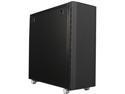
Lian Li PC-2130B Black Brushed Aluminum ATX Full Tower
Pros: Huge: Just what I expect in a full tower case. Quiet: The sound foam really does work and the fans are high quality. Even under full load, it's really quiet. However, there's a con here. See below. Great interior layout: The cage for the 5.25" front bays can be removed (who installs a DVD drive anyway? I haven't had one for 5+ years), allowing installing SSDs near the top of the case and HDDs down in front of the intake fans. Less interior obstructions mean better airflow. Cable routing is exceptional as well. No cheesy side window or LED lights on the fans. Yes I game, but this serves primary duty as my workstation for software development. I regularly have clients in my office, so I wanted something understated, yet classy, not Battlestar Galactica. This case is all of that. Nothing gaudy about it. Wheels: Leaps and bounds above my CM Haf 932 case. Those broke twice in the 4.5 years I’ve had it. These are machined aluminum. I don’t expect any issues here. Case filters: Filter cleaning is so easy I may actually do it on a regular basis. Top case vent: Perfect for the Corsair H110 radiator. (See below for con here.) Front cover: It’s like a work of art…what can I say? Overall build quality: Superb, with one exception. See cons.
Cons: The only con that I can come up with is related to the top grill. Normally, I wouldn’t drop an egg for something others might consider trivial. However, on a case this expensive, I wouldn’t expect to have to do my own mods to fix it. The problem is that it rattles against the case, especially when under load. There should’ve been some sort of rubber gasket or similar material to prevent metal to metal contact, especially in a case they classify as one of their ‘silent’ cases. The good news is the fix was easy enough. I just went to Home Depot and bought some rubber washers and installed them under the screws that mounted the radiator inside the case. The rubber washers protrude a bit above the screws and provide contact for the top grill. Problem solved. I know, not much of a con. But for the price, I can justify being a bit picky.
Overall Review: Not a con, so I’ll mention it here. The PSU I installed is the Corsair AX1500i. It is obscenely long and sits just over the bottom case fan nearest to the PSU. Not enough to cover it, but I did have to bend the fan grill down a bit and remove one fan grill screw to allow the PSU to sit on its riser. It sits over the screws that mount the case fan to the case. Not a big deal but thought I should mention it.
9/30/2014See more detail
Worth every penny
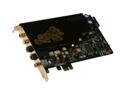
ASUS Xonar Essence STX Virtual 7.1 Channels 24-bit 192KHz PCI Express x1 Interface 124 dB SNR / Headphone AMP Card
Pros: Well, I’m an old school audiophile…or at least I used to be. In the 80s and 90s, I ran a Hafler 500 amp, Hafler preamp and M & K speakers. I started getting back into it a year ago when I bought the Xonar HDAV1.3 Deluxe for my media center. I’ve have not had any problems with that card and drivers, or the STX for that matter, in either Vista x64 or Win7 x64. (Both are currently in Win7 x64 boxes.) Not sure why others have issues. And anybody buying a $200 soundcard “should” have enough smarts to toss the CD that comes with it and download the current drivers from Asus. I’m a programmer and spend a lot of time at my office computer. Briefly, the hardware is an Asus P6X58D Premium mobo, i7-950, 12gb RAM and two 5770s in Crossfire. As far as I have read, the onboard Realtek ALC889 is a great chip with a SNR of 110. So I bought an Onkyo M-282 two channel amp a month ago, and have it hooked up to Polk Monitor 40 Series II speakers. But the sound was lacking. It simply didn’t have the fu
Cons: Absolutely none.
Overall Review: The only problem with this card is that I can now hear a difference between 192 and 320 kbit/s. I could even swear there is a difference between 320 and lossless, but let’s not go there. :)
1/29/2011See more detail
Just read the RAID0 benchmarks
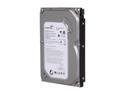
Seagate BarraCuda 7200.12 ST3500418AS 500GB 7200 RPM 16MB Cache SATA 3.0Gb/s 3.5" Internal Hard Drive Bare Drive
Pros: I’m a self-employed software engineer, and I’m kind of a HDD snob. I’ve run SCSI since the mid 90s, with my last SCSI system being two U320 15k HDDs in RAId0. I just build a new 1366 i7 system, 12gb RAM, with the new Sata III 600gb VelociRaptor as my primary workstation (didn’t want to mess with SCSI or SAS anymore). So I moved my dual core E8500, 8gb RAM system to my media center. I already had a spare Seagate Barracuda 500gb drive laying around, so I bought another to set up a RAID0 on the E8500 system just using the Gigabyte motherboard RAID controller. Below are the benchmarks for the two systems, both running Win 7 Ultimate x64. You can see for yourself, these drives flat out fly in a RAID0 configuration. (And yes, the Buffered Read number for the VelociRaptor is correct). The tests were run using the disk benchmark utility in Everest Ultimate v5.5. See other thoughts for benchmark results.
Cons: None.
Overall Review: Single 600 gb VelociRaptor on Sata III bus: Linear Read (Begin) 147.3 MB/s Linear Read (Middle) 125.5 MB/s Linear Read (End) 89.4 MB/s Random Read 120.7 MB/s Buffered Read 4717.0 MB/s Average Read Access 6.99 ms Two 500gb Barracudas in on-board Sata II RAID0: Linear Read (Begin) 247.4 MB/s Linear Read (Middle) 210.9 MB/s Linear Read (End) 131.8 MB/s Random Read 219.8 MB/s Buffered Read 433.8 MB/s Average Read Access 13.51 ms The existing Barracuda I had was the older 7200.11, but the array went together without a hitch. So in conclusion, buy two of these for the price of a single 1T HDD, RAID them and watch them fly. As a side note, I’ve had many Seagate drives through the years, including their SCSI products, and they have never let me down. Can’t say how customer service is as I’ve never had to return one.
10/7/2010See more detail
Great monitor, regardless of money

Hanns-G HZ281HPB 27.5'' 3ms Full HD 1080P HDMI WideScreen LCD Monitor 400cd/m2 X-Contrast 15,000:1(800:1)Built-in Speakers
Pros: I'm a software engineer and have a worked on a 24" Samsung 245bw for the last couple of years, also a 1920 x 1200 res monitor. I'm also a gamer. I needed a second display for my workstation and a friend recommended this. This display is now my primary display and the picture quality is better in every way over the 245bw. Brighter, clearer and the color is more accurate. No dead pixels either. I have to admit, for this price, I expected less...much less. I guess time will tell if the lower price (from the competition) will mean a shorter lifespan due to cheaper components. But for this price, if it dies in two years, who cares?
Cons: None so far.
Overall Review: Would like to have swivel and height adjust, but with a display this big, it doesn't really need it.
8/28/2010See more detail
Great sound, need to be willing to work with it
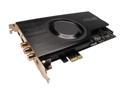
ASUS Xonar HDAV1.3 Deluxe 7.1 Channels 24-bit 192KHz PCI Express x1 Interface Audio/Video Enhancement Combo Card
Pros: I'm 53 and somewhat of an audiophile. In my 20s, I built my own speakers. In the 80s, I had a Hafler amp and preamp, Nakamichi cassette deck, M&K speakers,etc. I took a break to raise some kids, but that passion for good music started calling once again. So I did a ton of research. I've also had Creative cards in the past, but after talking to some guys who know their stuff and recommended this card, I bought it. It's home in my media center PC with an Onkyo 7.2 AV and Polk speakers. I can tell you that there is a big difference from on-board sound and this card. This card is warm and rich sounding, crisp on the highs and the bass is full without being boomy. (Also have a Polk 505 sub on one channel and a 200w Sony sub on the other.) Obviously, I'm a music guy. But the wife and I enjoy our movies, many of which are downloaded. Either downloaded or via my Blu-Ray player in my media center PC, I get full 192KHz audio. Yes, I run the audio through HDMI. Works great!
Cons: As others have said, you have to be willing to fiddle with it to get all of the benefit out if this card. But I can tell you this was the best investment I've made in my media center.
Overall Review: For example, my side speakers weren't working. Asus manual said to run the card in 8 channel output. But I dropped it to 6 channel output, and all channels now work without a hitch. This is probably because the source is 5.1, and my amp splits it to 7.2. But the manual should've covered this.
5/8/2010See more detail