




 here!
here!
I’m your shopping assistant for PC builds, upgrades, and everything tech.
Got questions? Ask away!
Start a conversation
here!
I’m your shopping assistant for PC builds, upgrades, and everything tech.
Got questions? Ask away!
Start a conversation

Joined on 06/19/08
Gave my old Thinkpad a Snappy Performance Boost!
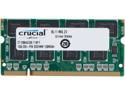
Pros: Recently my HP notebook died a sudden death, and I resurrected my old IBM Thinkpad R50 running Windows XP-Pro with only 512MB Ram. The sluggishness and freeze-ups when more than a few windows were open was making me want to start drinking again... But after upgrading it from 512MB to 1.25GB with this 1GB ram module (which went flawlessly)... Now my resurrected Thinkpad is zippy and fast!! No more annoying freezing up or reading War & Peace waiting for things to load. Perfect ram at a cheap price (was only $38.99 thanks to a NewEgg discount deal!! :)
Cons: Not really a con... Just be advised to have a pair of scissors handy when attempting to open Crucial's plastic "adult-proof" packaging ;)
Overall Review: Entire order got here in only 2 days. My NewEgg order status showed SHIPPED within 15-minutes after placing the order -- and that was for standard 3-day shipping WITHOUT paying for expedited processing or anything! Thank you NewEgg!!
Breathed new life into my Dell Precision M6500 workstation!
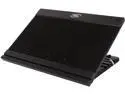
Pros: My Intel Core i5 560M readings are now averaging 10°-15° COOLER! The fan is QUIET. Solid and sturdy stand with good airflow, love the adjustable angles to raise my nb screen to eye level. Even the little tabs that slide into the front grooved channel to keep nb from sliding off stand are sturdy, they appear to be made of metal covered with rubber sleeves. Nice NOT to have flimsy plastic tabs there. I cannot imagine these tabs breaking.
Cons: Manufacturer's quality control leaves something to be desired in the soldering of wire leads to fan contacts department... My N9's FAN arrived DOA.
Overall Review: NewEgg as always was great... Fast delivery and good customer service... They offered to exchange my DOA cooling unit at their cost with a prepaid shipping label. But hoping to avoid the hassle and time lag between returning DOA unit and waiting for a new one to arrive, I was able to repair the non-functional fan myself instead... Happily the cooling unit's housing can be taken apart by removing a few (8?) phillips head screws. And just another 3 screws to remove the fan from the base. The 2 lead wires that SHOULD have been connected to two contacts on the fan housing, weren't!!! Yup, that would account for why my nb recognized the new USB ports just fine but the fan wouldn't turn on. The fan is plastic, no way I was going near that plastic with a soldering iron. So what was the fix? A gummy putty-like little glob mixture of Electrical Tape and Gorilla Tape pressed down onto the two wire leads connecting them to the two contacts and Viola! Working fan. In an otherwise quality and sturdily constructed cooling unit/stand, I fail to understand how the manufacturer could skimp on ensuring the most critical part -- the cooling fan -- would be functional. Shame on DeepCool for their poor soldering of such a crucial component! But Kudos to DeepCool for a unit that works great after getting it to work! I only wish the cooling pad was an extra 1" deeper length. My beast of a Dell workstation's (17" screen, 15.4"W x 11"D) rear rubber feet hang off the back of the cooling pad by a hair. The reason it hangs off the rear is because the channel that the two front holding tabs slide into is set back from the front by about 3/4". Also having the aluminum extrusion channels going all the way to the rear of the cooling unit would be nice. But to conclude, this cooling pad has truly breathed new life into my nb workstation. The amazing drop in CPU temps has improved overall system performance significantly. Now, instead of averaging a 50%-100% CPU load requiring frequent reboots, I'm averaging a 15%-25% CPU load instead -- with nothing else changed nor programs closed. A cooler CPU is a more efficient smoother faster better performing CPU. A cooling pad isn't just about keeping your cpu from frying ;-)
Tiny, Cute, Powers EVERYTHING I Need it to
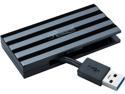
Pros: Great deal from NewEgg of course. Plugged in the power adapter first before connecting hub to notebook (as suggested by another reviewer plus in User Guide) -- then connected all my usb peripherals I needed to -- including 2 hard drives, printer, card reader, broadband modem -- everything recognized perfectly. Everything working perfectly.
Cons: None.
Overall Review: Pearlized red color looks great next to my silver, aqua blue/green, and black notebook and components -- really a stylish looking color coordinated shelf area with just the right splash of color :-) Color coordination isn't usually one of my concerns since heck -- camouflage and denim are my favorite colors ;)
New Life for my Trusty Old Thinkpad R50!
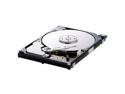
Pros: Replaced my old 33GB Travelstar HD with this 160GB Samsung and am happy to report the Samsung Spinpoint is JUST AS QUIET as my silent old drive (a major factor to me since I keep my Thinkpad on a shelf behind me and don't need annoying spinning or buzzing sounds). Perfect, no bad sectors or anything, and possibly even a little faster than my old drive. Runs cool, fast, 'n quiet.
Cons: I didn't buy TWO of these drives when I had the chance! (NewEgg's status on these now says, "Deactivated. This item is currently out of stock and it may or may not be restocked.")
Made HD clonng a breeze!
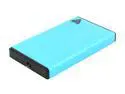
Pros: It took me 2 tries before I got the HD cloned correctly so the new drive would boot up correctly -- simple matter of overriding the "EZ Gig III" software default settings (which are preset to offer fastest instead of most complete/accurate cloning) -- no big deal -- the cloned drive booted up and worked PERFECTLY 2nd time around. The external hd enclosure itself is well-built, solid and sturdy. XP had no problem detecting it as soon as I plugged the USB cable in. Very handy that the external enclosure can handle either SATA or PATA drives, it has connectors for both. Also, no tiny little screws or anything to mess with! Handy latch button releases the enclosure's locking mechanism so its tray pops out easily.
Cons: None really. Other than I wish the external hd enclosure had some ventilation holes. Not a problem really unless your HD tends to run hot normally.
Overall Review: Well-built and does exactly what it's supposed to. I even kinda like the Aqua blue/green enclosure's color :-)
Done Dirt Cheap!
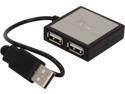
Pros: Inexpensive (only $6.99 @ NewEgg); Tiny; Attractive; Does what it's supposed to do. Before I only had 2 USB ports, now with this hub I effectively have 5. Good deal.
Cons: None.
Overall Review: You really just need to know the power draw requirements of devices you're going to plug in to the hub. Each port in the hub can only support a 100mA draw (the hub provides for 500mA shared total between itself and the devices plugged into it). If you need to plug power-hungry devices into your hub, then you'd want an externally powered hub instead of a bus-powered one like this. I was surprised my external keyboard requires 70mA but my external hard drive only requires 2mA. Go figure. When in doubt what power your devices need, go to Windows Device Manager, view the properties for your USB device, and the Power tab of each device's properties tells you exactly what the power draw of each device is. That takes the guesswork out of it. Entire order got here in only 2 days. My NewEgg order status showed SHIPPED within 15-minutes after placing the order -- and that was for standard 3-day shipping WITHOUT paying for expedited processing or anything! Thank you NewEgg!!


