

Your Browsing History


Jeremy D.
Joined on 01/29/06
0
0
product reviews
- 11
Yep. It does exactly what I expect it to.
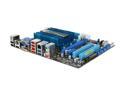
ASUS E35M1-M PRO Fusion AMD E-350 APU (1.6GHz, Dual-Core) AMD Hudson M1 Micro ATX Motherboard/CPU Combo
Pros: Basically a netbook in a micro-ATX form factor. - Plenty of computing power for a server/HTPC type of box. - Can run AMD Stream if you're into OpenCL and such - Incredibly low power. Core speed can vary from 800MHz to 1.6GHz, configurable through Catalyst Control Center. - Idles at 32C, 2xSuperPI is 45C without the fan in an Antec NSK2480 with both stock fans installed on their lowest speed. - No Audio/Video stuttering with anything I could throw at it (DXVA-enabled drivers, tested h264, Mpeg-4, Mpeg-2, Youtube HD) - Cheaper to buy this and run it for 2 years compared to my old hot computer for 2 years. - Installed Windows 7 on fresh disks with no hand-holding.
Cons: - Windows drivers are not yet available through Windows update. This will surely change. Until then, you have to use the install CD, at least to get online. - The installation DVD has a goofy GUI. I'd rather just have a list of things I can install, and not submenus or anything. The DVD file layout is quite nice though, in that you can easily find all the drivers in /Drivers with no particular searching required. - There's a scuff protector on the heatsink that needs to be removed on first use; I almost missed it and stunk up my apartment. - The BIOS boot order icons are a bit useless with multiple drives, as it only lets you select "hard disks" or CD/DVD. The actual boot order configuration menu lets you sequence the individual disks too.
Overall Review: It comes with a goofy little fan. It looks like you just screw it into the heatsink, and then you can apparently overclock a bit. I'm not entirely sure why Asus included it; I don't think the low power PC market is the type to overclock. The folks that do overclock probably won't use the little fan. There's a tiny little enable/disable switch for "TurboKey" but it isn't particularly well documented. Mine came with it switched to "disabled" but apparently the default is "enabled." It's got UEFI, which I find a bit jarring being used to the old ugly BIOS's of yesteryear. Because it's UEFI, I don't know how easy it would be to get Windows XP on this. I'm using Windows 7 Professional, 64-bit and it works great. It's a new system. If you deviate from the QVL for RAM, who knows what you'll get. I got some Kingston HyperX and it works flawlessly. It doesn't have "fake" RAID or a real RAID controller. I suspect it wasn't included because Windows software RAID is now very mature.
2/25/2011See more detail
Bad RAID
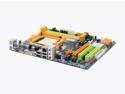
BIOSTAR TFORCE TA780G M2+ AM2+/AM2 AMD 780G Micro ATX AMD Motherboard
Pros: For what you pay, it has a lot of nice features. It really does a lot of things very well. Handles AM2+ and DDR2 1066, has some fair, not spectacular, but fair OC features, especially for an mATX board at this pricepoint. There are enough expansion slots for most purposes. The on-board sound isn't bad, and the onboard-graphics is OK as well.
Cons: One big con for me, why I ultimately returned this board: every, and I mean *every* configuration I tried of RAID1 would cause write errors in every operating system I tried. To be clear, I tried 32bit XP SP3, 64bit XP SP3, 32bit Vista SP1, 64bit Vista SP1, 32bit Ubuntu 8.04, 64bit Ubuntu 8.04, 32bit Ubuntu 7.10, and some Slackware I had lying around just for the heck of it. I tried the BIOS it came with and the most up to date BIOS with every OS, as well as the drivers that came on the CD or the drivers from their very slow website. This took exactly 19 installs before I determined I'm not the problem here. Around #7 I contacted tech support by email. The reply was to call them. I called them, and after a very short time on hold, was told that no one in the US tech support office knew what the problem was. I was also told they didn't want to RMA it, and should contact the Taiwan tech support office. They too were useless.
Overall Review: The Taiwanese tech support suggested that it was Microsoft's fault and I should take it up with them. Given that I tried several distributions of Linux, I doubt that. I currently have the exact same components running on a GA-M57SLI-S4. It works flawlessly. I was running my memory with 5-5-5-18 while trying to get the TA780G working, as well as not running my sound card, in case anyone was wondering. Components are: AMD Athlon 5400+ Black (Brisbane, running at stock 2.8GHz right now), Rosewill RCX-Z1 fan, Mushkin 2x1GB DDR2 800 (996533, running at 4-5-4-11), EVGA 8800GS "Superclocked edition." 2x500GB Seagate 7200.11 Barracuda drives in RAID1, Terratec Aureon 7.1 Space soundcard. Antec Smartpower 500W PSU, Lian-Li PC-61 USB case.
9/18/2008See more detail
Great motherboard
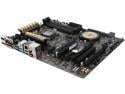
ASUS Z97-A LGA 1150 Intel Z97 HDMI USB 3.0 ATX Intel Motherboard
Pros: Works as advertised with no headaches. One-touch overclocking is stable. Easy low power configuration.
Cons: None that I can see.
5/31/2014See more detail
Great, Quiet, Best Value
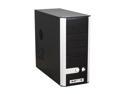
Cooler Master Centurion 5 CAC-T05-UW Black Aluminum Bezel , SECC Chassis ATX Mid Tower Computer Case
Pros: Cooling - Very effective. It's no tornado, but it's kept my P4 Northwood 2.66 at the same temperature as if the case were open. This is probably directly the result of the inclusion of the side air duct. Noise - Very little. Well dampened, the 80mm front fan does not whine as is typically characteristic of small fans, and the stock 120mm fan is very good and quiet. For me, the case fans are not the loudest part of the computer system; that task is strictly relegated to my graphics card. Features - Front access peripherals are useful. It's nice to see Firewire on the front. Screw-free 5.25 drive mounting is sturdy; I couldn't push drives out with all of my force when they are locked. The PCI expansion slot locks are also sturdy. Build quality - Case is reasonably sturdy and not terribly heavy. Front 5.25 slots don't bend in very easily. Power button and reset button are very easy to press. Rolled metal edges are present in some places, however you still may scratch yourself.
Cons: The case will bend/skew a little if you force it while a panel is off the side. The power supply slot is very easy to scratch yourself on. It is a bit difficult to pick up off of the floor as there are no real grips on the case, and there are no posts on the bottom. The front peripheral attachments are at the bottom of the case and not the top, restricting their use unless the case is on a desk.
Overall Review: I would call this the t-shirt of cases; they're reasonably cheap and comfortable, and they last a long time. Sure, you don't look like James Bond or somesuch if you're hauling these around, but this case absolutely gets the job done. I've recommended them to friends and they've thanked me for the recommendation. Protip; Newegg puts these on sale frequently, so try to avoid paying full price.
12/16/2008See more detail
Great Motherboard
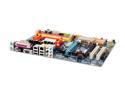
GIGABYTE GA-M57SLI-S4 AM2 NVIDIA nForce 570 SLI MCP ATX AMD Motherboard
Pros: No problems with it! SATA Raid is nice, comfortable overclocking options.
Cons: Perhaps not the best board for Phenom? I wouldn't know. I kind've wish I'd gotten a -D series from Gigabyte, but that's just nitpicking.
Overall Review: Current system: This board, Brisbane 5400+ Black Edition, EVGA 8800GS Superclocked, 2x1GB Mushkin DDR2-800 at 4-5-4-11 2T, 2x 7200.11 in RAID 1, Terratec Aureon Space 7.1, Antec Earthwatts 500W PSU in a Lian-Li PC-61USB modified with lots'o'quiet stuff. (Replaced a Northwood 2.6 on an ASUS P4G8X-DX)
12/1/2008See more detail
Solid Great Case
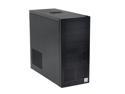
LIAN LI PC-61 USB Black Aluminum ATX Mid Tower Computer Case
Pros: It's stately and delightful to look at (or, to not look at, as it doesn't draw attention to itself). It has a fair number of fans and pushes a good amount of air, and has a distinct path of airflow. On the inside, the sharp edges are covered in plastic. The removable motherboard tray is great, as is the removable power supply slot, though the latter is frustrating without a fully modular power supply. The removable hard disk mount is wonderful as well.
Cons: I had some trouble mounting one of my DVD drives; I couldn't screw it in from both sides. I also had a few problems mounting PCI cards, specifically involving the slot covers; I sometimes had to remove the surround covers to get a card in. I think I would have liked some rubber dampers to put against the hard disks, or room to put some in, as they can be slightly audible.
Overall Review: Some people think that the tool-necessary design is a problem for the DVD drive and hard disks. Personally, I'm rather fond of tool-necessary for computers I don't expect to modify frequently, and tool-free for computers that get various parts shoved in them completely randomly. This particular build was a long-term build, and so the solidness of the assembly is welcomed.
9/6/2008See more detail