
Your Browsing History


Collin W.
Joined on 10/09/03
0
0
product reviews
- 5
Primary BIOS DOA - use the backup BIOS!
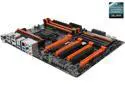
GIGABYTE GA-Z87X-OC LGA 1150 Intel Z87 HDMI USB 3.0 ATX Intel Motherboard with UEFI BIOS
Pros: Fast speeds. Hooray for the DUAL BIOS feature (but hang on to that thought..). Easier to setup than the Gigabyte GA-Z87X-UD5H (don't buy that model).
Cons: My GA-Z87X-OC Primary BIOS was dead on arrival - about to be sent back to NewEgg via RMA
Overall Review: This will be my last Gigabyte motherboard ever. After going through misery with my first GA-Z87X-UD5H mb that had to be sent to Gigabyte US for REPAIR (because I was a week outside the 30-day RMA from NewEgg), I got tired of waiting 3.5 weeks of repairing and bought the GA-Z87X-OC. When I got it in, it couldn't boot to POST or even the splash screen. It would beep once and display a single underscore line at the top right position. Frozen. Not good. But remember, this motherboard has the Dual BIOS feature which will help you if the primary/main BIOS gets corrupted. Amazingly, this motherboard had the Backup BIOS (where you switch to it via a tiny switch on the MB). I was able to boot to Windows and install the vF7 BIOS. However, the primary BIOS was still unbootable. After speaking with Gigabyte's Tech Support, I was advised to reflash the BIOS again and then ask NewEgg for an RMA if unsuccessful. I will be sending this board back to NewEgg via RMA and hoping for a good replacement. Additional notes: - NewEgg's RMA process is excellent. But if you suspect an issue with your purchase, move fast and contact NewEgg promptly. My first mistake was to keep testing the other Gigabyte GA-Z87X-UD5H motherboard longer than 30 days. - For Gigabyte's motherboards, I would think about an extended warranty. I got one. - If you send your Gigabyte mb to them FOR REPAIR, it will take FOREVER to get a reply or a status. Expect them to take anywhere from 3 weeks (my case) to 6 weeks (another reviewer) to get it back. I couldn't wait so I bought another board (this one) which now has to be RMA'd. FML...
2/12/2014See more detail
USB 3.0 ports still down, but video is back up
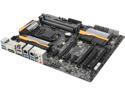
GIGABYTE GA-Z87X-UD5H LGA 1150 Intel Z87 HDMI USB 3.0 ATX Intel Motherboard with UEFI BIOS
Pros: -
Cons: - USB 3.0 ports still not working (some on the back, both on the front)
Overall Review: - I wanted to edit my previous review to say that I removed everything and reinstalled from the beginning. The video is now stable so far (both onboard and video card). - Some of the USB 3.0 plugs are still dead, so that hasn't been resolved. - I'll try to contact Gigabyte Support tomorrow morning to open a trouble ticket.
12/11/2013See more detail
Do NOT buy this motherboard
GIGABYTE GA-Z87X-UD5H LGA 1150 Intel Z87 HDMI USB 3.0 ATX Intel Motherboard with UEFI BIOS
Pros: - Fast board, when it's working - Lots of USB 3.0 ports
Cons: - One week in and now I can't get video from either my videocard or the integrated graphics using HDMI. I've tested this with another monitor and same thing - the graphics fuzz out during POST or while in the BIOS. - Some of the rear USB 3.0 ports do not work and the front two USB 2.0 ports do not work at all (Win8.1 x64 and another “Unix-like” O/S). This seems to be a common issue affecting many customers and I’ve verified my BIOS settings where the USB option is set to Enabled (and all ports should be active). Guess what? Still down. I believe the installed components (the power supply and RAM) are compliant with this motherboard: 1. Intel Core i7-4770K Haswell 3.5GHz LGA 1150 84W Quad-Core Desktop Processor Intel HD Graphics BX80646I74770K 2. CORSAIR Enthusiast Series TX750M 750W ATX12V v2.31 / EPS12V v2.92 80 PLUS BRONZE Certified 3. G.SKILL Ripjaws X Series 16GB (2 x 8GB) 240-Pin DDR3 SDRAM DDR3 1600 (PC3 12800) Desktop Memory Model F3-1600C9D-16GXM - I've already flashed the BIOS to vF7 but same issues continues. The USB 3.0 hotfixes on the Gigabyte site do not install - error message indicates that the patches are for a different O/S, even though it's the same O/S and x64. Oh, did I mention? I can't boot into any O/S because of the lack of video. - SATA plugs are on the far right side and face to the right (front of PC). Problem is that I have a rear eSATA plug with a very short SATA cable - I guess I can blame that on the case mfg.
Overall Review: It boggles my mind that I read all of the warnings for Gigabyte's motherboard reviews and I still foolishly chose to buy this board. What was I thinking? I am about ready to request an RMA from NewEgg because this motherboard's instability is not acceptable. Do NOT buy this motherboard if you're using Win8.1. Just don't.
12/9/2013See more detail
oh boy... bad ram stick smoked my mb
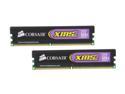
CORSAIR XMS2 4GB (2 x 2GB) DDR2 800 (PC2 6400) Dual Channel Kit Desktop Memory Model TWIN2X4096-6400C5
Pros: I got the 4GB pair (2GB ea) for a good price, and Corsair RAM has never let me down before. But....
Cons: Ok, where do I start? I put both sticks in my Vista PC and it wouldn't POST. By a process of elimination, I identify one stick as problematic while the other POST's fine. I test the suspect stick in another PC (Linux) and wait for the POST. Instead, there is the smell of something electrical burning and my motherboard is fried. Literally. On-board LAN is dead and the PC refuses to POST. Because this motherboard is 2.5 years old and out of warranty, I'm hosed. I sent both RAM chips back to NewEgg under RMA and will cautiously wait for a new shipment.
Overall Review: I've never bought anything that destroyed my equipment, so this is a new experience for me. I doubt that NewEgg would've fixed/replaced the motherboard so I'm out of luck here. Does anyone have any suggestions? Corsair is usually quite reliable for me, but this set was a disaster. Buyer beware.
2/2/2009See more detail
Trouble if you can't risk losing your data
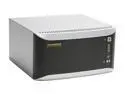
HAMMER HN1200-1000 1TB Network Storage by Bell Micro
Pros: Easy to use; moderately quick speeds over gigabit; quiet
Cons: NFS Sharing doesn't work; HAMMER cannot save your data if you need to send it in for repair (e.g. kiss your data goodbye);
Overall Review: I purchased a 1 TB Hammer MyShare NAS from NewEgg *almost* a year ago and for some reason, the unit refuses to power on as of last night. After talking with Hammer's techsupport, if I send it in for warranty service.. all they will do is replace the unit and I lose my data. There is no way around this. Tech support also said that I could "take the drives to someone who knows how to retrieve RAID1 data" but that would void my warranty (and kiss $450+ goodbye). They also wouldn't say how to extract the mirrored data. So you tell me. Do you want to buy a NAS unit from a company that can't rescue your data? Do you want to risk your data?
9/8/2008See more detail