

Your Browsing History


David C.
Joined on 06/29/06
0
0

product reviews
- 1
Excellent build quality and aesthetics
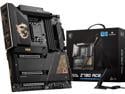
MSI MEG Z790 ACE LGA 1700 Intel Z790 SATA 6Gb/s DDR5 Extended ATX Motherboard
Pros: - Tons of VRMs for this price point - Heavy gauge backplate prevents deformation when mounting your AIO and plugging in your 24-pin - Black and gold design looks great as well as the RGB placement - Three PCIe slots when Godlike only has two - Tool-less M.2 NVMe installation - Plenty of JARGBv2 headers - Magnetic Wifi 6E antenna keeps it well planted. WiFi speeds are equal to my Ethernet speeds amazingly enough.
Cons: Not much to note. Not-so-minor issues: - Theres only one M.2 slot that supports PCIe 5 and that slot share lanes with PCIe_E1 (where youd normally run your GPU). As a result, you have to choose between utilizing 16 lanes for your GPU or dedicating 8 of those lanes to run your PCIe 5 capable M.2 NVMe at higher speeds. If you dont have PCIe 5 capable NVMes or youre not terribly concerned about having even higher data transfer rates through your storage, then this is a bit of a non-issues. Just dont use M2_4 and dedicate all lanes to your GPU. I know if youre not pushing your GPU to the absolute limit, you wont need to use all 16 lanes. Minor issues: - CPU Power 8-pin connectors block visibility of debug LED screen, which shows CPU Package temps after boot. However, I have this data directly on my AIOs display. - Could have used an additional USB2.0 header, but I dont know of any Z790 boards that provide three headers. - USB3.2 Gen 2 2x2 connectors should have been mounted at 90 degrees to match USB3.2 Gen 1 connectors. I have to get a right angle adapter her to neatly run that cable. - E-ATX size, but just barely bigger than ATX
Overall Review: Between Thanksgiving and Christmas, I decided to execute an MSi x Corsair build using the Z790 Ace as the foundation. I placed it into an MSi Prospect 700R case along with an i9-13900k, an MSi Ai1300p PSU, an MSi Suprim X 4080, a Corsair H150i Elite LCD, Corsair Dominator Platinum DDR5 32GB 7200 MHz, and 5TB worth of Corsair MP600 Pro NH M.2 NVMes. The Z790 Ace is really overbuilt. Im a huge fan of the quality of its construction. The heavy gauge backplate does a great job at resisting deformation and all connections and mounting points functioned without a hitch. M.2 NVMe installed without having to fumble with small screws on standoffs though for all other slots than M2_1, youll need a small Philips to access the slots under the heatsinks which have pre-applied thermal pads. After installing the 4080, it was also nice to have an available PCIe slot to pop in my Sound Blaster AE-5 Plus. These three-slot 4000 Series cards are going to be rendering secondary slots useless going forward. The black and gold aesthetic matches all other MSi components well; specifically the case, PSU and GPU. It is advertised as an E-ATX board as its slightly larger than an ATX board. As a result, in the Prospect 700R, youll have to make an awkward decision between using the cable cover or the E-ATX plate as there are pros and cons of each. Building this in a different case will yield a different set of trade-offs. Ultimately, the board booted right up with no issues and is playing nicely with my i9-13900k. MSi Click BIOS 5 is easy to navigate as always. I turned on XMP and had no issues running my RAM at 7200 MHz. At Auto settings, Im getting idle temps of high 30s/ low 40s on the 13900k. My only real complaint revolves around the sharing of PCIe 5 lanes between PCI_E1 and M2_4 and the fact that theres only one M.2 slot that COULD operate at PCIe 5 speeds. See my cons for more data. Other nuisances include the orientation of the USB3.2 Gen 2 2x2 connectors as noted in my cons, the lack of an additional USB2.0 header as those are always at a premium, and the location of the CPU 8-pin connectors. These are super minor though.
12/31/2022See more detail