
Your Browsing History


STEPHEN M.
Joined on 01/18/08
0
0
product reviews
- 22
On XP 32bit
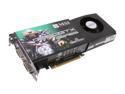
MSI GeForce GTX 260 896MB GDDR3 PCI Express 2.0 x16 SLI Support Graphics Card N260GTX-T2D896 OC
Pros: Far Cry 2 using Short Ranch all Highest settings 1440x900 AAx0 = 33-71f/s Avg 41f/s 1440x900 AAx8 = 21-43f/s Avg 27f/s 1680x1050 AAx0 = 30-61f/s Avg 38f/s 1680x1050 AAx8 = 18-33f/s Avg 23f/s Crysis with everything on High, except Shadows are medium, usually gets about 34f/s. Starcraft looks about the same... Overall, vast improvement over 8600 GTS. I was pulling 25f/s at 1280x800 at low
Cons: FC2 did alot better with DX 10 but it crashed during actual play. Vista = stress.
Overall Review: 9850 BE, GTX 260, 4gb 1066MHz, (all at stock speeds for this review) 32bit XP Directx 9. For the short time I had Vista 32bit Directx 10 was better for FC2 but not for Crysis to the same extent it was for FC2
12/19/2008See more detail
DDR3 1333
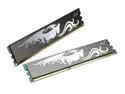
PQI 2GB (2 x 1GB) DDR3 1066 (PC3 8500) Dual Channel Kit Desktop Memory Model PQI310664-2048DB
Pros: It's pretty. It has a little tattoo thingy. Lower power consumption. Basic DDR3 stuff.
Cons: I thought I would get DDR3 1066Mhz but I got DDR3 1333. And I checked the serial number (or whatever you kids call it) and it was right. For some reason it has "...1066..." in the number but it is 1333Mhz. So, if you only want 1066 don't get it.
8/23/2008See more detail
Hz > Resolution
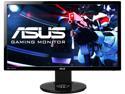
ASUS VG248QE 24" Full HD 1920 x 1080 1ms (GTG) 144Hz DVI-D HDMI DisplayPort Built-in Speakers Asus Eye Care with Ultra Low-Blue Light & Flicker-Free Backlit LED NVIDIA 3D Gaming Monitor
Pros: 144Hz 144Hz 144Hz!!! I didn't know how good it was until I spent a few hours on the computer and my eyes weren't sore. Reading is much nicer and browsing is much nicer. I've seen 2560x1600, 2560x1440, and 3840x2160 monitors and Hz > Resolution every time.
Cons: Windows auto detected the refresh rate to 60Hz when I first connected the monitor to the computer. The initial brightness is quite high. A "Night View Mode" is available but that's not too good at default. I had some issues with light boost.
Overall Review: If anyone tells you the the human eye can only see 24 frames per second, it's not true. *You will still need a graphics card that can handle 144 fps for games. *Also, you will need a newer mouse with a polling rate over the old standard of 125 or else your eye will be seeing a screen refreshing at 144Hz and a mouse on that screen updating at 125Hz which causes lag.
12/14/2014See more detail
Good... Enough
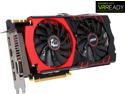
MSI GeForce GTX 980 GAMING 4G
Pros: *Fans don't spin at idle and remain quiet throughout usage *Stable OC to 1420MHz Core, 1822MHz Mem (haven't changed any power or voltage settings) *White MSI and Dragon logos are nice but not gaudy *Great for a 1080p 144Hz monitor if you want over 100fps on everything (except FC ~60-70fps on ultra, and W. Dogs ~50-60fps)
Cons: *Unnecessarily long and tall *It was a almost too long for my case, the HAF XB with an H100 Push/Pull. *28nm has been around for three generations now... 600 series, 700 series, and now 900 series *4GB of RAM is too small for future proofing. For example, W. Dogs uses 3,7-3,9GB and for the price/market segment, 4GB isn't going to last very long *This is basically a mid range card with amazing OC passing as a high end card with a high end moniker for a high end price
Overall Review: 4670K @ 4,2 GHz, 1,22v ASrock Z87 Extreme 4 G. Skill Sniper 4GB x 4 @ 1866MHz, 9-10-9-28 MSI GTX 980 @ 1420/1822 RM650 HAF XB
12/14/2014See more detail
Ugly, but Pragmatic
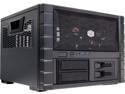
Cooler Master HAF XB EVO - High Air Flow Test Bench and LAN Box Desktop Computer Case with ATX Motherboard Support
Pros: -Great support for 240mm rad closed loop coolers. I do not recommend a 280mm rad because your psu cables will be too tight. -Horizontally resting mobo is great for those people who have had in the past had a PCIe slot broken and are weary of a traditional vertical mobo tray -No more 8-pin CPU power connector extension cable needed -Cable mgmt in general is very good.
Cons: -Only two 3.5" HDD -You MUST make sure you plug in all your cables before putting on the mobo tray -If a cable is too long or short, you'll have to remove the mobo tray again -With a push-pull configuration on a 240mm rad, the maximum gpu length is exactly 11" -Almost no bottom air flow, but the hot components are separated from the lower chamber; I know you can put in two 80mm fans, but I chucked mine all away c. 2008... -The side panel ducts are ugly and superfluous. -It good for closed loop coolers, but not a regular loop. I haven't tried, but it doesn't seem workable.
Overall Review: I really liked the inside of the case, but the exterior leaves a lot to be desired. I usually don't get a case unless I know guests will be impressed when they see it, but this case was just so well designed on the inside. I looked up this case on Coolermaster's website, and they sell a transparent top panel. I would have much preferred that to the raised vent. I have a H100 and XFX 7870 (CDFC), which fit fine.
8/10/2013See more detail
If Only...
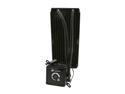
CORSAIR Hydro Series H100 (CWCH100) Extreme Performance Liquid CPU Cooler
Pros: It is much easier to install than a H50. The tubes are very flexible and long for easy placement.
Cons: If only it didn't have the molex connector. At first I didn't even think to plug it in. I just hid it in a nook in my case. Then the CPU fan error came up. "Certainly it was not because of the molex connector," I said to myself. It was the molex connector. Now I have to route a molex power cable up the back for a darn cpu cooler. I wouldn't have taken off so many eggs, but it can't be hidden now. I have a huge molex connector right in front my RAM. I have a window in order to look at the components, not the wires. For shame, corsair, for shame. It came with a few scuffs on the rad. I just put paint on them and called it a day.
Overall Review: The fans are both three pin.
8/8/2012See more detail