
Your Browsing History


Daniel C.
Joined on 06/18/04
0
0
product reviews
- 6
Works well!
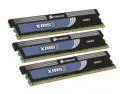
CORSAIR XMS3 6GB (3 x 2GB) DDR3 1600 (PC3 12800) Desktop Memory Model TR3X6G1600C7 G
Pros: These work just as well as the more expensive sticks. Don't be fooled by or pay for silly glitz like souped up super tall heat spreaders. That's all just marketing fluff like fins on a '50s Buick. I have these running at 1600 7-7-7-20 1.5V (!) with a Core I7 stepping D0 processor on an ASUS P6T Deluxe V2 motherboard without the slightest hickup. They don't get in the way of my cpu heat sink (Mugen 2).
Cons: None (that I have noticed).
Overall Review: No doubt in a few months from when this was written these timings will be considered slow, but they were quite respectable at the time, especially considering the low price of these sticks at the time I purchased them.
6/20/2009See more detail
Good keyboard!
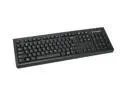
Kensington K64370A Keyboard for Life, Standard, USB Connected
Pros: This is a good keyboard. I've spilled all sorts of junk on it and yet it just keeps on working.
Cons: none
5/17/2010See more detail
Ouch, get the ultimate version instead
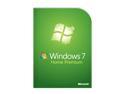
Microsoft Windows 7 Home Premium
Pros: Windows 7 in general is quite good, but...
Cons: The home premium version won't let you connect to the built-in FTP server (the one managed with IIS), TELNET server (it's a service) or Remote Desktop Protocol server (another service). Oh, you can run those servers on your machine, just not connect to them from other machines in your home. A Windows Anytime Upgrade to Windows 7 Professional ($$) or Windows 7 Ultimate ($$$) promptly solves that. Now of course most home users would probably not even know they had an FTP server or a TELNET server or what to do with them even if they did, but no connecting to the machine via Remote Desktop without paying extra? Gimme a break!
Overall Review: I upgraded from Windows XP Professional which had all these available at no extra cost, so I guess I was spoiled and didn't even know it. Shesh.
5/17/2010See more detail
It works with Windows 7 64-bit
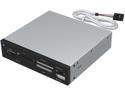
Sabrent 7 Slot USB 2.0 Internal Memory Card Reader & Writer (CRW-UINB)
Pros: It works well with Windows 7 64-bit right out of the box without having to do anything at all. It handles SDHC cards. You can hardly beat the low price (for something that actually works like this little sucker actually does).
Cons: The internal USB header connector cable is a bit short. Would be better if it was longer. But you can just buy a internal internal USB header cable extender if you need to / want to. If you do, then be sure to get the 10-pin type extender.
Overall Review: I use it to read and write SD and SDHC cards only. I haven't tried any of the other slots, so I can't intelligently comment on how well they work (or don't work as the case may be for all I know - sorry). This thing actually uses two internal USB ports. I guess that one is for the card reader functions and the other is for an actual USB port which is right next to the card reader slots. I really wanted only the card reader slots and didn't need or want yet another front panel USB port, but whatever. Likely easy enough to "fix" if desired by using a 5-pin internal USB cable extender and ignoring the other five pins. In my case I happened to have two internal USB ports available with nothing better to use them on so no problem.
6/20/2009See more detail
This is a good case
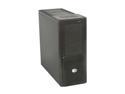
Cooler Master ATCS 840 RC-840-KKN1-GP Black Aluminum ATX Full Tower Computer Case
Pros: It's roomy. It's light. The documentation is good. It is even written in what appears to me to be passably literate English. Be sure to pay attention to the pictures in the manual, especially the one showing how to properly remove the front bezel. They clearly show the proper method and it's easy as can be. If you're a water cooling fan you can replace the two stock 230mm top fans with three 120mm fans and a 3x120mm radiator without having to modify the case in any way. Nice! None of the cons below have made me seriously regret purchasing this case (I have purchased more than one BTW). Personally I've never found a perfect case.
Cons: Both side panels are thin and lack mass so they end up vibrating like drum heads and amplifying otherwise small innocuous internal vibrations. Any sort of dirt or even a minor scuff on the black brushed aluminium case finish shows up badly and can only be properly cleaned off (without making it look even worse) by using a lint free cloth and wiping with the grain. The two fans in the top of case beat against one another, causing excess noise. Both bottom air intakes are blocked when the case is placed on carpeting, but especially the middle bottom air intake (because its filter is on the outside bottom of the case and the case floor is inexplicably molded a little extra far downwards there as well). Placing a fan on the optional middle bottom air intake makes it impossible to remove the filter from the rear bottom air intake. The forward top fan steals cool air from inside the case and exhausts it prematurely before it has had a chance to cool anything inside the case.
Overall Review: If you don't hook up the forward top fan, then the rear top fan just pulls cool air in from the forward top fan grill rather than exhausting hot air from inside the case. The motherboard tray hole for the 8-pin motherboard power connector is not in the proper postion for every LGA1366 (Core I7) motherboard I've ever seen. The blue power and hard drive LEDs are blindingly bright. They light up the whole room at night. The blinking of the power LED can become very annoying when the system is in sleep mode at night. The four front (top) USB ports are placed too close together to permit all four to actually be used at once in any likely real world situation that would cause you to want to use the front ports rather than the rear ports on your motherboard. Not a con, rather an amusing (to me) observation, that front 230mm intake fan seems to expend about as much energy cooling off the solid aluminum front face plate in front of it as it does cooling the 3.5 inch disk drives be
6/20/2009See more detail
Goof, but case cannot be opened!
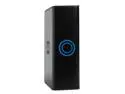
WD My Book Premium ES 500GB USB 2.0 / eSATA 3.5" External Hard Drive WDG1SU5000N
Pros: This drive and enclosure is VERY well made and works perfectly so long as you never need or want to open the enclosure.
Cons: Western Digital has intentionally made it very difficult to open the drive enclosure. They also won't tell you how to oepn it. The enclosure has no external screws and it is very difficult to figure out how to open, much less accomplish the deed even when you know how. I had to severely scratch one up in order to finally discover how to get it open. Skip this one if you think you'll ever want or need to open it.
5/29/2007See more detail