

Your Browsing History


KYLE T.
Joined on 03/20/08
0
0
product reviews
- 7
It is what it says it is
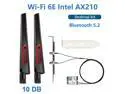
10DB Antenna Set Wi-Fi 6E Intel AX210 Bluetooth 5.2 + 3000Mbps 2.4Ghz 5Ghz 6Ghz M.2 2230 Key E Desktop Kit Wireless Adapter AX210NGW WiFi 6 Card 802.11ax/ac Support MU-MIMO OFDMA Windows 10
Pros: Product as described. This is a standard M.2 WiFi card with standard antenna connectors. The AX210 is a good chip with 6E and BT 5.2.
Cons: Inside the box, the card was in a small anti static bag with the small antenna connectors attached. The wires run out of that small bag to the large antennas. Its not terrible but seems like the card should have shipped with the antenna disconnected to avoid potential damage.
Overall Review: I purchased this for the Legion 5 Pro Gen 6 to replace the Realtek adapter. The card installed easily and has standard antenna connectors, so everything was straightforward. The seller contacted me prior to shipping to make sure the card would work in my system.
10/7/2021See more detail
VERY poor condition. Poor packaging. Inadequate product description. Not wrapped.

Apple iPhone 6s Grade C 64GB 4G LTE Unlocked Cell Phone 4.7" 2GB RAM Rose Gold
Pros: - all functionality of the phone works - not receiving it wrapped (as requested) let me see just how rough the screen was
Cons: - phone sliding/bouncing around in small box; no padding whatsoever to protect - screen was scratched up like it had been dragged behind a car for a few blocks
Overall Review: Purchased as a gift and paid for gift wrapping option. Did not ship wrapped, which was a good thing. The screen was in absolutely horrible condition. Description said refurbished, but did not indicate that this was in such poor condition. This phone can be purchased via [big online auction site] in near mint condition with all packaging and accessories for far less than Newegg sells it. The packaging was also really bad. This phone was thrown loose in a box to slide/bounce around during shipment (along with charging block and lightning cable), increasing the likelihood of damage. Be ashamed Newegg. Be ashamed.
11/23/2017See more detail
Update: Way better than expected (until it's not)
ETENWOLF AIR 3 Air Pump for Inflatables with 2600 mAh Battery & Camping Light, Ultra-Fast and Mini Electric Air Pump, Inflate Deflate for Air Mattress, Pool Floats, Vacuum Storage Bags black
Pros: USB-C charging Inflates more than expected on a full charge Very compact
Cons: After one of these stopped holding a charge, the seller and manufacturer were communicative at first, then just stopped. If it fails, you will NOT get a replacement or refund.
Overall Review: These are amazing little powerhouses. I decided to roll the dice on a pair of these on sale, and have been so impressed. They are very compact with a variety of adapters in a little bag. We have used them several times already, but the most impressive was inflating two double floats with back rests and the cooler in between, plus another single float. The battery started flashing red near the end, but it did that fairly quickly on one charge. We no longer worry about inflating our floats beforehand. We just bring this pump. Note: You have to push and hold the power button to turn it on, then you can press the power button or light button to activate the desired feature. If you just push the button expecting it to start, nothing will happen. Update: At the end of the season, one of the two I purchased just stopped taking/holding a charge.. I reached out to the seller and sent a lot of detail. It seemed like they were about to send a replacement, then just pawned me off to the manufacturer. The manufacturer replied to a couple of messages, then just stopped. If you have issues, you're on your own and have thrown your money away.
6/29/2026See more detail
Failed almost immediately
TEAMGROUP C175 128GB USB 3.2 Gen 1 Flash Drive Rounded Streamlined Unibody Design Black Pearl Seamless Construction Matte and Glossy Finish, Speed Up to 100MB/s (TC1753128GB01)
Pros: - None that I am aware of
Cons: - completely dead after 3rd use
Overall Review: I was able to create Ubuntu install media, and start the install process to make sure things seemed to be working. When I tried to use the media for an actual Ubuntu install, no system I put the drive into would recognize it. It is basically just e-waste now. Not even heavy enough for a paperweight. Not sure trying to get it replaced will be worth the effort.
2/12/2024See more detail
KVM Feature works well
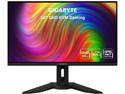
GIGABYTE 32" 165Hz 1440P SS IPS KVM Gaming Monitor, 0.8ms, FreeSync Premium, QHD 2560 x 1440, 94% DCI-P3, HDR Ready, 1x DisplayPort 1.2, 2x HDMI 2.0, 3x USB 3.0, 1x USB Type-C, M32Q (170Hz OC)
Pros: - BIG - bright - high-res and high refresh - 3 usable USB Type A ports (keyboard, mouse, webcam all connected at same time) - DisplayPort over USB-C for single cable connection to laptop
Cons: - not a fan of port placement (close to bottom, pointing down), but others probably prefer it that way - PD over USB-C not enough to charge laptop
Overall Review: I am not qualified to do a full review of the color space and panel, but I am very pleased with the display quality and brightness. No dead pixels. Minimal backlight bleed (probably the least amount I've had on an IPS). Thin bezels, except on the bottom. The USB-C connectivity, combined with the built-in KVM is awesome. I wish it was easier to get to the controls for the KVM functionality (you have to reach around to the back of the right side), but it's not that bad. I have a laptop with USB-C. That single cable is capable of driving DisplayPort 1440p @165Hz, G Sync (not officially supported, but compatible and works fine), and I have keyboard, mouse, and Logitech 920 webcam connected to the ports on the monitor. I have the USB-B and an HDMI port on the monitor connected to a Pi 4. Apparently the USB-C port does have PD, but only about 15W I think. It's definitely not enough to charge a laptop. Loving it so far!
8/30/2021See more detail
Nearly perfect eGPU
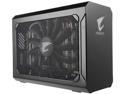
GIGABYTE AORUS GeForce GTX 1080 Gaming Box DirectX 12 GV-N1080IXEB-8GD eGPU
Pros: I almost never give 1 or 5 stars/eggs in reviews. This one really isn't a perfect 5, but it sure is close. The GTX 1080 is a powerful card, and Gigabyte has managed to fit it inside a very small enclosure. That feat does have some drawbacks, but there really is little Gigabyte can do about the drawbacks. Some reviews here say loud; some say quiet. It's all about perspective and looking at the product as a whole. If you think you will be able to game without headphones, or with a tiny set of cheap earbuds, you're mistaken. Does that make this eGPU loud? No. However... they have crammed a FULL GTX 1080 inside a ridiculously portable box, and there's no way to make that quiet! Put on some headphones and enjoy the ride! In case you missed this point, the AORUS eGPU is small. The included carrying case is well padded, and has zippered pockets on the ends. It is very light, and easy to carry. I suspect most will use it as a docking station, and for that it is also nearly perfect. It has the standard video outputs of a GTX 1080, combined with 3 USB 3.0 ports, and an extra QC USB charging port that is very handy. Getting it working on Bootcamp on the Mac took a little effort, but it wasn't particularly hard. There is a pretty good step-by-step page for getting it to work. It's amazing that this works on Windows (Asus GL702VM), MacBook Pro 2016, and Bootcamp. Performance is great. It is slightly below an internal GTX 1080, but the performance increase over the GTX 1060 in the GL702VM was huge. I have posted a bunch of 3D Mark scores on the Asus GL Series forums comparing the 1060 to the 1080 connected to the Asus and MacBook.
Cons: I noticed at least one review that said the GPU fan grinds against the side of the enclosure. This was not the case for me, until I carried it in its bag a few times. Pressing down on the top of the case eased whatever pressure was there and the noise was gone. Gigabyte did cut it a little close on the spacing between the metal mesh and GPU fan. A gigabit Ethernet port would have been a nice touch, along with an additional Thunderbolt 3 port. Adding a USB gigabit Ethernet adapter is easy enough, and there is a relatively cheap one that is Windows and Mac compatible that works well. I know adding the additional ports would have increased the price somewhat, so I don't think this "con" should reflect too much on the overall review. Another complaint I've seen is regarding the short cable. Yes, it's short. That isn't a Gigabyte issue. Full performance, low latency Thunderbolt 3 connections pretty much need a short cable. Try a longer cable at your own risk, and expense.
Overall Review: I would recommend this product wholeheartedly. It was easy to setup, it is small and inconspicuous, works great as a dock, and improved gaming performance in huge ways.
3/25/2018See more detail