
Your Browsing History


Adam J.
Joined on 07/21/05
0
0
product reviews
- 31
Works with 9950
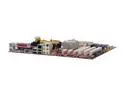
MSI K9N2G Neo-FD AM2+/AM2 NVIDIA GeForce 8200 ATX AMD Motherboard
Pros: Coupled with the Phenom9950BE, I was able to upgrade from E8400 on a P5N-G. I even swapped out harddrives to avoid a clean install. Took a few reboots but now runs smoothly. The rate on the Windows went from 5.7 to 5.9. I haven't even overclocked it yet. So far everything runs smoothly, but I did get a Blue Screen Memory dump error after testing out Titan Quest. Coupled with a 8800GT everything runs faster than the E8400. At a price of $180 (I paid $230 for the E8400), definitely faster than intel for the price. It's cost effective since I don't need SLI.
Cons: The boot up time isn't much faster than the E8400 system. Both have DR2800 4 gb of RAM. I did get some ASUS aacenter.exe violation error on bootup but I've manually removed it from the Regedit so it's not bothering me anymore. Windows Media player shows a media share center not working sign, so I've disable it.
Overall Review: I've built >20+ computers since I was 12 years old for 20 years starting with 486 boards, always budget concious because same computer would be worthless one and half year later. For a decent system for less than $700-$800 definitely an intel killer for the same money. Q6600 is still $100 buck more than this phenom, plus the equivalent motherboard for it would be another $50-60 more. Also 9950BE COMES with fan and heatsink!!!! Make sure you have retail version of VISTA before a harddrive swap. Phenom 9950BE at 2.6Ghz K9N2G Neo-FD GSkill DR2 800 2x2 Zotac 8800 GT o.c.
9/9/2008See more detail
Get something else.
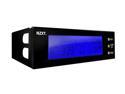
Controller Panel
Pros: Blue LCD. Clock and alarm.
Cons: CPU temperature from a external probe, I had followed instructions of placement. It's about 10 degree C off. I had also ordered a Blue Orb fan. You can't change fan speed. It doesn't have plugs to control any other fans. Cant read numbers from view angle from desk (if your case is below). Won't work with 3 pin fan connections.
Overall Review: If I would have know I would haven't have bothered. The blue LCD screen looks cool but only function as a clock. Temperature probes are clueless. [email protected], ASUS p5n-D, gskill 4gb, 8800gs, caviar 250, thermaltake matrix
2/19/2008See more detail
I had to return but turns out probably worked okay. Only DVI port works?!?!?
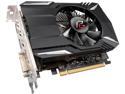
ASRock Phantom Gaming Radeon RX 560 4GB GDDR5 PCI Express 3.0 x16 (Uses x8) Graphics Card RX560 4G
Pros: Okay for what you pay for. But I returned it because I originally thought defective. I would not recommend this card at all or any RX560 at this point. See below.
Cons: So back in November I decide to build a low spec built with Ryzen 5 2600, M.2 250 GB boot drive, 16 Gb Ram, ITX motherboard and RX 560, which should allow low res gaming . After putting all the ingredients together, everything booted up fine. Windows 10 loaded up with few minutes. I was extremely please at ease and speed of build and load times. Then the nightmare begain which in part was my fault. I had set up everything with HDMI port, which has no problem booting up and loading windows. Once I loaded AMD drivers for the build. screen went blank. Nothing. So reboot, bios screen fine, but as soon as windows booted up, it gets Black Screen blank. Nothing. reboot several times, same result. I ended up erasing the original Windows and reinstalling the OS. As soon as you load AMD drivers, blank black screen. I probably reinstalled windows about 5 times with same results. So I decided to return the ASR 560 for a Gigabyte 560. Similiar specs and price. Another 1 week later. Same results with the Gigabyte GPU. I even tried it with the DP port. So I thought maybe MB was faulty. So I returned the ASR MB for a similar Gigabyte MB. another 2 weeks go by for the exchange and refund and receiving new MB. Perhaps the powersupply of 450 Watts not sufficient. Same problem with 850 Watt PSU. Again having to reinstall windows several time. Thank goodness that it's a fast computer, reinstalling Windows 10 takes like only 3-4 minutes with a USB drive. I even returned the DDR4 memory for a different brand. Same result. The whole process took 2 months to figure out. I even spent $20 dollar a new PCIe riser to see if the Fractal Design itx case was the culprit. Nope!!! So now I have Gigabyte MB and GPU 560, SAME problem. Then I thought this can't be component problem. There must by a systemic problem with a B450 MB and RX560. Then I thought why don't i just try the DVI to HDMI cable for kicks. Again at this time I have been playing around with HDMI and DP cable getting same blank black page. So the DVI port is the only functional port on the RX560. I assume for both ASR 560 and Gigabyte 560. I couldn't get the other HDMI or DP work with multidisplay either. If I had tried the DVI port from the start I wouldn't have had to spend extra $100 and 2 months to troubleshoot this dung. Thanks AMD and your dungy driver support and design for Rx560. So default is DVI, once you load the AMD driver. So having spent extra $200 or so for restock fee.
1/27/2019See more detail
Everything I wanted in a uATX, but did not post!
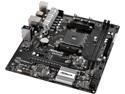
ASRock AB350M AM4 AMD Promontory B350 USB 3.1 Micro ATX AMD Motherboard
Pros: Everything I wanted. microATX. M.2. Enough USB 3.0. SATA ports etc etc.
Cons: It did not post. Powers on, nothing on video output!!!! I tested other components on my other Ryzen system, they worked fine. I had to return.
Overall Review: So this is my first ASRock MB, after about 26 years of custom builds (25+). ASRock is a "newer" brand, as Gigabyte, BioStar, MSI, Asus, ECS, Intel etc, that i've had builds before. From 486s to AMD K5s K7s to Cyrex (remember those?) to Pentiums to Sandybridge and Ryzen 7s, I've had ZERO motherboard returns until this one. I was kinda disappointed. I sent the motherboard back, and got a Gigabyte B350 mATX which was $20 more. Everything worked perfectly. Boots up in about 8 seconds from cold. Other thoughts: Ryzen 1600 with Wraith Spire CPU cooler. Geil DDR4 8gb x 2 @2400 AMD version Xigamax 650 WATT Bronze PSU WD M.2 256gb PCIe Primary drive Toshiba 2 TB Secondary drive Gigabyte RX 560 2gb videocard Lian PC-V351A Silver Aluminum MicroATX Desktop Computer Case Win 10 Pro 64 bit
9/9/2017See more detail
Under $1/GB
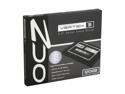
OCZ Vertex 3 2.5" 120GB SATA III MLC Internal Solid State Drive (SSD) VTX3-25SAT3-120G
Pros: Hasn't had a problem. Fast, has been very reliable so far. Comes with mounting bracket for 3.5in bay. 7.9 Windows rating.
Cons: None so far
Overall Review: I upgraded from 64gb Corsair. No other software needed, just Windows 7 System Back up program. No need for Ghost or the other stuff. Just remove your D drive, have a second HD to back up image file. Restore onto 120GB drive, then HD manager, extend the size. Replace D Drive. Only problem you have upgrade to BIGGER drive than original. If you didn't do an original ACHI setting for original install of windows, then you can't change to that setting later. It need clean install of windows from beginning, but still 7.9 on Windows 7.
6/24/2012See more detail
Small footprint, but everything went in
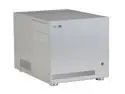
LIAN LI PC-V351A Silver Aluminum Micro ATX Desktop Computer Case
Pros: All Aluminum design. Every panel comes off. Everything fit in I wanted, even a HD6950 10 in card with two PCI power pins on top of card. Two 2TB drive and a SSD drive. Fits onto a standard AV rack or console. Supports FULL atx powersupply I've got RaidMax 850W PSU.
Cons: VERY cramped, expected. The rear HD fan can't accommodate the power/SATA cable for the HD, so I'm not sure why they even bothered with that fan, this was removed on my build. You had to, if you want your HDD plugged in. My SSD is floating in one of the internal 5.25 bays, which I don't mind. Slightly noisier than my HTPC build but I think that's due to HD6950.
Overall Review: Since Diablo III came out, I had to upgrade. The weakest link being Videocard. But I still wanted a small footprint, low power HTPC style box that will fit in my AV rack. Most Slim desktop states it will accommodate a 11inch Video card, YEAH IF YOU DON"T plug in the PCI power!!!! This was the only box small enough and able to acommodate everything I wanted, even 4TB of disk space!!! No the prettiest but works for me. i5 CORE 2400s GSkill v1.5 1333 x 16 gb ASUS H67-M Pro Micro ATX OCZ Vertex 3 120 GB boot drive 2X Hitachi SATA III 2 tb system (4TB total!!!) LG Super Multi BH12 Bluray Burner Raidmax 850W GOLD plus Modular PSU Sapphire ATI HD6950 OC edition LIAN LI PC V351 Silver Case
6/13/2012See more detail