
Your Browsing History


hayden c.
Joined on 02/02/25
0
0

product reviews
- 5
Not perfect but still recommend
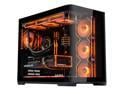
SAMA 2851 ATX Mid-Tower PC Gaming Case, High-Airflow, Sturdy Curved Tempered Glass Front, 4 ARGB PWM Fan Pre-installed with Fan Hub, Black
Pros: -Love the curved glass exterior -Four Reverse blade fans pre-installed with a fan hub -Good tactile-feeling power button -Fairly easy to build in
Cons: These cons are minor but worth noting: -instructions could be better, especially for a novice builder -Can be difficult to fit a full-size ATX board, but it's possible -fingerprint magnet -very large case, but building in it feels small -RGB power button doesn't feel great, squishy -Very thick USB 2.0 header cable, had to buy an adapter to fit my bottom-middle fan -uses the split-up case header connections instead of single, easy connector -little space for hard drives -Sama logo decal on the glass itself -bad cable management on the included fans and fan hub -only space for a small GPU sag bracket with bottom fans installed
Overall Review: Overall, I think this is a very solid case, a great value for the price and once I was finished building in it, I think it was all worth it. Once you are all done, it really is a good-looking piece. Now, that doesn't mean it was all sunshine and rainbows. The instructions were pretty bad. They are enough to get the job done, but they leave out important info. Make sure to install the included motherboard standoffs on the right side to properly secure the board. It also doesn't tell you how to use the LED button on the case (Press once to turn on, hold down button to enable ARGB) This is a very big case, it does not fit on my desk's bottom shelf intended for PCs and needed additional support. Despite its size, there are some clearance issues if you want to use an ATX board (I used the GIGABYTE X870E AORUS ELITE WIFI7 AM5). I had to really squeeze in the fans and the cabling to make stuff fit. I highly recommend plugging in the case connectors in the motherboard before installing bottom fans. I would also recommend buying a thin USB 3.0 header extension cable for like $8, because the included case USB 3.0 cable is extremely thick and will 100% get in the way of any fan you want to install in the bottom-middle section. Make sure to follow the motherboard manual's instructions for connecting the other case headers. It uses the split-up type, where you have to connect single-pin headers one by one. Another problem with its size is the lack of hard drive space. There is a bracket in the back intended to mount them, but it just gets in the way of cable management and would only really be useful for installing SSDs. I just took it out and tossed it aside and put my 2 hard drives in the empty space below the PSU and they fit well enough. I just wish they were actually mounted instead of basically being loose, held there by the fan hubs and such. Either way, if you are using additional SSDs or HDDs, just get rid of that bracket. In terms of fans, it comes with 4 pre-installed reverse-blade fans, with space for up to 10. I recommend buying 2 more reverse blades for the bottom, 4 regular ones for the back exhaust and top, and removing the pre-installed back exhaust fan and using it on the bottom. I only used regular ones for my computer, but I would prefer if it was uniform, so follow what I said there. The included fan hub is nothing special. It is one of those ones that has no case, just an exposed board that you plug everything into. It's secured with a screw in the case, so I had to unscrew it for cable management. It feels pretty flimsy, like I could break it by bending just a little. It works though. Important to note it doesn't have enough connectors for all 10 fans if you go that route. You can easily fit an AIO at the top, and *maybe* has enough space for a push-pull config, but I didn't want the headache with additional fan cables. All-in-all, I do recommend this case. If you are a noob builder, I also think this is a good case for you. It may sound like I listed a lot of issues, but none were really that bad, and I think going through those issues would be good practice for a new builder to learn and hone their skills. Once it's all said and done, it looks excellent.
4/29/2025See more detail
What on earth is this price increase??
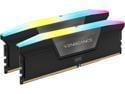
CORSAIR Vengeance RGB 64GB (2 x 32GB) 288-Pin PC RAM DDR5 6000 (PC5 48000) Desktop Memory Model CMH64GX5M2N6000C30
Pros: -works -decent lighting
Cons: -price
Overall Review: I got this RAM in a bundle for $192 after the discounts and stuff in April of THIS YEAR. Now it's $872???? No way in hell is it worth that much. Under no circumstances should you buy it at that price. Psycho.
11/19/2025See more detail
Dominant CPU
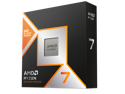
AMD Ryzen 7 9800X3D - Ryzen 7 9000 Series Zen 5 8-Core 5.2 GHz - Socket AM5 120W - AMD Radeon Graphics Desktop Processor - 100-100001084WOF
Pros: -Handles anything you can throw at it
Cons: -Somewhat high temps at large workload, no big deal
Overall Review: Had no issues with it so far, handles any game with my GPU at low util. I don't really play simulation games or anything super CPU intensive but it works with flying colors on everything I have tried so far, including emulation.
4/29/2025See more detail
It's an SSD
WD_BLACK 1TB SN850X NVMe Internal Gaming SSD Solid State Drive - Gen4 PCIe, M.2 2280, Up to 7,300 MB/s - WDS100T2X0E
Pros: -Free with motherboard purchase -works, fast
Overall Review: It's a basic SSD. I'm not the type to check read/write speeds or temps and stuff, but it works good.
4/29/2025See more detail
Good Board
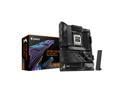
GIGABYTE X870E AORUS ELITE WIFI7 AM5 LGA 1718, ATX, DDR5, 4x M.2, PCIe 5.0, USB4, Wi-Fi 7, 2.5GbE LAN, EZ-Latch, 5-Year Warranty
Pros: -Good-looking board -good bios -easy to update -Useful quality features (Bios flash button, power and restart button for open-case testing, error code display)
Cons: -the larger 3x SSD heatsink is VERY annoying to secure -included software is not great -shared lanes for SSDs and GPU is dumb
Overall Review: Not too much to say, it is a good board. Looks cool and gets the job done. Posted on my first try. Before loading up on SSDs, just know that if you use the top and bottom SSD slots in the part that holds 3 of them, your GPU goes from x16 to x8. I read that it doesn't matter that much, but still annoying. Use the SSD slot above the GPU and the one in the very middle of the three unless you don't care about that. Also, the square heatsink for the 3 SSDs SUCKS, it is so annoying to secure onto the board, and even when you get it on there it does not feel safe. Not a ton of fan headers so make sure you get a hub. The software is meh, I don't really use it. You can control the fans and RGB through it but I just set the fans to what mode I want and skip the RGB control, I use SignalRGB for that. It is a good board, but some of the SSD stuff is annoying to deal with.
4/29/2025See more detail