




 here!
here!
I’m your shopping assistant for PC builds, upgrades, and everything tech.
Got questions? Ask away!
Start a conversation
here!
I’m your shopping assistant for PC builds, upgrades, and everything tech.
Got questions? Ask away!
Start a conversation

Joined on 07/03/03

Great drive
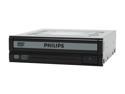
Pros: Great drive, super quiet, burns all the 16x rated disks i have at 20x, takes around 4 minutes to burn a dvd. No coasters from 50+ disks so far. So good i recommended to friends and family
Cons: It wasn't free !
Overall Review: DVD-RAM capability is not really useful any more, but always nice to have
Don't touch with a barge pole
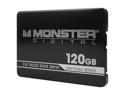
Pros: It was cheap
Cons: I bought this product when it was first listed on newegg's page, i thought the specs looked good, and it was cheap, sadly there wasn't any feedback on the drive, but i thought i would get it as an upgrade from the crucial 64gb ssd i had. I cloned the drive, but it kept failing, thought it might be the old drive, so tried cloning to a laptop hdd and went thru fine. So decided to try a clean install of windows 7. after 4 failed attempts with various errors it finally went thru a full install only to blue screen when i tried to do anything in windows, or when windows started to boot up. Came to newegg to look at doing a RMA and getting a replacement, then saw everybody else having problems with the drive. Not right that we cannot get a refund on a product that is obviously faulty. Not one good review so far for this drive.
Great power supply for the price
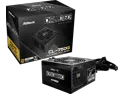
Pros: Great price 12V-2x6 power connector with bright color to ensure it's plugged in correct
Cons: Sadly not modular
Overall Review: Great power supply, was looking for a 750w atx 3.1 gold rated power supply, and this power supply was heads and shoulders below the rest when it came to price. I'm a big fan of ASRock, i have their Z790 Riptide motherboard, and would choose ASRock over everybody else when it comes to motherboards. Nice to see them now doing power supplies too
Don't buy this until they fix the software

Pros: Cheap for a case with a built in screen
Cons: The screen is useless due to the poor software
Overall Review: The screen is useless due to the poor software. I've done several installs and reinstalls of the software, and the widget runs one time but as soon as you try to do something like rotate the screen (it defaults to being upside down) then screen will not display the widget again until you uninstall the software and reinstall). The display is always on with the default background even when the PC it turned off. I've wiped the PC clean and done a clean install of windows but continue to have problems with the screen.
Not great, issues that make it a real pain to use - No support - Stay well clear
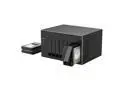
Pros: Much cheaper than any other 8 bay NAS i could find. Bring your own operating system. Not stuck using an operating system that the vendor could stop supporting down the line. You can easily install TrueNAS, Windows or a Linux distro.
Cons: BIOS defaulted to boot from HDD, not SSD. Since using the NAS for over a week now, i've found a big annoyance. If the NAS is rebooted (either from the TrueNAS dashboard or power button), the BIOS resets the hard drive boot priority, so it fails to boot up, it instead gives a error about trying to boot from a TrueNAS data disk. It's been another week since i started to use it, and now one of the fans has become very noisy. Thankfully the NAS is in a place next to my main server, but it's only been a few weeks and one of the fans is doing this, not a good sign. Just coming up to the year review, and i've had to stop using the NAS. The fans are soooo loud, i've emailed Orico support on numerous occasions, and no response. Also one of the hard drives is always failing. I've switched out all the drives, and put brand new drives in it, and it continues to give errors on the same channel each time.
Overall Review: I had 8 x 10tb SATA WD Red hard drives sitting around from a retired Dell Server project, and wanted to find something to back up my NAS server. There was very little information available online for this NAS box, but i thought i would give it a try. The item was double boxed, the product box was a plain brown box, nothing indicating what it was. First thing i noticed was marks on the top of the chassis. Not sure if this has been used again, it looks like it's been repackaged as the protective plastic bag was half on/half off. Along with the NAS, there was a white box with hard drive screws, power cable and 6ft cat5 cable. No card, or instructions. After taking it out of the box, i noticed that the back of the device does not have a expansion slot like the vendor's website shows (Newegg doesn't include any pictures of the back of the device). When i took the cover off, i saw a 1x pci-e expansion port, but now sure how you can plug anything into it without there be a cut out for the expansion slot. I installed all the drives, had to remove a few of them as they weren't detected (there are blue LED's on the front to show the drives being detected). After several attempts with 1 drive being detected, i moved it to another bay, and all 8 drives were detected. I setup TrueNAS Core, first time using it, very easy to setup from a usb drive. After the initial boot, i moved the NAS from my desk to the other room that was going to be it's final spot, booted up, but could not access the web interface. Plugged in a monitor and keyboard, and found that the BIOS defaulted to the first boot drive being one of the hard drives, not the SATA SSD. Changed the boot priority and fixed it.
Really impressed, well built O11 clone
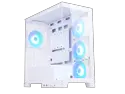
Pros: Really well built, quality materials, surprised me, i've used this brand before, and this is easily the best case SAMA has built Some neat ideas like the hinged door to install SATA drives, gives you access to CPU backplate
Cons: Installed fans come in exhaust mode
Overall Review: I'm constantly building PC's, and found that recently people are really wanting a white case, so was looking for something i've not built in before. I've used SAMA cases before, and they are budget cases, and aren't always great, but i was really surprised with this case. I discarded the fans, and installed 6 different ARGB fans, and removed the fan controller. This is a well built case, looks great, and i'll probably get it again for another build


