
Your Browsing History


Robert C.
Joined on 08/22/05
0
0
product reviews
- 5
Its fine, works as advertised, wonky audio setup.
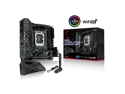
ASUS ROG Strix Z790-I Gaming WiFi 6E LGA 1700 (Intel 14th & 13th & 12th Gen) mini-ITX gaming motherboard (PCIe 5.0,DDR5,10+1 power stages,Thunderbolt 4,2.5 Gb LAN,USB 3.2 Gen 2x2 front panel Type-C, 2x M.2/NVMe SSD)
Pros: Good power distro for O/C, handling my 13900k just fine.
Cons: Gimmick audio - Hive is required for any 3.5mm jack based audio. Standard 5.1 systems with 3 jacks will not work with this M/B as it only has a single 3.5mm and an SPDIF, both located on the Hive attachment. So now I need to find some kind of adaptor for my 5.1 system, and will have another bit of clutter on my desk I don't want. My own fault for not checking, but checking for audio jacks on your I/O panel is not something I have ever had to do in 20 years of building PCs.
Overall Review: If you only have USB audio, sure its a good board, but I would have gone with last years 690 had I known this before I tried to plug my speakers in. Always best to avoid nonstandard systems, as you don't know if they will have any long-term support. Would have returned for this alone had I not already slapped a monoblock on it and hard tubed the whole rig. But if that doesn't bother you, or you use USB based audio, its fine, its actually quite good.
2/19/2023See more detail
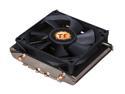
Thermaltake Slim X3 CLP0534 80mm CPU Cooler
Pros: Small, brackets fit well. Solid enough construction for its price
Cons: Should have been all copper at its size, i5 2320 hits 76c full load Vs the stock cooler held it at 71c. Does not perform better then stock.
Overall Review: Should note my Case has no fans, I'm sure the temps would have been lower with both the Slim X3 and stock, but the stock Intel cooler is still better it just won't fit when I put the power supply in. Use it if you need a slim line cooler and the stock won't fit. Stick to lower wattage CPUs a 65watt would have probably been fine temp wise.
9/25/2012See more detail
Mixed feelings
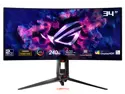
ASUS 34" 240Hz OLED UWQHD Curved Gaming Monitor NVIDIA G-Sync DCI-P3 99% sRGB 135% ROG Swift OLED PG34WCDM
Pros: -Has great brightness range, really noticeable on space games. -The curve makes any game where you sit in a cockpit or can adjust the FOV more immersive. -Built in KVM is nice, I keep my laptop hooked up to it as well.
Cons: -Vary susceptible to pixel burn it. I play a lot of games with fixed menus, and now I have Map icons from X:4 permanently along the right side of the screen. Using the Pixel cleaning function every time it prompted me to did not seam to prevent this. This is the first screen I've owned since an early LCD one in 2004 that I have had pixel burn in on. -Expensive, got it more for brand matching with a lot of other parts I had then anything else.
Overall Review: This is my first HDR and OLED screen so looks amazing to me, lot of other people bring up issues with the HDR, but as I have never had HDR before I have nothing to compare. Overall I'd say its fine. But for almost 1200 USD I expected the screen to be more durable. Will likely be avoiding ROG branded items in the future not because they are bad, but more because the brand name upcharge doesn't seem to perform any better then other offerings, at lower cost.
8/3/2024See more detail
good for SFF/water cooling
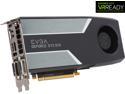
EVGA GeForce GTX 970 04G-P4-1972-KR 4GB SC GAMING, Silent Cooling Graphics Card
Pros: Xspc Razer GTX670 +Backplate waterblock confirmed to fit this perfectly. 2nd card no issues, stock cooler was easy to remove and the 670s water block was an exact match. Card itself performs as advertised.
Cons: First one I ordered happened to be a bad card. Not a big deal it happens sometimes. Newegg could not replace it due to having gone out of stock for a few weeks, so they provided a full refund no questions asked.
Overall Review: Card will work just fine with smaller then 500w power supplys, it only draws 12amps off the +12v rail full load. Runs cooler then the 670 it replaced. Averaging around 47c full load Vs. 49c.
1/21/2015See more detail
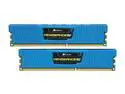
CORSAIR Vengeance LP 4GB (2 x 2GB) DDR3 1600 (PC3 12800) Desktop Memory Model CML4GX3M2A1600C9B
Pros: Its made by Corsair, I swear by this brand. been using them for years. Low Profile for a SFF bulid.
Cons: Had difficultly installing windows on the build, after some checking of error codes (0x80070570) I puled one DIMM still same issue, so I replaced it and pulled the other still same. Pulled an old corsair Dominator out of my other PC put it in and no more issues installed fine. I would have understood one stick to be bad, wouldn't have been upset at all as things sometimes go bad. But both is something I did not expect from Corsair.
Overall Review: I still stand by corsair, two bad sticks isn't going to erase the many many years of 100% flawless operation of corsair sticks in my builds. Some times Tech fails, as simple as that. Also if you ever see 0x80070570 code when installing windows, check your ram first.
9/24/2012See more detail