

Your Browsing History


DANIEL S.
Joined on 06/30/08
0
0
product reviews
- 9
3070 performance for less than a 3060
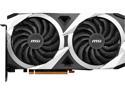
MSI Mech Radeon RX 6750 XT 12GB GDDR6 PCI Express 4.0 Graphics Card RX 6750 XT MECH 2X 12G OC
Pros: This card is just as fast as a 3070 for less money. Yeah it's not as good in RTX, but what games have RTX? None of the ones I play do. AMD cards also run significantly better with older/slower CPUs. An midrange nvidia GPU like a 3060 will bottleneck an older CPU like a 2700X by around 20%. A card like this will not because there's less driver overhead. Yeah nvidia has some cooler tech, but many games don't support it, or people hardly ever use it. Like Nvidia has a better encoder, but I bet most gamers don't even know what that means. Nvidia also has G-sync which is better than the AMD alternative, but nobody has G-sync monitors because they're way more expensive. In real-life gameplay this card beats all my friend's 3060s by 20-40% in DX12 games like Ready or Not. It's about on par with my friends 2070 Super, paired with the same 3600X CPU I have.
Cons: This specific model GPU has a fragile fan shroud that shattered off in shipping. Newegg processed my RMA and got me a replacement card in about 5 days with no big hassle, so I'm not taking any eggs. Otherwise this card blew about my expectations.
Overall Review: Aggregate bench-marking sites are legitimately bias against AMD. These AMD cards are just better than NVidia for a practical budget gamer. If you're looking to spend as much money as possible, NVidia is probably better, but for any sort of budget gaming AMD is back on the map. 3070 performance for the price of a super cheap 3060.
12/31/2022See more detail
Nice keyboard Disappointing Battery
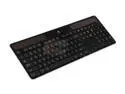
Logitech Certified Refurbished K750 (920-002912) Wireless Solar Keyboard - Black
Pros: Really nice feeling. Easy to type on. Thin. Can just charge on a windowsill with no cables.
Cons: The battery only lasted 1 year and 10 months for me. It no longer charges, and without any USB option, to plug it in you're just out of luck. When I first go it the battery lasts a very long time without any light source at all, but that greatly diminished over time. Also, running out of charge at night is a terrible experience, since you must hold a lamp right over your lap in order to use the keyboard.
Overall Review: The Logitec Solar App stops detecting the keyboard when the battery gets older, so you just have to play it by ear and charge it as much as you can. I have no idea why this is, but it happens.
8/15/2015See more detail
Great deal so far!
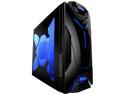
NZXT Guardian 921RB 921RB-001-BL Blue LED SECC Steel / ABS Plastic ATX Mid Tower Computer Case
Pros: Good Cable management-- so many inexpensive cases do not have space for cable management. Comes with three quiet blue-LED fans and has space for another 120-140mm fan on the top. The side window has a a really neat shape. The intakes have filters Screwless drive bays The temp LCD is a nice touch The whole case looks really nice and has mostly good build quality, especially for the price. Nice front panel USB and audio placement, if you keep you tower up on your desk like I do. Keep in mind the ports are on the left side though, so you probably couldn't put your tower to you left very easily, unless you wanted to run your headphone cable around.
Cons: The plastic fasteners for the expansion cards don't secure the cards very well, though I used to screws anyway, so maybe that's how it's supposed to be. Also one of the aforementioned "plastic fasteners" broke off when I was fiddling with it, but it in no way effects the function of the case, and it breaking off may very well have been my fault, so I won't take an egg. This isn't much of a con, but the side intake fan comes extraordinarily close to hitting my HD 6970's power connectors-- like there's hardly a centimeter to spare. When I originally installed the side the fan was buzzing a bit because the +2 connector on the 6+2 fell into the fan. It's certainly not not a major issue, but keep that in mind if your card has its power connectors on the side.
Overall Review: I bought this case as an upgrade for a very cheap low-end case I had that was starting to warp under the strain of all my parts. Also, I had no idea how to install the temp. probes and the case documentation didn't say how, though I looked it up somewhat easily. I had no idea you literally tape the probes around inside the case :P
5/31/2012See more detail
Worked great for about a year
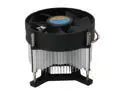
MASSCOOL 8WT15-38 90mm Long life Bearing CPU Cooler
Pros: This thing kept an E1200 and it's upgraded E5700 nice and cool for about 10 months. Nice bolt through mounting design. It was cheap.
Cons: The bearing on the fan is shot after 10 months. It's still keeping the CPU cool, but making a lot noise. Definitely not a *long life* bearing.
12/26/2011See more detail
Great Tough Keyboard
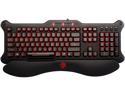
Mad Catz MCB44026N0B2/04/1 V5 Keyboard
Pros: This is a beastly keyboard. It's backlit, with a brightness adjuster and looks very cool. It comes with a wrist support thing, I don't use it, but it's optional and snaps right on. I once accidentally spilled a glass of water ALL OVER this thing. I freaked out, because usually that's it, but I flipped it over and emptied the water out, didn't remove any keys or take it apart, and it still works perfectly. No shorts or anything. Another time I spilled milk on my side of it, which is usually a death sentence for electronics, but it STILL WORKS no shorts no sticky keys. It's got some plastic blocking the circuits as I can tell, and that blocks spillage really well.
Cons: It's not really a dedicated gaming keyboard. It has anti-ghosting, but no dedicated gaming things. Not that this is bad, since you can game with any keyboard.
Overall Review: Don't let the "gaming keyboard" turn you away from this. It's pretty much just a really nice keyboard that looks really awesome.
7/20/2011See more detail
Works just fine.
MASSCOOL 8WT15-38 90mm Long life Bearing CPU Cooler
Pros: I bought one of these for a Celeron DC processor because the Intel HSF didn't fit on the board I was trying to fit it on. This was mainly due to those stupid plastic pins. The Screw on design worked perfectly, and created a nice snug fit. I only looked at the bios temperature right after installation, and it stays at a constant 32C while on the BIOS screen, which is quite decent. I would say it's a nice cheap upgrade from the Stock Intel HSFs.
Cons: None that I know of.
3/3/2010See more detail