
Your Browsing History


John H.
Joined on 12/11/05
0
0
product reviews
- 52
Great card
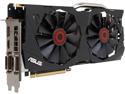
ASUS GeForce GTX 970 4GB GDDR5 PCI Express 3.0 SLI Support Graphics Card STRIX-GTX970-DC2OC-4GD5
Pros: Solid card. I love how these cards by Asus have their fans shutting off when in idle. Also, when idle these cards (in general the GTX 970) have pretty low power consumption. Great connectivity options. Beautiful looking card.
Cons: The card weighs quite a bit and sags. I used black lego blocks to prop it up a bit.
8/17/2015See more detail
Some major issues!
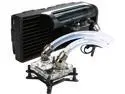
Swiftech H220 X2 Prestige 2x120 mm Drive X2 Prestige AIO CPU Cooler
Pros: -Swiftech name! -Really low CPU temps (down 5 degrees Celsius compared to NZXT X61 during a stress test with a 4790k @ 4.6GHz). -Beautiful AIO cooler! -LED lights are a nice touch -Nicely packaged
Cons: -Soft alloy screws (prone to stripping) for both waterblock and radiator mounting. -Fans grind on top mesh of case unless loosened approximately 4-5 turns (due to it being a pull configuration). -Not an easy install at all compared to other major AIO brands. -Seeing the white fans through the top of a black case is not my idea of pretty.
Overall Review: Here is the long and winded scoop on why I only gave this AOI Cooler 3 eggs. This was a hard score to give, especially given the fact that I really like Swiftech and I know they have a strong following from enthusiasts. But, the product has to live up to what is being touted. I bought the H220 X2 Prestige after reading Techpowerup's review of the cooler and realizing that it was newly released (I love having the latest and greatest). I bought the X2 with the aspirations of replacing my NZXT X61 that was housed in a Corsair 350D. The X61 was preventing me from using a rear mounted 120mm fan and also preventing me from having two optical drives (was only able to put one drive in the lower of the two slots). The X2 arrived in the mail quick and well packaged. I unboxed this beautiful cooler and immediately got to work at uninstalling the NZXT X61 from my Corsair 350D. I opened up the X2's instructions and was surprised at how difficult they were to understand and follow compared to the graphic tutorial NZXT provided with the X61. I went to put the radiator up against the top of the 350D and quickly realized that not only was this cooler not going to fit with the rear fan installed but it wasn't going to fit unless I removed the entire optical drive cage (not an option). I was totally bummed.... fast forward... I decided to use my Fractal Design R5 (which was going to be used for a new X99 build). So now that I decided to use the Fractal R5 instead of the 350D (moved all components first) I settled on a top mount orientation as well. I placed the radiator where the screws line up and began installing the radiator screws with a standard craftsman screwdriver. Without much effort at all, the first screw stripped really badly. I promise this wasn't an accident (user error)... these screws are incredibly soft compared to other component hardware. I know I'm setting myself up to being criticized at proper use of tools which I accept knowing full well I used the screwdriver appropriately. Needless to say I used the utmost care for the remainder of the screws and only managed to strip one more. Next up was the water block which compared to the NZXT X61 (only AIO cooler I had to compare it to) was incredibly more difficult to install. The waterblock needs to sit on the CPU and you need to finagle your screwdriver around the CPU with hoses in the way and push down on each mounting screw to secure the water block. I was having a tough time so I decided to remove the radiator from the top and work around it because the hoses were getting in the way. Again, this just wasn't as seamless as I was expecting especially considering how easy and effortless the NZXT X61 install went. I installed the waterblock, radiator, funky device header, and then double checked everything in the rig before closing it up. I finally connected everything in the I/O header and went to boot... WHOA!!! The fans came alive to full speed which wouldn't have been so crazy startling had they not been brushing/rubbing/grinding up against the top of the case mesh. I immediately turned the PSU off and inspected the radiator and fans. I made sure all the screws were mounted into the appropriate mounting holes. I couldn't find any thing wrong on the case end. What I did see though was that the fans (by design) protruded ever so slightly from the fan guard (what use is a fan guard if it doesn't guard the fan). As a remedy, I loosened all the radiator screws 4-5 turns until there was a noticeable gap between the radiator and the top of the case. I booted back up and things were quiet. As an experiment I slowly began to tighten the screws until the grinding started. I could only add back another turn or two before the grinding of the fans began. Mistakenly, I mounted the funky header device on the far side of the radiator so I was unable to click through the buttons and try the different LED colors and such. I assumed there was going to be a software driver (much like the X61 driver/software) that would allow me to manually control the lights and fan speed. HWmonitor spotted the CPU fan as being at 1100RPM. I assume this was the pump. I wasn't able to determine the fan speed at idle with HWmonitor. I used Asus' AI suite 3 but am unsure if the rotational speeds I was seeing were the pump or the fan. In hind-site I think I was seeing both... I guess I'm just used to the CAM software for the X61. The CPU cooler performed wonderfully in regards to cooling the CPU! Temps were down a solid 5 degrees Celsius during an OCCT stress test (4790k at 4.6GHz). I was very impressed by its cooling abilities. Because of the all the above mentioned issues I ran into (not working in a micro ATX case, fan's grinding on top of case, crazy hanky install and the stripped screws) I decided to return this cooler and use the X61 until I see the need to upgrade again much later. I had high hopes to finally try out Swiftech.
2/17/2016See more detail
BEAUTIFUL PSU
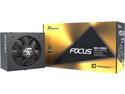
Seasonic FOCUS GX-550, 550W 80+ Gold, Full-Modular, Fan Control in Fanless, Silent, and Cooling Mode, 10 Year Warranty, Perfect Power Supply for Gaming and Various Application, SSR-550FX.
Pros: Solid build quality - you could tell right from the box that this PSU is built to last. Love the braided cables and the compact size. The hybrid switch seems useful. The PSU is going to fit in the compact HTPC case perfectly. As always - Newegg rocks with super fast shipping and great customer service!
Cons: Would love it if the remainder cables were braided or in a sheath of some sort.
12/18/2018See more detail
Uncertain reliability, loud, but nice looking
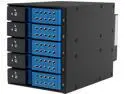
iStarUSA BPN-DE350SS-BLUE Trayless 3 x 5.25" to 5 x 3.5" SAS SATA 6 Gbps HDD Hot-swap Rack
Pros: The drive cage itself is very nice looking. I'm impressed that 5 drives can fit into a 3 (5.25 inch) bay slot.
Cons: Installation in an iStarUSA case was a little hanky. You'd think it would be smooth but things just didn't quite line up with precision. I plugged a SATA power cable in and the SATA receptacle cracked (still usable). This was well after the RMA period so I didn't both since it seems to work. After initial power up I noticed that even on "low" the fan was crazy loud. Not a problem (so I thought) because I love replacing fans. I bought a Noctua 80mm fan... didn't fit in the little cage they have. Not to mention the header is 3 pin. I used the Noctua fan for something else and bought a Coolermaster fan. This fit (only 10mm thick) but the 3 pin didn't fit in the 3 pin header. So I plugged the fan into my motherboard (ran it under the cage pinching the wire) and now the cage makes a strange noise. I wrote tech support at iStarUSA and they said it might be making noise because the fan isn't plugged into the drive cage. I'm not sure that makes sense.
Overall Review: In hindsight I might have bought the Rosewill RSV-SATA. Having a 120mm fan plug directly into the PSU (or swapping the fan out for a 4 pin PWM fan) is much nicer for the noise in my opinion.
2/25/2016See more detail
Solid router (AC1900)!
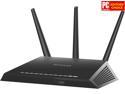
NETGEAR Nighthawk AC1900 Dual Band Wi-Fi Router, Gigabit Router, Open Source Support, Circle with Smart Parental Controls, Compatible with Amazon Alexa (R7000)
Pros: Netgear makes a solid product. I purchased the AC1900 when it first came out over a year ago. So far I've utilized it to its full potential (without getting away from stock firmware). This router comes very stable and solid out of the box... but with a little bit of tinkering and learning the product it really delivers. Of course nowadays all modern routers come with the standard features like DHCP server and QoS. -The range for both 2.4GHz and 5GHz is reasonable. - The look of the router is very sleek! - DHCP server works really well especially when reserving IP addresses. - Comes with a NO-IP free DSN.
Cons: - Get's a bit hot! - The USB printer function was pretty buggy under Win 8.1 (I haven't yet tried it under Win 10). This bug appeared in the form as adding several instances of the same printer - thus not connecting to the correct one during a print demand. - Only 4 Ethernet LAN ports (fills up quick).
1/14/2016See more detail
G. Skill all the way!
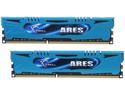
G.SKILL Ares Series 16GB (2 x 8GB) 240-Pin PC RAM DDR3 2400 (PC3 19200) Desktop Memory Model F3-2400C11D-16GAB
Pros: After almost two years this kit is still as reliable as it was on the day it was purchased. XMP profile set it to 2400MHz on day one and it still as strong as ever at that frequency... I've had problems with other manufacturer kits not running at the speed advertised. G. Skill seems to never disappoint in this regard.
Cons: None
8/17/2015See more detail