
Your Browsing History


DAVID W.
Joined on 07/02/04
0
0
product reviews
- 6
8 integers cores running cool
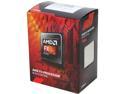
AMD FX-8320E - FX-8000 Series Vishera 8-Core 3.2GHz (4.0GHz Turbo) Socket AM3+ 95W Desktop Processor - FD832EWMHKBOX
Pros: A lot to like: - 8 cores (integer) - relatively low power consumption (for AMD) - reasonable price
Cons: Unable to compete with Intel: - really 4 modules, with 2 integer and 1 floating point core per module - outperformed in performance and power efficiency by slightly more expensive Intel products
Overall Review: I have a personal policy of trying not to support monopolies. I remember in 1990 buying a machine for $4000, where 25% of that price was for the Chipzilla CPU. Without AMD (and other competition) it is likely that monopoly pricing would return. I have been waiting for a modern multiple-core CPU which can adequately power my main desktop machine (without sacrificing too much in performance) while giving off < 100W heat output. This, or the FX-8370e, is what I have been waiting for.
11/29/2014See more detail
Lasted over 3 years
WD Blue 500GB Desktop Hard Disk Drive - 7200 RPM SATA 6 Gb/s 16MB Cache 3.5 Inch - WD5000AAKX
Pros: Worked well for many years. I have had extremely good results from buying WD drives over the past decade.
Cons: SMART monitoring revealed early signs of failure a few weeks ago.
Overall Review: I bought this in the summer of 2011 to replace a smaller slower SATA drive that I used in an older computer. I was very happy with the price vs. performance of this drive, and never had any negative issues at all until recently. When the SMART monitor started detecting problems I made some rudimentary attempts to fix the issues. The drive still "worked," but the issues could not be corrected, and I decided "better safe than sorry" and retired the drive. I did not lose any data, and backed all my files up to another machine and replaced it with a WD10EZEX 1TB drive. (The other drive I was using in the machine, a WD5000AAKS, is older and still works fine.)
11/29/2014See more detail
Died after 1 month
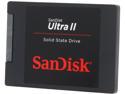
SanDisk Ultra II 2.5" 240GB SATA III Internal Solid State Drive (SSD) SDSSDHII-240G-G25
Pros: Worked great for a while.
Cons: No longer recognized by BIOS. Not recognized on any machine I plug it into. Lost 4-5 weeks worth of work after replacing most of my desktop machine.
Overall Review: This is an update to my review of 11/29/2014. I was using it as my primary disk. A 1 TB WD HDD purchased at the same time works fine, and no swapping of cables or switching SATA connection on the motherboard made any difference. Only this SSD is dead, and for no apparent reason. It lasted just long enough that I cannot return it to Newegg for a refund.
12/15/2014See more detail
Replaced an older 500 GB WD disk
WD Blue 1TB Desktop Hard Disk Drive - 7200 RPM SATA 6Gb/s 64MB Cache 3.5 Inch - WD10EZEX
Pros: Price, performance, and past experience with WD drives.
Cons: Only time will tell.
Overall Review: I had to replace an older disk on my desktop, a 500 GB WD5000AAKX, which was showing signs of failing. I needed more space, and something that would perform up to the abilities of my new motherboard. I chose this based on size, features, and price.
11/29/2014See more detail
Works great as advertised
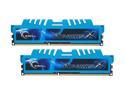
G.SKILL Ripjaws X Series 16GB (2 x 8GB) DDR3 1866 (PC3 14900) Desktop Memory Model F3-1866C9D-16GXM
Pros: Worked great as DDR3-1333 on first boot (lower that the rated DDR3-1866, but this is expected). Enabled "overclocking" via the motherboard BIOS, and selected the XMP profile for DDR3-1866; tested with memtest86+ through 4 passes and everything has been fine ever since.
Cons: Cannot say anything bad about memory that works....
Overall Review: Bought to use with an AMD FX-8320e CPU and ASUS M5A99FX Pro R2.0 motherboard. I have used G.Skill in the past, and have good luck both with modules working as shipped, and getting replacements for the occasional dud module. I set aside 8 GB to use as a tmpfs ramdisk on Linux, and compile kernels and other software directly on the RAM as a disk -- no problem. 'Nuff said.
11/29/2014See more detail
Nice AM3+ board for FX-8320e
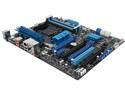
ASUS M5A99FX PRO R2.0 AM3+ AMD 990FX + SB950 USB 3.0 ATX AMD Motherboard with UEFI BIOS
Pros: Several strong points: - features work as advertised - BIOS easy to use - some attention to Linux users (better than none)
Cons: Minor weaknesses: - BIOS needed update (no points off, since this is to be expected) - min/max voltage on the onboard IT8721 sensor chip way off (probably needs to be corrected in the BIOS)
Overall Review: Bought this for my main desktop machine, mostly running Debian Linux (Sid) and occasionally Win7. Detected conservative RAM (G.SKILL Ripjaws X DDR3 1866, 2 x 8GB, F3-1866C9D-16GXM) settings on first boot as DDR3-1333; this is normal and expected. Easily changed from "Auto" to "D.C.O.P" and was able to choose DDR3-1866 memory profile; survived 4 passes of memtest86+, and I have been very happy since then! The Linux kernel driver for the board's IT8721 chip ("it87") detects ridiculous min/max voltage levels, causing my log files to be spammed with false alarm warnings, but I was able to workaround the issue with a custom settings file in /etc/sensors.d/. I need to make some attempt to get ASUS to address the issue with an updated BIOS, or some data about the correct min/max values... but I have not made an attempt to do so yet (since I am still happily setting up the rest of the system to my liking).
11/29/2014See more detail