
Your Browsing History


Kevin R.
Joined on 03/15/05
0
0
product reviews
- 7
Working great
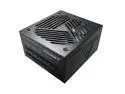
MONTECH Titan Gold 1000W High-End ATX Gaming Power Supply - 80 Plus Gold & Cybenetics Gold - Fully Modular - ATX 3.0 Standard Compatible - PCIe 5.0 Connector Ready - New 12VHPWR
Pros: -Value for the money -Great acoustics and power delivery -10 year warranty -Includes 12VHPWR cable -Internal parts manufactured by CWT which also supplies for many other name brands such as Corsair, MSI, Thermaltake, and NZXT
Cons: -The heat shrunk sleeve near the ends of the 12VHPWR cable are really stiff and basically unbendable which could likely cause a side panel clearance issue for most people, including myself. There is some exposed cable between the heat shrunk sleeve and the connector that can be bent, but the bend required to fit my side panel on is more severe than I'm comfortable with, so I will be looking to purchase a right angle adaptor.
Overall Review: I put entirely too much research into purchasing a 1000W PSU with a 12VHPWR connector, and the conclusion I came to was to purchase this Montech Titan Gold. Fortunately all that research paid off. I've been using it for a month and only have one minor complaints which I noted in the cons section. I anticipate if Montech continues to deliver value and quality like this, they will start to become a more well know brand for PC components.
5/8/2023See more detail
Disappointed
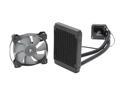
CORSAIR Hydro Series H60 (CW-9060007-WW) High Performance Water / Liquid CPU Cooler. 120mm
Pros: Ah, it fits with BOTH Intel and AMD CPUs?
Cons: Extremely disappointed in this purchase. I have a ZALMAN CNPS9500. I don't know what compelled me to buy the Corsair H60 to replace my ZALMAN, but I did and I regretted it. Idle and load temps were much higher (4-5 C higher on idle/15-17 C higher on load). I followed all recommended directions for setup and watched several videos before installing so I knew exactly what to do and expect. I ensured the the pump was operating at 100% capacity, and I did as Corsair recommended and used their included fan and configured it to pull air into the radiator from outside the case. Temps were high and I even tried turning the fan up to 100%, but it made little difference in temps and only created a ton of noise. There is nothing that I can find that I did wrong that would cause temps to be so much higher, but I got fed up and put the ZALMAN back on and returned the Corsair.
Overall Review: I would recommend the ZALMAN CNPS9500 over the Corsair H60 to anyone wondering what to get over their stock cooler.
1/3/2015See more detail
Great case
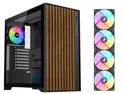
SAMA V Nature ATX MATX Mid Tower PC Case - Front Panel with 10 Black Walnut Colored European Beech Wood,4 Addressable RGB Fans Pre-Installed
Pros: -Sleek, modern design -Good airflow (at least with the 140mm I installed) -Solid construction
Cons: Some nitpicks I have: -The color of the wood is quite a lot darker than shown in the product pictures. -The opening where the CPU power cable feeds through it slightly too low and is covered just enough by the motherboard that you won't be able to get the cable through. So run that cable through before installing the motherboard. -The spec sheet indicates that three 140mm fans will fit in the front of the case, but I had to do some finagling to get three to fit, and the fit is extremely tight.
Overall Review: I bought this case to connect to my living room TV because it has a stylish appearance that looks almost like a piece of furniture so it feels like it belongs in a living room compared to most other PC cases that stick out like a sore thumb. I did opt to immediately replace all of the 120mm fans with Arctic P14 140mm fans since the larger fans would be quieter and give better airflow with the RTX 4090 I have. Overall temps and airflow are good.
2/5/2025See more detail
Works well
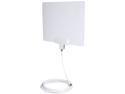
Rosewill Digital TV Antenna, HDTV Antenna, Super Thin UHF/VHF Indoor Antenna Multi-directional Range up to 35 Miles with 15 ft. High Performance Coaxial Cable, Reversible, Paintable RHTA-15004
Pros: - Works better than the rabbit ears I was using. - Comes with a nice, long cord.
Cons: - I would have preferred if it also came with suction cups to hang in the window instead of velcro tabs. - The plastic packaging that the antenna comes in, is unnecessarily difficult to open, I nearly sliced my hand open.
Overall Review: Some channels cut out occasionally, but at least now I can actually get a reception for those channels whereas before I couldn't pull them in at all.
4/29/2016See more detail
Wonderful
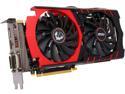
MSI GeForce GTX 970 GAMING 4G
Pros: Games look beautiful Extremely quiet Cool temps Nice GUI apps
Cons: It can't make me a sandwich.
Overall Review: I initially had issues getting the card to work. Games were constantly crashing and I was getting Blue Screens. But I realized after some time that I still had overclocked settings loaded for my old GTX 660 and I had not run a Driver Cleaner. Once I did this it work flawlessly. I was too antsy to install it and start using it. Keep this in mind if you have issues.
4/27/2015See more detail
Works Great
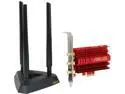
ASUS PCE-AC68/US Dual-band Wireless-AC1900 Adapter IEEE 802.11ac, IEEE 802.11a/b/g/n PCI Express Up to 600 and 1300Mbps Wireless Data Rates WPA2 manufactured recertified
Pros: Fast connection, external antenna adapter
Cons: none
Overall Review: Anyone who is having trouble installing this like I did at first should go to services.msc and make sure WLAN is not disabled. Change it to Automatic and then start the service. That was the problem I had, and after doing so it worked perfect.
3/12/2015See more detail