
Your Browsing History


JESUS R.
Joined on 11/29/07
0
0
product reviews
- 2
Perfect performance
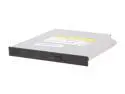
SONY 8X DVD Multi Writer 8X DVD+R 8X DVD+RW 8X DVD-R 6X DVD-RW 8X DVD-ROM 24X CD-R 24X CD-RW 24X CD-ROM Black Slim SATA Model AD-7700S
Pros: This drive does everything it was designed to do, plus more... If you search the web you will find an optional Optiarc firmware that allows you to permanently set the "bit-setting / booktype" permanently to DVD-ROM, on all DVD+R, DVD+RW and DVD+R DL / DVD9 media. This feature is very convenient for obtaining "absolute" compatibility among different devices. The performance of this unit is great, for being a "laptop" DVD-RW drive, and at this price nothing can match it. I've been a NEC CD & DVD drive fan for the past 15+ years, and recently with the joint venture with Sony (Optiarc), they are still delivering pioneering technologies and products at a great price. Like previously stated, this product is no exception to it.
Cons: Wished the drive could burn at a faster speed, like their desktop counterparts, but the current space and power limitations make it unsuitable at this moment. It's just a matter of time that they improve their overall performance.
3/2/2010See more detail
Simple, beautiful and works great
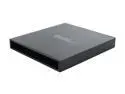
SYBA CL-ENC55001 5.25" SATA USB 2.0 External Enclosure for Slim SATA CD/DVD Drive/writer
Pros: The promotional photos don't make justice. Once you take it out of the box, you'll say, "WOW, this enclosure is real NICE" with a BIG smile. It's an extruded all aluminum chassis, whith just one USB Mini connector in the back. You'll NOT need an additional power adapter, because it comes with a "Y" USB cable, to "step up" the current. I paired this enclosuer with one OPTIARC / SONY AD-7700S 8X Slim DVD Multi Writer Black SATA, and it makes a killer combo, IMO a better deal than purchasing an external slim DVD burner. Read my review on the AD-7700S and you'll know why... Make sure your PC has two available USB ports, and you'll be rocking ! ! !
Cons: You'll have to unscrew the two tiny screws in the back, and carefully pry open the backplate. Once you've opened it, the drive installation is a piece of cake. Also, always use their suplied "Y" cable, just to make sure your burn will not end up as a coaster. The "bad" thing about using it is that your PC needs to have 2 USB ports available, but then again, you'll not have to worry about carrying and connecting an external A/C adapter for it.
3/4/2010See more detail