
Your Browsing History


Rowell R.
Joined on 08/26/13
0
0
product reviews
- 1
Absolute Unit of a Motherboard that is Feature Packed
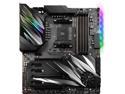
MSI PRESTIGE X570 CREATION Motherboard AMD AM4 SATA 6Gb/s M.2 USB 3.2 Wi-Fi 6 Extended-ATX
Pros: This review is for the MSI Review Rebate Program I want to disclose that the rebate will not influence my review and if issues ever arise, I will update this review • Generous amount of USB Ports • RGB Lighting and RGB Headers • 3 full sized PCIe 4.0 slots • Built-in Bluetooth and Wi-Fi 6 • Included M.2 Expander Card (Allows for 2 extra M.2 cards on top of the 2 dedicated slots on the board itself) • Built-in Aquantia 10 Gb LAN NIC (better than the weird speed NICS they include in other boards like 2.5 Gb and 5 Gb) and Intel Gigabit NIC • Clear CMOS Button and POST Code LEDs • Two Thermistors for measuring temperatures in specific areas • Chipset Fan is not loud and rarely active • Supports plenty of RAM kits of varying speeds and capacity • MSI Dragon Center combines software features available for this board into one program • Plenty of Accessories Included (RGB Header Cable Extensions, MSI Badge Sticker, 4 SATA Cables, SATA Cable Labels, and an MSI Cloth Bag for the Cables) • Build Quality is great and the board is quite hefty (not “plasticky”)
Cons: • Right Angle 24-Pin header was a pain for cable management (It makes sense for ATX motherboards but not so much for E-ATX) • No Motherboard Speakers included (I still like to have them included for diagnostics if the LEDS are being blocked from my sight by an expansion card) • Chipset Fan has no protective shroud when compared to other boards • You have to manually change the RGB LED profiles/colors by opening MSI Software; you cannot change profiles/colors by key press or associate profiles/colors with a specific program (for instance I cannot have the RGB lights be green automatically if I am running GTA V, I have to open the MSI Dragon Center, then access Mystic Light and change the profiles/colors from there) • Needs more than 6 SATA ports (I plan on expanding my storage and I am currently utilizing all 6 ports) • You need to remove the built-in M.2 Heatsinks on SSDs to install them or remove the Backplate/Thermal Armor Piece
Overall Review: I was doing some research on X570 Boards and chose this board based on Buildzoid’s critique on YouTube and I think I made the right decision. Keep in mind this is an E-ATX board so even if it fits in your case cable management will be a pain. The amount of USB ports is just amazing, the Bluetooth works and WiFi 6 is quick and closes the gap with Ethernet. Having two NICS is useful if you have a NAS that supports the Aquantia 10Gb NIC while you can use the Intel Gigabit NIC to connect to the internet. The RGB lighting on the board is not tacky or tasteless either, it actually looks nice and attractive. I did not have an issue updating to the new ABBA BIOS which addressed the boost issues for Ryzen 3000 but it took a while for me to understand the new BIOS and select the proper boot order for my drives. The RGB lights did not work on “Jazz” mode (reactive to sound) at first but the BIOS update fixed it. I have never used the MSI Creator software for this but MSI Dragon Center works well with my board. My Ryzen 7 3700X runs flawlessly on this board and so does the XMP profile for my 32GB Corsair Vengeance Pro RGB kit I am using with the MSI GTX 1070Ti DUKE. My main gripe with this board is really just that right angle 24 pin header as it makes it awkward to insert the 24-pin power connector but this can be remedied by getting a 90-degree adapter to make it straight again (I am planning on doing this); even on a full tower like the Corsair 760T I am using I had to expose more of the 24-pin connector to the front of the case to plug it in (the cable grommets were right in front of the header and I was not able to bend my cable at such an extreme angle). You really get what you pay for and I would buy this again in a heartbeat.
9/30/2019See more detail