
Your Browsing History


Andrew D.
Joined on 04/27/06
0
0
product reviews
- 15
Very Pleased
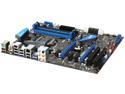
MSI P67A-GD65 (B3) LGA 1155 Intel P67 USB 3.0 ATX Intel Motherboard
Pros: * uEFI BIOS. * Revision 3.0. * Decently Priced for a P67 Motherboard. * Aesthetically Pleasing. * OC Genie makes overclocking easy. * Comes with a lot of extra's, plenty of SATA connectors and the nice USB 3.0 back plate. * On Board Power\Reset buttons makes for easier trouble shooting, I had no problems anyway. * Great Warranty.
Cons: * SATA Ports are inconveniently placed right where the back of the GPU is, results in higher-end cards basically sitting on them. Also pretty hard to plug extra SATA connectors in once a GPU is in place. * uEFI is kinda meh, you can use your mouse but you still have to actually select everything with the keyboard. * Pretty much to be expected but had to manually set RAM timings. * The socket was really creaky when I was securing the CPU in place, but even with the CPU out it made the same noise. * 8x/8x is kinda a drag for SLi\xFire users (more so for SLi) but I only run a single GPU so it doesn't bother me. * Would have been nice to see a Debug LED on there but with all of the other features it almost feels unnecessary.
Overall Review: With all of the Con's I couldn't justify dinging even a single Egg since this is probably the best Motherboard I've dealt with. Was definitely worth the wait for the SB recall and I'm very thankful MSI got this mobo out early.
3/11/2011See more detail
Looks Great

Tommaso Design(TM) Genuine 1inch long Blue Topaz Journey Pendant in 14k White Gold
Pros: The Topaz is fantastic and the Gold looks great. All-in-all a pretty good purchase at a great price.
Cons: The chain is a little flimsy and the design looks a little different in person, but the general style is the same so it's excusable (probably just a weird angle-related issue).
5/4/2011See more detail
Great, Cheap
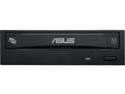
ASUS 24X DVD Burner - Bulk 24X DVD+R 8X DVD+RW 8X DVD+R DL 24X DVD-R 6X DVD-RW 16X DVD-ROM 48X CD-R 24X CD-RW 48X CD-ROM Black SATA Model DRW-24B1ST/BLK/B/AS
Pros: Does a great job at a low price point. Couldn't ask for more.
Cons: Kinda loud, and feels really cheaply made, but I could just be grasping at straws.
Overall Review: I've come to expect great things from ASUS, I was not disappointed.
3/11/2011See more detail
Great Upgrade
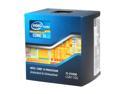
Intel Core i5-2500K - Core i5 2nd Gen Sandy Bridge Quad-Core 3.3GHz (3.7GHz Turbo Boost) LGA 1155 95W Intel HD Graphics 3000 Desktop Processor - BX80623I52500K
Pros: * Very Fast + Great for Overclocking, runs easily at 4GHz+ on any P67 board. * On Par for the $1000 1366 i7's, and barely get's edged out by the i7-2600k. * Better than any AMD offering for Gaming, resulted in a 300% increase in my FPS over my Q6600 playing Rift. * Offers a great entry-level enthusiast CPU for any gamer looking to upgrade.
Cons: * No HyperThreading which makes very little sense to me. It doesn't have a noticeable performance impact but it would have been a nice way to balance out this chip. * Motherboard in short supply. Since the recall it's hard to get a solid well-priced P67. * Included HSF is pretty weak and has the Push Pin's From The 9th Platform design. Kept it anyway until I could get a Mugen2 and swapped the thermal paste out for some Silver 5. Runs nicely at sub-30c idle and mid 40's under load. * Not necessarily worth it if you already have an i7. Going from a Q9550 or anything from over 18 months ago is a huge improvement, but going from like a 920\930 or even 870 won't be that huge of a performance gain for most people. But anyone who didn't get the first-gen i7's is in for a HUGE performance increase.
Overall Review: The 2500k overclocked is one of the most powerful CPU's on the market. With a price tag of $230 it's basically a steal since it can run with the 980\990x in gaming performance. I highly advise anyone who get's it grab some Arctic Silver5 and\or a new HSF and overclock away. It's never been easier anyway, some mobo's (my P67A-GD65 for example) come with 1 button Overclocking as is.
3/11/2011See more detail
Works as Advertised
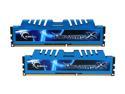
G.SKILL Ripjaws X Series 4GB (2 x 2GB) DDR3 1600 (PC3 12800) Desktop Memory Model F3-12800CL8D-4GBXM
Pros: Runs at advertised speeds in my P67A-GD65. Stuff flys and rocks a 7.9 on Windows. My first experience with using G.Skill, stuff looks amazing and runs just as well.
Cons: Had to manually set the timings in BIOS because it read as 9-9-9-28.
3/11/2011See more detail
Great, Some Flaws
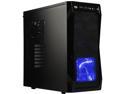
Rosewill CHALLENGER ATX Mid-Tower Gaming PC Computer Case, Expansion Ready: Internal 3.5" Bays & External 5.25" Bays, 3 Pre-installed Fans with Side Fan Mount Option
Pros: I like a lot about this case. It looks great, it's well designed, high quality, and is shockingly quiet. Overall it was probably the best mid-tower I could find. It's a great case, but it is hardly without flaws.
Cons: But then there's the flip side. The tool less design can be very frustrating, especially the CD\DVD\BD drive bays. I had to take the back panel of the case off several times to get access which was rather time consuming. Having gone from a Full Tower to a Mid-Tower it was rather cramped, and my GPU was roughly 1.5 inches from the housing for the HDD's which made plugging the power cords in a pain. The area that housed the PSU also had screw holes that did not correctly line up with 2 of the holes on my Corsair TX650W.
Overall Review: Overall I would recommend this case if you are looking for a quality enthusiast case, and you have a decent amount of experience as well as a good amount of time to spend installing everything.
3/11/2011See more detail