
Your Browsing History


John R.
Joined on 03/23/03
0
0
product reviews
- 10
It's the PRO/ 1000 GT Desktop Adapter
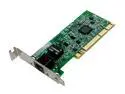
Intel PWLA8391GTL Desktop Adapter PRO/1000 GT Low Profile 10/100/1000Mbps PCI 1 x RJ45
Pros: Just so you know, this is really the Intel® PRO/ 1000 GT Desktop Adapter, with drivers available at downloadcenter.intel.com/Filter_Results.aspx?ProductID=1878
Cons: Low Profile does not mean the card's profile, it means the screw-down riser on the back. So this card will not fit in your normal ATX case. For that you want the "PWLA8391GT" (no L), also available here at NewEgg.
Overall Review: Even though its a "Desktop" card, it is fully supported with signed drivers for Server 2003, including NIC teaming
5/31/2007See more detail
Designed to thwart upgrades
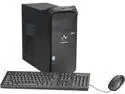
Gateway Desktop PC DX4885-UR1C Intel Core i5-4440 4GB DDR3 1TB HDD Intel HD Graphics 4600 Windows 8.1
Pros: Acceptable performance, quiet.
Cons: The specs show it has an open PCI Express slot for a graphics card, but the PSU does not have a single spare connection. In fact, you would need a proprietary power cable for the motherboard just to add a hard drive. You cannot replace the PSU because the motherboard has a proprietary 12 pin connection. So this PC is designed specifically to thwart upgrades. Down the road, these products will be in service for far shorter period than conventional PCs (no doubt by design) because they cannot be upgraded. This increases the cost of ownership, and has negative environmental impacts as well.
Overall Review: I will avoid the Gateway / Acer products altogether from now on, and I advise you do so as well.
7/29/2014See more detail
A good, solid UPS
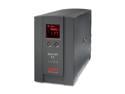
APC BR1500LCD 1500VA 865 Watts 8 Outlets BACK-UPS RS
Pros: * Quality UPS, contains advanced battery management from APCs more expensive product lines * High VA for the money * Cool looking LCD you will rarely notice * Service - APC sells large UPS solutions to commercial users and we home uses get to benefit from their service infrastructure. You can get timely tech support, order replacement batteries, and even trade in your old units for credit on newer models. I've always been impressed with them (at least compared to their competition). Contrast Cisco's 'special' support channel for Linksys buyers.
Cons: Like all UPSs - heavy, requires some maintenance, and APC's free service tapers off over time. 'Surge suppression' is just shunting over-voltage to earth ground via MOVs, which is not a great idea in my opinion. All consumer surge suppressors work this way. Read up at brickwall.com on how industrial equipment is protected from surges.
Overall Review: A UPS is a pretty technical piece of equipment and isn't going to run maintenance free forever. The time your PC runs on battery power depends on the power your PC draws and the condition of the batteries. That makes for a huge range in battery life, and the only way to make it last longer is to get a bigger UPS. There is nothing the manufacturer can do to change this, but you could buy the management suite so you can monitor your load and batteries. The 'weird intermittent noises' someone mentioned may be the normal self test it performs (daily?), or it may be an under-voltage problem in your power a the wall. It can also be because your batteries or control board need replacing. If you were to run the management software (no home user bothers) it would warn you of these issues, but most of us find out when it fails to protect us from an outage, or just turns itself off. I would not return the unit to service after it failed on me until it was repaired!!
9/1/2010See more detail
Excellent, Professional LCD Stand
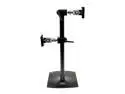
Ergotron 33-091-200 DS100 Dual-Monitor Desk Stand, Vertical (black)
Pros: Very high quality construction, exceeded my expectations. Specs here say 23lbs max, buy instructions say 23lbs per monitor (double the wt of my 24" ASUS monitors). Articulating arms allow pan / tilt / height / rotation(!) of monitor by user without tools. Even includes black tie-wraps and Velcro for cable management.
Cons: Expensive, but well worth it in my opinion. Slightly cheaper at NewEgg than other vendors I found.
Overall Review: Has dust covers for the arm joints so it looks much nicer installed than in the pictures. Tension of each pivot can be adjusted with a wrench and socket, but mine required no adjustment out of the box. Base is large because you may have two 24" monitors dangling from it... it needs to be stable. Base is flat enough that it is not in my way.
7/15/2009See more detail
Wow, thats a nice monitor
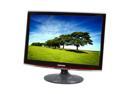
SAMSUNG T220 Rose-Black 22" 2ms GTG Touch of Color series Widescreen LCD Monitor 300 cd/m2 DC 20,000:1
Pros: Wow, this is a really nice monitor. Far, far exceeded my expectations given the price. The color and response rate are noticeably better than my older, more expensive LCDs, despite being much larger. The brightness out of the box could probably give you a suntan, and you can crank it down with easy to use presets or go hardcore in the setup menus.
Cons: Hardly a con, but I decided the big fancy housing would be out of place at work, so I will not buy one for my cube. I would have otherwise. Also, no HDMI, which i did not buy it for, but missed once I realized it looks like a high-end TV. Its so awesome you will want to connect everything to it.
Overall Review: I bought this for an older person with vision problems, hoping it would make the PC easier to use and encourage more use. It surely did that- I am still getting thanks two months later.
8/6/2008See more detail
very quick auto-adjust and resync
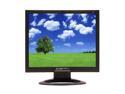
SCEPTRE X9g-Naga V Black 19" 8ms LCD Monitor 300 cd/m2 800:1, US Warranty
Pros: Bright, decent display for the price. The real surprise is in the firmware; the sync is so fast I can see my PC post messages at boot up. None of the new generation low-cost LCD panels I have seen up until now can do this.
Cons: One stuck pixel, only noticeable on a black screen. Dim zone in the top right, only visible on a blue /green fill. Connections are awkwardly tight, esp the DVI. The included DVI cable fits, but I have seen cables that would not.
Overall Review: I bought this monitor for a PC build / repair station, and it is absolutely perfect for this role due to the unexpectedly quick response to changing sync rates. I really lucked out buying this one.
6/12/2007See more detail