

Your Browsing History


Don H.
Joined on 05/29/02
0
1
100%
product reviews
- 40
HP/Seagate Constellation ES ST2000NM0011, REFURBISHED
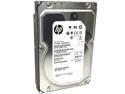
HP/Seagate Constellation ES ST2000NM0011 (649401-003) 2TB 7200RPM 64MB Cache SATA 6.0Gb/s 3.5inch Internal Enterprise Hard Drive
Pros: Business grade hard drive. Lots of metal. Length and width same as any 3.5" HDD, but thicker. Long format with no errors. Appeared new, never used, condition, although manufactured years ago. Works great. Cheap price but not cheap quality.
Cons: none.
Overall Review: Unwrapped the HDD, clipped it into an x-dock tray and slipped it into a slot in the front of my CoolerMaster HAF case, powered up, disk management recognized it, I chose format (not quick) and assigned a disk letter. After a couple of hours the format finished, and the disk was ready. I copied my data to it, and now it serves as my data disk. My system C-drive is on an SSD. I would buy it again, and I would encourage budget conscious enterprise as well as consumer users to consider purchasing these drives. I am cautiously certain that these HDDs will last many years of use.
9/9/2019See more detail
4T Data storage
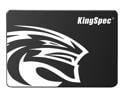
KingSpec P3 SSD 4TB Internal 2.5" Solid State Drive 2.5 Inch SATA III 3D NAND Flash Data Storage, Speed up to 520MB/s, laptop PC Desktop compatible, Black
Pros: Potentially stores lots of data. No errors on format. Easy to install. Low priced. Use as a backup disk.
Cons: Failed after 15 months. Its replacement works great. Lost the backed-up data. Fortunately, the primary data was unharmed, and is now backed up on the replacement SSD. I'm just out the cost of the drive. I can't remember a failure of anything else I bought at Newegg going back more than 20 years.
Overall Review: I do not recommend this SSD for data storage.
6/2/2025See more detail
Mannajue wireless gaming keyboard and mouse
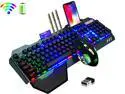
Wireless Gaming Keyboard and Mouse,Rainbow Backlit Rechargeable Keyboard Mouse with 3800mAh Battery Metal Panel,Removable Hand Rest Mechanical Feel Keyboard and 7 Color Gaming Mute Mouse for PC Gamers
Pros: Pros: excellent craftsmanship, metal frame, backlit - stays lit for several minutes before dimming, wireless - I like the cleanness of my desktop, rechargeable - charge lasts (no idea how long, yet), small enough to fit in my backpack, quiet, heavy - doesnt move around, slots for cards, pencils, and phone, keys are small. Mouse is easy to adjust to - is part metal and heavy enough not to move too far when I am trying to be precise, mouse lights stay lit.
Cons: Cons: Keys are too small for me, key touch is too light - keystroke should not register unless pressed all the way down. If I brush a key, it registers, and most often the space bar. Because the keys are so small, I often nudge an adjoining key. I have to go back and edit almost every line, including this one. I cant adjust the time before the backlit dims. The phone and pen holders are tilted so they are useless. The credit card holder works fine.
Overall Review: Overall, I am satisfied with this keyboard and mouse combo and will use it for a while. I would recommend it to gamers but with reservations to other users.
12/10/2022See more detail
Terrific Board
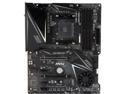
MSI MPG X570 GAMING EDGE WIFI AM4 AMD X570 ATX AMD Motherboard
Pros: The board arrived with all its accessories and literature. Set up went as usual, except for a couple of minor issues. Bios graphical interface is fairly intuitive, and this is one of the things I especially like about MSI motherboards. Application operation is flawless - response is instantaneous. Temperatures are very acceptable. Whatever Im doing doesnt seem to make the chipset fan go on hardly ever. Processor is a Ryzen 7 2700 with an air cooler. I hear air blowing, but no motor noise from any of the fans.
Cons: Dealing with the heatsink cover over the M.2 SSD presented a challenge for me. The size of the screws of the heatsink are too small. It took me a lot of time and patience to unscrew them without losing them. Then once the SSD was inserted, it was very difficult to get the heatsink fastened back down. Plugging in the power connectors and the fan headers is pretty straightforward, but the little bitty front panel connectors always seem to be a problem. Plugging in the back panel cables was pretty usual; however, the PS2 Jack on the back panel is difficult to make a connection. I tried two keyboards, and after really pressing the connector into the jack really hard, I got the keyboard to work. That cant be good for the jack or the keyboard and I dont know how long they will last, but the trend is to USB keyboards, anyway.
Overall Review: Overall, I am very satisfied with this refurbished board. The current price makes this very attractive. With a good graphics card, an up-to-date NVMe M.2 SSD, and lots of memory it is an inexpensive but powerful system. I would recommend this board for personal, educational, business, and scientific applications.
10/29/2021See more detail
Megaflow 200 case fan
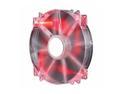
Cooler Master MegaFlow 200 - Sleeve Bearing 200mm Red LED Silent Fan for Computer Cases
Pros: Moves air, quiet, fits in the top of my Cooler Master HAF LAN Box. Red light. Keeps the parts cool. Also has standard screw holes.
Cons: While the fan is almost silent, it has only a 3 pin connecter, and the rpms can't be controlled by the motherboard. Red light.
Overall Review: I would recommend this fan.
11/16/2020See more detail
Anivia 1080p HD Webcam W8
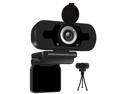
Anivia 1080p HD Webcam W8, USB Desktop Laptop Camera, Mini Plug and Play Video Calling Computer Camera, Built-in Mic, Flexible Rotatable Clip
Pros: Can be mounted on the top of the monitor or down on the desk top on a little tripod. Image is high definition. Audio is OK. Lense cap included. Installation was easy. Low price.
Cons: No zooming function. Lense cap has to be attached by user. While effortless, installation requires patience.
Overall Review: This webcam is better than older laptop webcams and cheaper than many webcams for desktops. I don't use the lense cap; I just unplug it, unless I am on a Zoom meeting. When I plug it back in, I sometimes need to reselect it as the input device, but that's not the fault of the webcam, and video and audio are immediately available. I recommend the Anivia webcam for any one needing a low cost solution.
11/16/2020See more detail
seller reviews
- 1
Orico HDD enclosure
This is an excellent hard drive enclosure. I have not tried an SSD, but I am confident that an SSD would work in the enclosure, just as well. I have bought several of these for my wife and daughters, and they are very happy with them. Delivery was prompt and without the slightest damage. Orico is a great company, and I recommend it and this product.
On-time
Delivery
Product
Accuracy
Customer Service
Satisfactory
5/15/2018See more detail