
Your Browsing History


Jeremy F.
Joined on 05/18/04
0
0
product reviews
- 21
Great Price:Performance Ratio
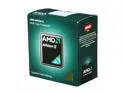
AMD Athlon II X2 255 - Athlon II X2 Regor Dual-Core 3.1 GHz Socket AM3 65W Desktop Processor - ADX255OCGMBOX
Pros: * Fast, for its purpose * Inexpensive, compared to Intel options * Quiet stock fan * Cool core temps <40C under load [stock HS/Fan] I used this for an HTPC build. I wanted Dual-Core performance for handling Blu-ray playbacka nd audio decompression without video performance loss. I opted for AMD and paired it with a MoBo having on-board video instead of an Intel chip with on-chip video as a better performance choice for HTPC application. I am not disappointed with this choice at all, but I can't really compare it to the alternative to say "which is better". The price was cheap, considering it is dual core with 2MB cache at 3.1 GHz.
Cons: I'm not sure that Everest is reading the CPU temperature right as it never seems to exceed 22C.
Overall Review: Considering the huge, double 120mm fan-based heatsink I put on my gaming rig [Intel i7-920 CPU] to keep it under 60C while gaming/compiling, the stock heatsink and fan on this CPU is pretty good, as simplistic as it looks. It's real quiet and you can only really hear it if you put you face to the case when it's under load. HTPC Build: Case: Silverstone LC-17B PSU: Antec EA-430D [Earthwatts, 80-plus Bronze] MoBo: Gigabyte 880GMA-UD2H CPU: AMD Athlon II X2 Regor 255 3.1 GHz Dual Core RAM: 4GB dual-channel G.Skill F3-12800CL9D-4GBNQ Optical: Lite-On 8x Blu-ray Disc Combo, SATA OS drive: WD1600AAJS 160GB Caviar Blue, SATA Storage: 2x WD15EARS 1.5TB Green Drives, SATA Input: IOGEAR 2.4GHz Wireless On-Lap Keyboard
1/14/2011See more detail
Beware of MoBo Heatsinks
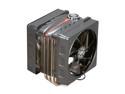
Cooler Master V6 GT - CPU Cooler with Dual 120 mm PWM Fans and 6 Heatpipes
Pros: * Very nice design I can't let the cons take away all the eggs.. I m sure this is a great product.
Cons: * size * potential fitment issues (see below)
Overall Review: The CM V6GT cooler has a staggered heatpipe layout coming from the thermal conductive block. (You can see a good view of this if you look at the screenshot gallery - specifically the second to last picture.) The problem is that on Motherboards with large heatsinks on the North-/South- bridge (usually one long pipe across the board with fins+ for cooling) the V6GT heat pipes on the farthest edge (of each side) will hit against the heatsinks of the MoBo, preventing proper seating/mounting to the CPU. For reference, I am using the Asus P8P67 WS Revolution (Rev 3.0); which has nice, but large-ish, heatsinks on the NV200 chip, and transistors currounding the CPU block.
11/18/2011See more detail
Nice Product - Great Price*
Motorola CommandOne Bluetooth Headset (Retail Packaging) - Black
Pros: - Great features - Comes with several earpiece nubs to match even the weirdest-shaped ears - Great price * (bought this during a Cyber sale over the Black-Friday weekend)
Cons: - Picking the right earpiece is trial and error
Overall Review: - I needed to replace my 8-year old BT earpiece and this worked out well
1/2/2013See more detail
Factory Parts Are Always Good

SONY PS3 DualShock 3 Black w/ Ratchet & Clank Collection Bundle
Pros: - Factory Original Controller from Sony - Fast Order/Shipping from NewEgg
Cons: - None
Overall Review: - I bought this bundle to get the controller, but a classic game at a discounted price is a nice bonus
1/2/2013See more detail
Awesome case. Gold Standard.
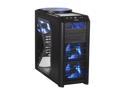
Antec Nine Hundred Two V3 Black Steel ATX Mid Tower Gaming Case
Pros: Excellent layout. Many improvements over the V1 Antec 902 I bought 2 years ago. Many cutouts and tie-offs for clean cable routing, hiding in the case. V3 has a cutout under the CPU part of ATX MoBos so fans/heatsinks for the CPU could be replaced without removing the MoBo.
Cons: None.
Overall Review: Suggestions for v4? * Eliminate the additional fan mount from the internal back of the secondary drive cage. I think it's intention was to allow users to add a fan there to blow across the graphics cards, but any fan would be in contradiction to the already included fan at the front of the secondary drive cage. - Considering the capability to hide the cables has incresed even more, and the face it has a see-through panel, consider adding plastic matrix to the back of the drive cages to hide the gray, unpolished metal and labels of components that get illuminated from the internal blue LEDs.
6/17/2011See more detail
Great board. Take care with SLi/Xfire.
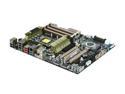
ASUS Sabertooth X58 LGA 1366 Intel X58 USB 3.0 ATX Intel Motherboard
Pros: - Very good layout on all components/runs cool. - MemOK! functionality seems to expand memory acceptance, - Good BIOS. - On-board LED diagnostic lights that illuminate during power-on sequence; supplements POST info.
Cons: SATA connections are parallel to the board, so when mounted in the case it can be difficult to plug new things in [YMMV]. Primary and Secondary PCIe slots (16x) are a little too close to each other. Tertiary PCIe only runs at 4x (only a con as it related to the former comment)
Overall Review: I recommend trying to plug in the SATA cables you'll need before mounting in the case if you think the above con applies to your set up. Take precaution in purchasing 2x cards for an SLi or Xfire configuration that enough space will be left over for cooling.
6/17/2011See more detail