
Your Browsing History


DAVID H.
Joined on 06/01/01
0
1
product reviews
- 1
Drive 5 monitors from a MacBook Pro
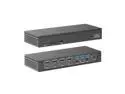
Wavlink 5K Quadruple Display USB-C Universal Docking Station, 4 monitor with 4 DP, 4 HDMI, 100W PD Charging, 2.5G Ethernet, 3 USB3.0, SD/TF, Audio/Mic, for New MacBook Neo/MacBook/Windows
Pros: I have been using this product, and two previous versions as I added monitors, for about 6 years now. Wavlink is under rated as a company, perhaps because people simply haven't heard of their innovative products. But I can tell you from hands on that they have solved problems for me that have reduced the rats nest of wires on my desk dramatically! I use a combination of two systems, a PC and a MacBook Pro. Both of these systems come into a KVM. The key reason that I purchased the Wavlink product was that it had dual support for both HDMI AND Display Port monitors. This was critical because my KVM at the time was pure DP. I have since switched over to HDMI as HDMI handles a KVM better than the DP in my experience. But still, I needed that DP option when I purchased this device. One thing I can say about this product is I was impressed, and actually blown away the support for external peripherals out of box. In the past I needed external USB switch boxes to go back and forth between systems, but because of the support on this device, it was able to add all of the too many peripherals to this system through the KVM.
Cons: The only thing that I would say you should be aware of is how large the power brick is going to be. That should be understood, it is a 100W charge coming out of the doc, so you should expect this, but if you don't know, be aware.
Overall Review: Absolutely! If you are using a system that has 4 monitors, and you want to be able to deliver that video data through a single Thunderbolt port, then this is the product for you.
1/16/2024See more detail
seller reviews
- 2
WAVLINK Docks and Service are both exceptional!
In the past 10 years, I have been a long time multi-monitor user. I have also had to flip back and forth from HDMI to DP on my monitors over the years as the occasional monitor would die, and I would buy something new that was at a good price. (In my multi-monitor setup, the middle monitor is the star, and is larger than the others, and I have a total of 4 monitors together. The setup matters in this case, because it has to do with the ability of the Dock to support this setup. So the center is a 32" Asus Rog, so that I get a good high res, high refresh monitor. The left and right monitors are 27" MSI's. They are not as high spec as the center, because they are essentially where I put static data that I check on periodically, but are not the work horses of the setup. The 4th monitor is actually a Teleprompter because I do a lot of face to face style virtual meetings, so I use it to allow me to essentially look other meeting attendees in the eye, and give a feeling to my audience that I am talking directly to them. This means I have different size monitors, and different resolutions and refresh rates on each monitor. The other part of this setup is that I use a 4 monitor KVM to switch back and forth between a PC, which can support all 4 monitors by default from the video card. The other system is why I needed a great Dock. It is a 2020 Mackbook Pro. In the past I have had multiple devices supporting individual monitors, and using this approach has always been a bit of an issue because it frequently puts so much strain on the laptop that it can overheat it regularly. This Wavlink dock offloads all of this video processing, and lets me switch back and forth easily all through a single USB-C cable. What makes the Wavlink so powerful is that by offloading that video processing, it keeps the MacBook stable, cool, and also over this same cable, POWERED! If you have ever tried to find a Dock that could provide the power to support a MacBook Pro, you would soon discover that you probably need to keep it plugged into a separate power brick because the docks out there just can't power the laptop and drive those monitors. In addition to having the system connected to multiple monitors, I also have a high quality studio microphone connected through a WavXLR, as well as three seperate Stream Deck devices. Because the KVM I use is also a bit overtaxed, I have discovered that it doesn't like to switch a lot of peripherals without problems. So I have an ATEN USB A/B switch box. This is for my mouse, keyboard, and two of the Stream Deck devices. There is one Stream Deck device plugged into the KVM, as that keeps it from failing on switch. The final item is a Blackmagic ATEM Mini Pro. This pushes video to the Teleprompter, and also manages my cameras. So! All of this means that I have a lot of peripherals attached to my MacBook Pro, but I would have no way to plug all of that in directly. The WAVLINK dock keeps all of this easily managed. And finally, there are a few extra things I will say about the WAVLINK. 1. The external peripheral power this unit offers lets me drive power to my laptop and peripheral cooling pads. Keeping all of this equipment cool keeps it all stable and functional. 2. Having the front facing USB connections plus the memory card slots is super helpful. I frequently record SpaceX launches, and when I am bringing down my camera videos, and the direct connects for my cameras to update the cameras is so much easier having a front facing connection set. It is surprising to get ALL of this in a box that is so small and sleek. It is like a hidden gem on my desktop. One of the reasons for the exceptional review is that I actually had an issue with one of these devices after Apple updated to a later OS. When this happened, I had a lot of troubleshooting to figure this issue out. The Wavlink team was phenomenal at helping me resolve the issues, and was truly one of the most helpful groups I have ever worked with for a peripheral device. Communications were fast, clear, and exceptional. I would especially like to call out Regina for her help. She went above and beyond, and when we determined that the issue was with the device, she helped me arrange an advanced replacement so that I could get back to work ASAP. With all of this said, I cannot make a higher recommendation for a device, company or service than what I have received from Wavlink. To say I am a delighted customer is an understatement!
On-time
Delivery
Product
Accuracy
Customer Service
Satisfactory
1/24/2024See more detail
Wavelink 4 Monitors of Glory...
So who in the heck would want or need 4 monitors? Aside from me, let't talk about monitors, and home work. Most people feel like having a huge 4K monitor is the best idea. But if you are (like I am) running a MacBook pro, or a windows laptop with limited USB-Cs for connections, you may want to rethink using a 4K. I tried the 4K route first, with fewer monitors, but lots more pixel real estate. Why did that not work? Well a few reasons: 1. The 4K was so hard for the laptop to run, that the thing ran on full fan all the time, even with a laptop cooler. 2. 4K in Zoom is a waste because zoom isn't sending that much over the air anyway, and if you want to do a good presentation, you will put your slide deck on one screen, then present to an extended screen so you always get ZERO pop ups, notifications, warnings, etc. during your presentation. 3. If you plug the extended monitor on the same side of your laptop as the power, you will guaranteed, overheat your laptop, and like, me melt your motherboard. So what do you do instead? 1. Use 2 to 4 extended monitors. By going with smaller monitors, you end up with a lighter load on your CPU and GPU, not overheating your laptop. Plus, the WaveLink in this case will actually do much of the video processing. 2. If you are in a customer centric role like I am, you may want to feel like you are making eye contact with your customer, so you get a teleprompter screen for that 3rd or 4th monitor. 3. Assuming all of this is the case, you can use a 2, 3, or 4, monitor WaveLink dock. The reason I pick WaveLink is because the displaylink support for multiple monitors is FLAWLESS. 4. One other reason I love the WaveLink is that it has both HDMI and DP options. I actually use a KVM for my devices, and having the single WaveLink box side by side with my KVM makes it SO easy to swap between my windows desktop and my laptop. So while you may not need 4 Monitors, I can tell you that the ONLY reason I have this specific model is because I had such good luck with the other 2 monitor WaveLink that I had before when I was trying to extend the life of an older displaylink Dell Dock. At the time I couldn't find a 4 monitor edition of the WaveLink, so I just bought a 2 monitor dock to handle my other two monitors. I had such good luck with the other WaveLink device over my Dell Dock which had a tendency to overheat or glitch out right in the middle of a presentation. I got frustrated with it and gave up. So now, one simple device. Tons of peripheral support, plus two sweet memory card slots on the front, along with an additional 100W charging USB-C, and bonus audio if desired. This thing really cleaned up my desktop! It does get warm, but not hot like the Dell. I cannot recommend this product highly enough if you need 4 monitors.
On-time
Delivery
Product
Accuracy
Customer Service
Satisfactory
10/1/2022See more detail